This article shows how to read large Excel files in chunks in PHP — a few thousand rows at a time instead of all at once, using a read filter. Loading a spreadsheet the ordinary way builds every cell in memory before your code sees a single row, and on a big enough file that ends in “Allowed memory size exhausted”. A read filter tells the reader which rows to keep, so you can walk the file in chunks and process each one on its own.
The work is done by one small class and three methods. IReadFilter is an interface with a single method, readCell(), which the reader calls for every cell in the file and which returns true to keep it or false to discard it. IOFactory::createReaderForFile() builds the reader, setReadFilter() hands it your filter, and calling load() once per chunk with a new filter walks the file. Around that, listWorksheetInfo() reports how many rows the file has without loading it, and disconnectWorksheets() releases each chunk before the next.
You read Excel files in chunks when a file that works fine on your machine kills the import on the server. It is worth measuring rather than assuming, though — and the numbers below are measured, including the one that shows what chunking does not fix. Read to the end before you size your memory_limit.
Requirements to read Excel files in chunks:
- Composer
- PHP 8.2 or newer
- The
gdandzipextensions
PhpSpreadsheet 5 lists ext-gd and ext-zip as hard requirements, so composer install stops with “ext-gd is missing from your system” rather than installing if gd is off. Enable it in php.ini before step 2.
Tested with PhpSpreadsheet 5.9 on PHP 8.5.
Step 1.
Setup dependencies.
{
    "require": {
        "phpoffice/phpspreadsheet": "^5.0"
    }
}
Step 2.
Install phpspreadsheet.
$ composer install
Step 3.
Create a new PHP file. Load Composer’s autoloader and import IOFactory and the IReadFilter interface.
<?php

require 'vendor/autoload.php';

use \PhpOffice\PhpSpreadsheet\IOFactory;
use \PhpOffice\PhpSpreadsheet\Reader\IReadFilter;
Step 4.
Write the read filter. IReadFilter asks for one method: readCell(), which receives a column letter, a row number and a sheet name, and answers whether that cell should be kept. The reader calls it for every cell in the file, so keep it cheap — a comparison, not a database lookup.
The $row === 1 line is the detail that is easy to miss: row 1 holds the headers, and without it every chunk after the first arrives with no header to key the data by.
class ChunkReadFilter implements IReadFilter
{
    private int $startRow;
    private int $endRow;

    public function __construct(int $startRow, int $chunkSize)
    {
        $this->startRow = $startRow;
        $this->endRow = $startRow + $chunkSize - 1;
    }

    public function readCell(string $columnAddress, int $row, string $worksheetName = ''): bool
    {
        // Always keep row 1 so every chunk has the header.
        if ($row === 1) {
            return true;
        }

        return $row >= $this->startRow && $row <= $this->endRow;
    }
}
Step 5.
Build the reader and find out how big the file is. listWorksheetInfo() reads the sheet’s dimensions without loading its cells — on the 20,000-row file used below it answers in 0.22 seconds and 8 MB, where loading the file properly takes 2.6 seconds and 50 MB. That is what tells the loop where to stop.
setReadDataOnly(true) asks the reader for values and not formatting. It is the right setting for an importer, and it is covered in its own article linked below.
$inputFile = 'large.xlsx';
$chunkSize = 2000;

$reader = IOFactory::createReaderForFile($inputFile);
$reader->setReadDataOnly(true);

// Reads the sheet's size without loading its cells.
$worksheetInfo = $reader->listWorksheetInfo($inputFile);
$totalRows = $worksheetInfo[0]['totalRows'];

echo "Total rows: {$totalRows}\n";
Step 6.
Walk the file one chunk at a time. Each pass installs a filter for its own row range and calls load() again — so the file is opened once per chunk, and each load returns a spreadsheet holding only those rows plus the header.
disconnectWorksheets() is not decoration, and leaving it out is the most expensive mistake in this article. A Spreadsheet and its worksheets hold references to each other, so unset() alone cannot free them and every chunk stays in memory. Measured on the 20,000-row file, the difference is the whole point of the exercise:
                    with disconnect    without
after chunk 1            20 MB          20 MB
after chunk 5            26 MB          36 MB
after chunk 10           26 MB          54 MB
Without it the loop climbs without ever settling and finishes on 54 MB — more than the 50 MB the plain one-shot load costs. You would have done all the extra work of chunking and made memory worse. One line separates the two columns.
$processed = 0;

for ($startRow = 2; $startRow <= $totalRows; $startRow += $chunkSize) {
    $reader->setReadFilter(new ChunkReadFilter($startRow, $chunkSize));

    // Loads only this chunk's rows, plus the header.
    $spreadsheet = $reader->load($inputFile);

    $rows = $spreadsheet->getActiveSheet()->toArray();

    // Drop the header row the filter kept for us.
    $headers = array_shift($rows);

    foreach ($rows as $row) {
        if ($row[0] === null) {
            continue;
        }

        $record = array_combine($headers, $row);

        // Do the work here: insert it, validate it, total it.
        $processed++;
    }

    // Release the chunk before loading the next one.
    $spreadsheet->disconnectWorksheets();
    unset($spreadsheet);
}

echo "Processed {$processed} rows.\n";
Complete code to read Excel files in chunks.
<?php

require 'vendor/autoload.php';

use \PhpOffice\PhpSpreadsheet\IOFactory;
use \PhpOffice\PhpSpreadsheet\Reader\IReadFilter;

class ChunkReadFilter implements IReadFilter
{
    private int $startRow;
    private int $endRow;

    public function __construct(int $startRow, int $chunkSize)
    {
        $this->startRow = $startRow;
        $this->endRow = $startRow + $chunkSize - 1;
    }

    public function readCell(string $columnAddress, int $row, string $worksheetName = ''): bool
    {
        if ($row === 1) {
            return true;
        }

        return $row >= $this->startRow && $row <= $this->endRow;
    }
}

$inputFile = 'large.xlsx';
$chunkSize = 2000;

$reader = IOFactory::createReaderForFile($inputFile);
$reader->setReadDataOnly(true);

$worksheetInfo = $reader->listWorksheetInfo($inputFile);
$totalRows = $worksheetInfo[0]['totalRows'];

echo "Total rows: {$totalRows}\n";

$processed = 0;

for ($startRow = 2; $startRow <= $totalRows; $startRow += $chunkSize) {
    $reader->setReadFilter(new ChunkReadFilter($startRow, $chunkSize));

    $spreadsheet = $reader->load($inputFile);

    $rows = $spreadsheet->getActiveSheet()->toArray();
    $headers = array_shift($rows);

    foreach ($rows as $row) {
        if ($row[0] === null) {
            continue;
        }

        $record = array_combine($headers, $row);

        $processed++;
    }

    $spreadsheet->disconnectWorksheets();
    unset($spreadsheet);

    echo '  rows ' . $startRow . '-' . min($startRow + $chunkSize - 1, $totalRows)
        . ' | peak ' . number_format(memory_get_peak_usage(true) / 1048576, 1) . " MB\n";
}

echo "Processed {$processed} rows.\n";
Test reading Excel files in chunks.
Command line testing. The sample large.xlsx holds 20,000 data rows of id, name and email in a 449 KB file.
$ php read-large.php
Result: the Excel file read in chunks.
The file is walked in ten chunks, and the peak settles instead of climbing:
Total rows: 20001
  rows 2-2001 | peak 20.0 MB
  rows 2002-4001 | peak 24.0 MB
  rows 4002-6001 | peak 24.0 MB
  rows 6002-8001 | peak 26.0 MB
  rows 8002-10001 | peak 26.0 MB
  rows 10002-12001 | peak 26.0 MB
  rows 12002-14001 | peak 26.0 MB
  rows 14002-16001 | peak 26.0 MB
  rows 16002-18001 | peak 26.0 MB
  rows 18002-20001 | peak 26.0 MB
Processed 20000 rows.
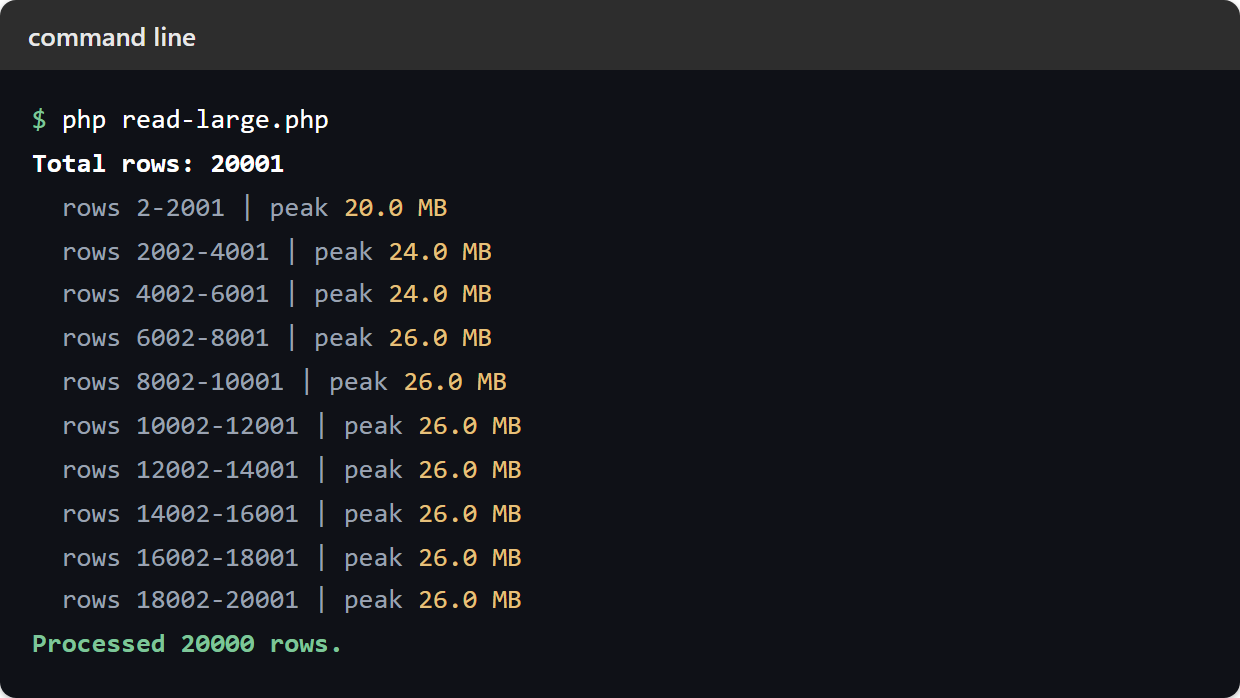
Reading the same file in one go costs 50 MB. Read Excel files in chunks and that drops to 26 MB, and the last eight chunks add nothing to the peak.
What reading Excel files in chunks actually buys you.
It is widely repeated that a read filter makes memory constant, so the file size stops mattering. That is not what happens, and it is worth seeing the real figures before you rely on it. The same three-column file at four sizes, chunked 2,000 rows at a time:
rows      full load    chunked
5,000        16 MB       14 MB
10,000       26 MB       16 MB
20,000       50 MB       26 MB
40,000       94 MB       40 MB
Chunking is a large, real win — 40 MB instead of 94 MB at 40,000 rows, and the gap widens as the file grows. But the chunked column grows too. It is not flat, and a file twice as big still costs you.
The reason is in what a read filter does. readCell() decides whether a cell is kept, not whether it is read. The reader still opens the archive and parses the sheet’s XML on every chunk. It also loads the file’s shared-string table in full first — every distinct piece of text in the workbook. Only then does it consult your filter about a single cell. The filter keeps rejected cells out of the Spreadsheet object; it cannot keep the file out of the parser.
That table is why unique text is expensive. The same 40,000 rows cost 40 MB when every name and address is distinct, and 30 MB when they repeat — identical row counts, 10 MB apart, purely in shared strings.
So: read Excel files in chunks to turn a file that will not load into one that will, and it is the right tool. It does not make memory independent of file size. If your file is large enough that even the chunked figure is too high, the answer is not a smaller chunk — it is a format whose reader can stream, such as CSV.
Choosing a chunk size.
The trade-off is worse than it looks, and it runs against instinct. Smaller chunks hold fewer rows — but the file is re-opened and re-parsed once per chunk, and that parse cost does not shrink when the chunk does. So you pay it more often for almost nothing. The same 20,000-row file at five chunk sizes:
chunk size   loads   peak memory   time
       500      40        24 MB    19.7 s
     1,000      20        24 MB    10.8 s
     2,000      10        26 MB     6.6 s
     5,000       4        30 MB     4.0 s
    10,000       2        38 MB     3.2 s
Read it from the bottom up. Dropping from 5,000 to 2,000 rows saves 4 MB and costs 2.6 seconds — a fair trade. Dropping from 2,000 to 500 saves 2 MB and triples the runtime, because 40 loads means parsing the file 40 times. Past a certain point a smaller chunk is not buying memory at all; it is just re-reading the file.
1,000 to 5,000 rows is the sensible range. Measure with memory_get_peak_usage(true) on your own file rather than guessing — the right number depends on how many columns it has and how much unique text is in them.
Reading only some columns of an Excel file in chunks.
The filter sees the column too, so a file with fifty columns of which you need three can throw the rest away. This cuts what is stored per row, which is the part chunking leaves on the table:
public function readCell(string $columnAddress, int $row, string $worksheetName = ''): bool
{
    // Keep columns A, B and C only.
    if (!in_array($columnAddress, ['A', 'B', 'C'], true)) {
        return false;
    }

    return $row === 1 || ($row >= $this->startRow && $row <= $this->endRow);
}
Importing each chunk as you go.
You read Excel files in chunks so you can pair the technique with something that consumes the rows. The natural partner is a database insert. Prepare the statement once outside the loop, and execute it per row inside. One transaction should wrap the whole file, so a failure in the last chunk cannot undo the first nine. The import article linked below has that code.
Chunking takes a slice of the file because the whole thing will not fit in memory. Inside a workbook the reason is usually different: the whole range is there, it just is not the question. Slice A Range With The TAKE, DROP And CHOOSECOLS Functions In Excel takes the first or last rows, drops a header, or picks out columns with a formula, and a negative count works from the end of the range.