This article shows how to import Excel files into MySQL in PHP: read an Excel file with PhpSpreadsheet and load its rows into a MySQL table. The first row of the spreadsheet is treated as the header, so each column lines up with a column in the table, and every data row below it becomes an INSERT. The whole import runs inside one transaction, so a bad row halfway down the file leaves the table exactly as it was.
Two libraries share the work. On the spreadsheet side, IOFactory::createReaderForFile() builds the right reader for the file, setReadDataOnly(true) tells it to skip fonts and colours it will never use, and toArray() pulls the sheet into a two-dimensional array; array_shift() then lifts off the header row and array_combine() keys each remaining row by it. On the database side it is plain PDO: prepare() compiles the INSERT once, execute() runs it per row with the values safely bound, and beginTransaction(), commit() and rollBack() make the import all-or-nothing.
Importing Excel files into MySQL is one of the most common jobs there is — a supplier sends a price list, a colleague exports a report, and it all has to end up in a table your application can query. The pattern below is short and it is the safe version: prepared statements instead of string-concatenated SQL, a transaction instead of hope. Get it working with the three-row sample, then point it at your own file and columns.
Requirements to import Excel files into MySQL:
- Composer
- PHP 8.2 or newer
- The
gdandzipextensions - The
pdo_mysqlextension - A MySQL server you can connect to
PhpSpreadsheet 5 lists ext-gd and ext-zip as hard requirements, so composer install stops with “ext-gd is missing from your system” rather than installing if gd is off. Enable it in php.ini before step 2. pdo_mysql is what PDO talks to MySQL through.
Tested with PhpSpreadsheet 5.9 on PHP 8.5 and MySQL 8.4.
Step 1.
Setup dependencies.
{
    "require": {
        "phpoffice/phpspreadsheet": "^5.0"
    }
}
Step 2.
Install phpspreadsheet.
$ composer install
Step 3.
Create the table the rows will land in. The columns match the spreadsheet’s header row, and id is the primary key — step 8 builds on that to handle rows the file has already sent once.
CREATE DATABASE IF NOT EXISTS demo;

USE demo;

CREATE TABLE users (
    id    INT PRIMARY KEY,
    name  VARCHAR(100) NOT NULL,
    email VARCHAR(255) NOT NULL
);
Step 4.
Create a new PHP file. Load Composer’s autoloader and import the IOFactory class, which we will use to read the Excel file.
<?php

require 'vendor/autoload.php';

use \PhpOffice\PhpSpreadsheet\IOFactory;
Step 5.
Connect to MySQL with PDO. Setting ERRMODE_EXCEPTION matters here: without it PDO fails silently and a broken import looks like a successful one. The charset=utf8mb4 in the DSN keeps names and addresses intact — leave it out and any non-ASCII character in the spreadsheet arrives mangled.
$pdo = new PDO('mysql:host=localhost;dbname=demo;charset=utf8mb4', 'root', '', [
    PDO::ATTR_ERRMODE => PDO::ERRMODE_EXCEPTION,
]);
Step 6.
Read the spreadsheet. createReaderForFile() picks the reader that matches the file, and setReadDataOnly(true) tells it to load values and skip formatting — an importer only wants the data. Then toArray() returns the sheet as rows, array_shift() takes the first one as the headers, and what is left is the data.
$inputFile = 'users.xlsx';

$reader = IOFactory::createReaderForFile($inputFile);

// We want the values, not the fonts and colours.
$reader->setReadDataOnly(true);

$spreadsheet = $reader->load($inputFile);

$rows = $spreadsheet->getActiveSheet()->toArray();

// The first row holds the column headers.
$headers = array_shift($rows);
Step 7.
Prepare the INSERT once, before the loop. This is the part to get right. A prepared statement sends the SQL and the values separately, so a cell containing '); DROP TABLE users; -- is stored as that harmless string instead of being executed — and a name like O'Brien just works, with no quoting to remember. Building the query by pasting cell values into a string is how spreadsheets become SQL injection.
The ON DUPLICATE KEY UPDATE clause decides what happens when the file carries an id the table already holds: instead of failing on the primary key, the existing row is updated. That makes the import repeatable — run it twice and you get three rows, not six, and not an error.
$sql = 'INSERT INTO users (id, name, email) VALUES (:id, :name, :email)
        ON DUPLICATE KEY UPDATE name = VALUES(name), email = VALUES(email)';

// Compiled once, reused for every row.
$statement = $pdo->prepare($sql);
Step 8.
Insert the rows inside a transaction. array_combine() keys each row by the headers, so the code reads $record['name'] rather than $row[1] and does not break when someone reorders the columns. Casting is deliberate: a spreadsheet cell is not typed the way a column is, so (int) and (string) hand MySQL what it expects.
The transaction is the safety net. Every row is written provisionally until commit(); if any row throws, rollBack() undoes the entire import. Without it, a file that goes wrong on row 900 leaves 899 rows behind and no clean way to retry — you would have to work out where it stopped. It is also much faster than committing each row on its own.
$pdo->beginTransaction();

try {
    $imported = 0;

    foreach ($rows as $row) {
        // Key the row by the headers: $record['name'], not $row[1].
        $record = array_combine($headers, $row);

        // Skip trailing blank rows.
        if ($record['id'] === null || $record['name'] === null) {
            continue;
        }

        $statement->execute([
            ':id' => (int) $record['id'],
            ':name' => (string) $record['name'],
            ':email' => (string) $record['email'],
        ]);

        $imported++;
    }

    $pdo->commit();
} catch (Throwable $e) {
    // Any failure undoes every row written above.
    $pdo->rollBack();

    throw $e;
}

echo "Done. Imported {$imported} rows into users.\n";
Complete code to import Excel files into MySQL.
<?php

require 'vendor/autoload.php';

use \PhpOffice\PhpSpreadsheet\IOFactory;

$pdo = new PDO('mysql:host=localhost;dbname=demo;charset=utf8mb4', 'root', '', [
    PDO::ATTR_ERRMODE => PDO::ERRMODE_EXCEPTION,
]);

$inputFile = 'users.xlsx';

$reader = IOFactory::createReaderForFile($inputFile);
$reader->setReadDataOnly(true);
$spreadsheet = $reader->load($inputFile);

$rows = $spreadsheet->getActiveSheet()->toArray();
$headers = array_shift($rows);

$sql = 'INSERT INTO users (id, name, email) VALUES (:id, :name, :email)
        ON DUPLICATE KEY UPDATE name = VALUES(name), email = VALUES(email)';

$statement = $pdo->prepare($sql);

$pdo->beginTransaction();

try {
    $imported = 0;

    foreach ($rows as $row) {
        $record = array_combine($headers, $row);

        if ($record['id'] === null || $record['name'] === null) {
            continue;
        }

        $statement->execute([
            ':id' => (int) $record['id'],
            ':name' => (string) $record['name'],
            ':email' => (string) $record['email'],
        ]);

        $imported++;
    }

    $pdo->commit();
} catch (Throwable $e) {
    $pdo->rollBack();

    throw $e;
}

echo "Done. Imported {$imported} rows into users.\n";
Test the import of Excel files into MySQL.
Command line testing. The sample file users.xlsx has id, name and email in row 1 and three data rows below it.
$ php excel-to-mysql.php
Result: Excel files imported into MySQL.
The script reports what it wrote:
Done. Imported 3 rows into users.
And the rows are in the table:
mysql> SELECT * FROM users;
+----+----------+------------------+
| id | name     | email            |
+----+----------+------------------+
|  1 | John Doe | john@example.com |
|  2 | Jane Roe | jane@example.com |
|  3 | Sam Poe  | sam@example.com  |
+----+----------+------------------+
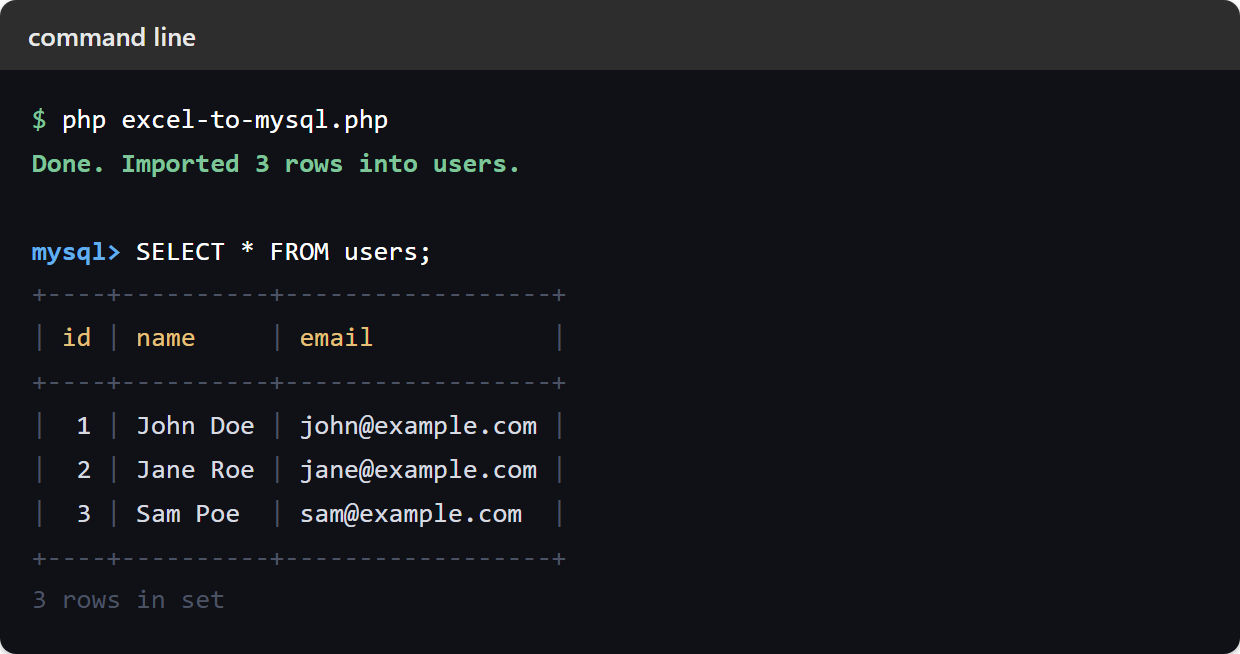
Run the script a second time and the count stays at three. That is ON DUPLICATE KEY UPDATE from step 7 doing its job — the same file imported twice updates the rows instead of duplicating them or failing.
Importing Excel files with date and number columns into MySQL.
Two column types need care, and both surprise people the first time.
A date cell does not read back as a date. Excel stores dates as a serial number counting days from 1900, so toArray() hands you something like 46095 where you expected 2026-03-14. Insert that into a DATE column and you have stored nonsense. Convert it with Date::excelToDateTimeObject(), using Date::isDateTime() to tell a real date cell from an ordinary number:
use \PhpOffice\PhpSpreadsheet\Shared\Date;

$cell = $spreadsheet->getActiveSheet()->getCell('D2');

if (Date::isDateTime($cell)) {
    $date = Date::excelToDateTimeObject($cell->getValue());
    $value = $date->format('Y-m-d');
}
There is a catch, and it is step 6’s. Nothing in a spreadsheet marks a cell as a date — the value is just a number, and the number format applied to it is the only thing that makes it one. A number format is styling, so setReadDataOnly(true) discards it. Under that setting isDateTime() returns false for a genuine date cell, the branch above never runs, and 46095 goes into the database. No error, no warning — just a wrong number in a column you will trust later.
So if your file has date columns, drop the setReadDataOnly(true) line from step 6:
$reader = IOFactory::createReaderForFile($inputFile);

// Do NOT set readDataOnly if you need to detect dates -
// it discards the number formats isDateTime() depends on.
$spreadsheet = $reader->load($inputFile);
Reading the styles costs memory, which is the trade. If you know the column is a date and do not need to detect it, you can keep setReadDataOnly(true) and convert by position instead — call excelToDateTimeObject() on that column’s value without asking isDateTime() first.
Decimals need the opposite kind of attention. A price shown as 4.50 in Excel is the float 4.5, and floats are not exact — for money, use a DECIMAL column and pass the value as a string so MySQL does the rounding rather than PHP.
Importing a large Excel file into MySQL.
The script above loads the whole spreadsheet into memory before writing a single row, which is fine for the thousands of rows most imports are and wasteful for the ones that are not. If your file is big enough to strain memory_limit, read it in chunks with a read filter and insert each chunk as you go — the transaction can still wrap the lot. That technique has its own article, linked below.