This article shows how to guard against XXE when reading an untrusted Excel file in PHP with the latest version of PhpSpreadsheet. An .xlsx is a ZIP archive full of XML, so accepting one from a stranger means parsing hostile XML on your own server. That is the setting for an XML External Entity attack, where the document tells your parser to go and fetch something it should never touch.
Here is the headline, and it is not what most tutorials say. In PhpSpreadsheet 5.9 the defence is already on. Every reader is built with an XmlScanner attached, and there is no setSecurityScanner() method to call — that advice is out of date, and copying it produces a fatal error rather than a hardened script.
So your job is not to install the guard. Instead it is to know what the guard actually stops, to confirm it is running, and to add your own rule when your threat model needs more. Below we build three genuinely hostile workbooks, watch all three bounce, and then extend the scanner with a check it does not make on its own.
Requirements to guard against XXE when reading Excel files:
- Composer
- PHP 8.2 or newer
Tested with PhpSpreadsheet 5.9 on PHP 8.5. This matters more than usual here, because the scanner API changed across the 1.x, 2.x and 3.x lines — check your own installed version rather than trusting an older article.
Step 1.
First, set up the dependencies. Here we pin the latest major release of PhpSpreadsheet (the 5.x line).
{
    "require": {
        "phpoffice/phpspreadsheet": "^5.0"
    }
}
Step 2.
Next, install phpspreadsheet.
$ composer install
Step 3.
Then confirm the guard is running before trusting it. One line answers the question, and a second shows that the setter people reach for does not exist.
$reader = new XlsxReader();

echo '  getSecurityScanner() : ' . (new ReflectionClass($reader->getSecurityScanner()))->getName() . "\n";
echo '  setSecurityScanner() exists : '
    . (method_exists($reader, 'setSecurityScanner') ? 'yes' : 'no') . "\n";
Step 4.
Now build the attacks. Since a workbook is just a ZIP, poisoning one means opening it, editing a part, and putting it back. This helper injects a DOCTYPE straight after the XML declaration of a worksheet part.
/** Build a copy of good.xlsx with an XXE payload injected into a sheet part. */
function poison(string $source, string $target, string $doctype): void
{
    copy($source, $target);

    $zip = new ZipArchive();
    $zip->open($target);
    $xml = $zip->getFromName('xl/worksheets/sheet1.xml');

    // Slip the DOCTYPE in immediately after the XML declaration.
    $xml = preg_replace('/(\?>)/', '$1' . $doctype, $xml, 1);

    $zip->addFromString('xl/worksheets/sheet1.xml', $xml);
    $zip->close();
}
Step 5.
Then create three payloads. The first is the classic file-disclosure entity, the second hides the same thing behind null bytes, and the third is an expansion bomb that aims to exhaust memory rather than steal anything.
file_put_contents('secret.txt', "DB_PASSWORD=hunter2\n");
$secretPath = str_replace('\\', '/', realpath('secret.txt'));

// 1. The classic external-entity payload.
poison('broken/good.xlsx', 'xxe-classic.xlsx',
    '<!DOCTYPE foo [<!ENTITY xxe SYSTEM "file:///' . $secretPath . '">]>');

// 2. The same thing with null bytes between the characters of "<!DOCTYPE",
//    an old trick for slipping past a naive string search.
poison('broken/good.xlsx', 'xxe-nullbyte.xlsx',
    "<\0!\0D\0O\0C\0T\0Y\0P\0E foo [<!ENTITY xxe SYSTEM \"file:///{$secretPath}\">]>");

// 3. A billion-laughs style entity-expansion bomb.
poison('broken/good.xlsx', 'xxe-bomb.xlsx',
    '<!DOCTYPE lolz [<!ENTITY lol "lol">'
    . '<!ENTITY lol2 "&lol;&lol;&lol;&lol;&lol;&lol;&lol;&lol;&lol;&lol;">'
    . '<!ENTITY lol3 "&lol2;&lol2;&lol2;&lol2;&lol2;&lol2;&lol2;&lol2;&lol2;&lol2;">]>');
Step 6.
Finally, try to load each one. The scanner throws Reader\Exception, so an ordinary catch turns an attack into a rejection.
foreach (['broken/good.xlsx', 'xxe-classic.xlsx', 'xxe-nullbyte.xlsx', 'xxe-bomb.xlsx'] as $file) {
    printf('%-20s', basename($file));

    try {
        $spreadsheet = IOFactory::load($file);
        echo "LOADED   - sheet \"" . $spreadsheet->getActiveSheet()->getTitle() . "\"\n";
    } catch (ReaderException $e) {
        echo "BLOCKED  - " . $e->getMessage() . "\n";
    }
}
Test the guard against XXE when reading Excel files.
Command line testing.
$ php xxe.php
Result of the guard against XXE when reading Excel files.
The valid workbook loads, and the scanner refuses all three attacks before any parsing happens. Notice that it catches the null-byte variant as well, because the scanner matches its pattern with null bytes allowed between every character:
Is a security scanner active by default?
  getSecurityScanner() : PhpOffice\PhpSpreadsheet\Reader\Security\XmlScanner
  setSecurityScanner() exists : no

good.xlsx           LOADED   - sheet "Report"
xxe-classic.xlsx    BLOCKED  - Detected use of ENTITY in XML, spreadsheet file load() aborted to prevent XXE/XEE attacks
xxe-nullbyte.xlsx   BLOCKED  - Detected use of ENTITY in XML, spreadsheet file load() aborted to prevent XXE/XEE attacks
xxe-bomb.xlsx       BLOCKED  - Detected use of ENTITY in XML, spreadsheet file load() aborted to prevent XXE/XEE attacks
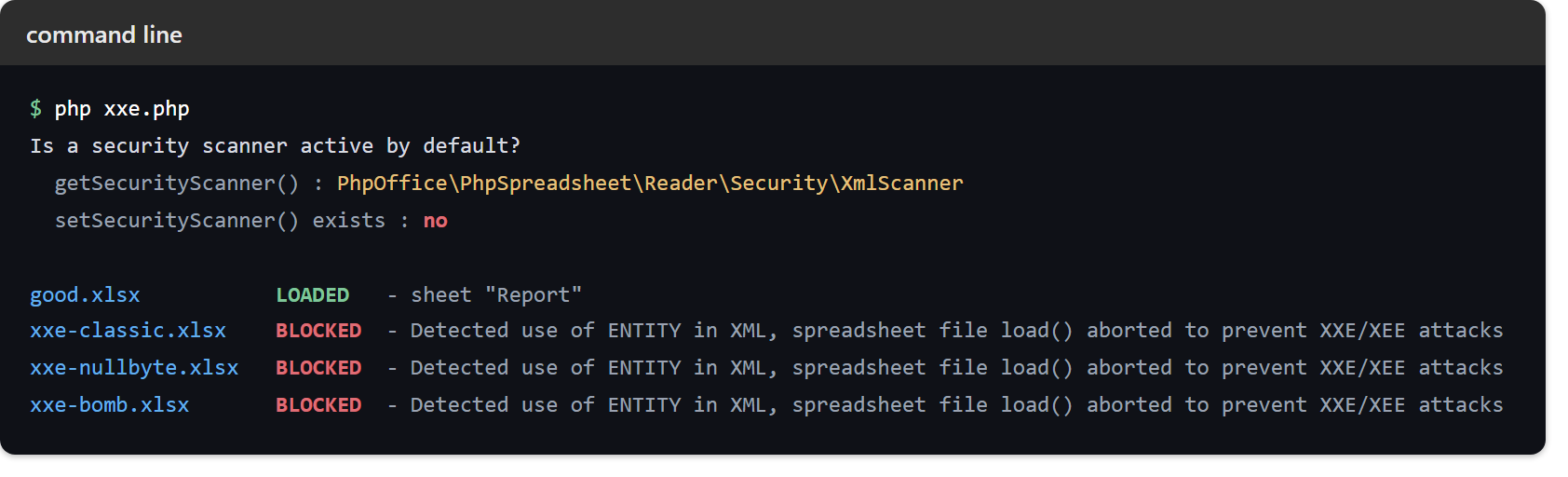
The rule is blunter than it first appears. The scanner rejects any <!DOCTYPE at all, rather than trying to decide which entities are dangerous. As a result it turns away a harmless doctype too — which is the right trade, because a spreadsheet has no reason to carry one.
It also refuses UTF-7 and EBCDIC encoded parts, and content that changes shape when converted to UTF-8. Those are all ways of writing <!DOCTYPE so that a simple search will not see it.
Extend the guard against XXE with setAdditionalCallback.
The scanner checks for one thing. So the built-in guard against XXE stops there, and anything beyond it is yours to add. setAdditionalCallback() runs on every XML part after the built-in check passes, and throwing from it rejects the file.
Consider a workbook with no doctype anywhere, but with a hyperlink pointing at a local path. Nothing above objects to it, because it is perfectly well-formed XML:
$reader = new XlsxReader();

$reader->getSecurityScanner()->setAdditionalCallback(
    function (string $xml): string {
        if (stripos($xml, 'file://') !== false) {
            throw new ReaderException('Rejected: workbook references a local file path');
        }

        return $xml;
    }
);
Running the same file with and without that callback shows the difference plainly:
$ php xxe-callback.php
default scanner       LOADED   - link is file:///etc/passwd
with callback         BLOCKED  - Rejected: workbook references a local file path
The callback must return the XML string when it is happy, since its return value is what the reader goes on to parse. Above all, do not use it to strip suspicious markup and carry on. Reject the file instead, because a workbook that needed sanitising is a workbook you have no reason to trust.
Finally, remember this guard covers only the XML layer. Everything a file can still do to you once it parses cleanly — being damaged, being empty, or carrying a payload aimed at whoever opens it next — belongs to rejecting a corrupt file and preventing formula injection.