This article shows how to accept an uploaded Excel file from an HTML form and read it with the latest version of PhpSpreadsheet using plain PHP. Reading the file is the part you already know. The part that decides whether this is a feature or a hole in your site is everything that happens before load() is called.
The shape of it is a short checklist: the upload must have succeeded, the size must be one you chose rather than one php.ini chose for you, is_uploaded_file() must agree the file really arrived over HTTP, and move_uploaded_file() must relocate it out of the temp directory before you touch it. Only then does IOFactory::identify() ask what the file actually is — by reading its bytes, not by believing its name.
That last distinction is the one that matters. The filename and the MIME type in $_FILES are both supplied by the browser, so both are attacker-controlled; the contents are not. This is the inbound counterpart to downloading an Excel file in the browser — together they let a workbook make the whole round trip through a web page.
Requirements to handle an uploaded Excel file:
- Composer
- PHP 8.2 or newer
Step 1.
First, set up the dependencies. Here we pin the latest major release of PhpSpreadsheet (the 5.x line).
{
    "require": {
        "phpoffice/phpspreadsheet": "^5.0"
    }
}
Step 2.
Next, install phpspreadsheet.
$ composer install
Step 3.
Build the form. Two attributes carry the whole thing: method="post" and enctype="multipart/form-data". Miss the enctype and the browser sends only the filename — $_FILES arrives empty and the bug looks like a server problem when it is a markup one. The accept attribute filters the file picker, which is a convenience for the user and no protection at all for you.
<form action="upload.php" method="post" enctype="multipart/form-data">
    <input type="file" name="spreadsheet" accept=".xlsx,.xls,.ods">
    <button type="submit">Upload</button>
</form>
Step 4.
Now create the handler. Import IOFactory and the reader’s exception class, then set your own limits. Note what is missing from the allow-list: Csv. A CSV has no signature of its own, so very nearly any text file is identified as one — accepting Csv here means accepting anything at all.
<?php

require 'vendor/autoload.php';

use \PhpOffice\PhpSpreadsheet\IOFactory;
use \PhpOffice\PhpSpreadsheet\Reader\Exception as ReaderException;

const MAX_BYTES = 2 * 1024 * 1024; // 2 MB

// Note what is NOT here: Csv. A CSV has no signature of its own, so almost any
// text file identifies as one - accepting Csv means accepting anything.
const ALLOWED = ['Xlsx', 'Xls', 'Ods'];
Step 5.
Check that the upload succeeded. $_FILES['spreadsheet']['error'] is not a boolean — it is one of eight constants, and each says something different to the user. A file too large for php.ini and a file the user never chose are both failures, but telling them apart is the difference between a helpful message and a shrug.
// 1. There must be a file, and the upload must have succeeded.
if (!isset($_FILES['spreadsheet'])) {
    exit("No file was submitted.\n");
}

$file = $_FILES['spreadsheet'];

if ($file['error'] !== UPLOAD_ERR_OK) {
    $reasons = [
        UPLOAD_ERR_INI_SIZE   => 'larger than upload_max_filesize in php.ini',
        UPLOAD_ERR_FORM_SIZE  => 'larger than the form allows',
        UPLOAD_ERR_PARTIAL    => 'only partially uploaded',
        UPLOAD_ERR_NO_FILE    => 'not chosen at all',
        UPLOAD_ERR_NO_TMP_DIR => 'no temporary folder on the server',
        UPLOAD_ERR_CANT_WRITE => 'could not be written to disk',
        UPLOAD_ERR_EXTENSION  => 'blocked by a PHP extension',
    ];
    $why = $reasons[$file['error']] ?? 'rejected for an unknown reason';
    exit("Upload failed: the file was {$why}.\n");
}
Step 6.
Apply your own size limit, then confirm the file is genuinely an upload. is_uploaded_file() is the check that stops a crafted request from pointing your script at a path that was already on the server — without it, tmp_name is just a string someone else can influence.
// 2. Check the size yourself. php.ini limits are the outer wall, not your rule.
if ($file['size'] > MAX_BYTES) {
    exit("Upload failed: the file is larger than 2 MB.\n");
}

// 3. Confirm PHP really put this file there. This is what stops a crafted
//    request from pointing the script at a file already on the server.
if (!is_uploaded_file($file['tmp_name'])) {
    exit("Upload failed: that was not an uploaded file.\n");
}
Step 7.
Move the file somewhere you control. PHP deletes tmp_name the instant the script finishes, so anything you plan to keep has to be moved first. Give it a name you generate — never the name the browser sent, which can contain path separators and anything else the sender felt like typing.
// 4. Move it out of the temp directory before touching it. PHP deletes
//    tmp_name the moment the script ends.
$target = __DIR__ . '/uploads/' . bin2hex(random_bytes(8)) . '.upload';

if (!move_uploaded_file($file['tmp_name'], $target)) {
    exit("Upload failed: could not move the file into place.\n");
}
Step 8.
Only now ask what the file is. IOFactory::identify() inspects the bytes and returns the name of the reader that can handle them, throwing a Reader\Exception when nothing can. Catch that, and check the answer against your allow-list — identify() tells you which reader would try, which is not the same as telling you the file is one you want.
// 5. Only now ask what the file actually is. The name the browser sent and the
//    MIME type it claimed are both attacker-controlled; the bytes are not.
try {
    $type = IOFactory::identify($target);
} catch (ReaderException $e) {
    unlink($target);
    exit("Rejected: that file is not a spreadsheet PhpSpreadsheet can read.\n");
}

if (!in_array($type, ALLOWED, true)) {
    unlink($target);
    exit("Rejected: {$type} files are not accepted here.\n");
}
Step 9.
The file has passed every check, so read it. createReader() takes the type identify() just returned, which means no guessing from the extension. Escape the original filename before echoing it — it is still user input even now.
// 6. It is a spreadsheet, and one we accept. Read it.
$spreadsheet = IOFactory::createReader($type)->load($target);
$worksheet = $spreadsheet->getActiveSheet();

$safeName = htmlspecialchars($file['name'], ENT_QUOTES, 'UTF-8');

echo "Accepted {$safeName}\n";
echo "Detected format : {$type}\n";
echo "Sheet           : {$worksheet->getTitle()}\n";
echo "Rows            : {$worksheet->getHighestRow()}\n";
echo "Columns         : {$worksheet->getHighestColumn()}\n";

unlink($target);
Complete code to handle an uploaded Excel file.
<?php

require 'vendor/autoload.php';

use \PhpOffice\PhpSpreadsheet\IOFactory;
use \PhpOffice\PhpSpreadsheet\Reader\Exception as ReaderException;

const MAX_BYTES = 2 * 1024 * 1024; // 2 MB

// Note what is NOT here: Csv. A CSV has no signature of its own, so almost any
// text file identifies as one - accepting Csv means accepting anything.
const ALLOWED = ['Xlsx', 'Xls', 'Ods'];

// 1. There must be a file, and the upload must have succeeded.
if (!isset($_FILES['spreadsheet'])) {
    exit("No file was submitted.\n");
}

$file = $_FILES['spreadsheet'];

if ($file['error'] !== UPLOAD_ERR_OK) {
    $reasons = [
        UPLOAD_ERR_INI_SIZE   => 'larger than upload_max_filesize in php.ini',
        UPLOAD_ERR_FORM_SIZE  => 'larger than the form allows',
        UPLOAD_ERR_PARTIAL    => 'only partially uploaded',
        UPLOAD_ERR_NO_FILE    => 'not chosen at all',
        UPLOAD_ERR_NO_TMP_DIR => 'no temporary folder on the server',
        UPLOAD_ERR_CANT_WRITE => 'could not be written to disk',
        UPLOAD_ERR_EXTENSION  => 'blocked by a PHP extension',
    ];
    $why = $reasons[$file['error']] ?? 'rejected for an unknown reason';
    exit("Upload failed: the file was {$why}.\n");
}

// 2. Check the size yourself. php.ini limits are the outer wall, not your rule.
if ($file['size'] > MAX_BYTES) {
    exit("Upload failed: the file is larger than 2 MB.\n");
}

// 3. Confirm PHP really put this file there. This is what stops a crafted
//    request from pointing the script at a file already on the server.
if (!is_uploaded_file($file['tmp_name'])) {
    exit("Upload failed: that was not an uploaded file.\n");
}

// 4. Move it out of the temp directory before touching it. PHP deletes
//    tmp_name the moment the script ends.
$target = __DIR__ . '/uploads/' . bin2hex(random_bytes(8)) . '.upload';

if (!move_uploaded_file($file['tmp_name'], $target)) {
    exit("Upload failed: could not move the file into place.\n");
}

// 5. Only now ask what the file actually is. The name the browser sent and the
//    MIME type it claimed are both attacker-controlled; the bytes are not.
try {
    $type = IOFactory::identify($target);
} catch (ReaderException $e) {
    unlink($target);
    exit("Rejected: that file is not a spreadsheet PhpSpreadsheet can read.\n");
}

if (!in_array($type, ALLOWED, true)) {
    unlink($target);
    exit("Rejected: {$type} files are not accepted here.\n");
}

// 6. It is a spreadsheet, and one we accept. Read it.
$spreadsheet = IOFactory::createReader($type)->load($target);
$worksheet = $spreadsheet->getActiveSheet();

$safeName = htmlspecialchars($file['name'], ENT_QUOTES, 'UTF-8');

echo "Accepted {$safeName}\n";
echo "Detected format : {$type}\n";
echo "Sheet           : {$worksheet->getTitle()}\n";
echo "Rows            : {$worksheet->getHighestRow()}\n";
echo "Columns         : {$worksheet->getHighestColumn()}\n";

unlink($target);
Test handling an uploaded Excel file.
Create the uploads folder the handler writes into, then serve the two files with PHP’s built-in server and open the form in a browser. Uploading with curl works just as well and is easier to repeat.
$ mkdir uploads
$ php -S 127.0.0.1:8000
$ curl -F "spreadsheet=@report.xlsx" http://127.0.0.1:8000/upload.php
Result of handling an uploaded Excel file.
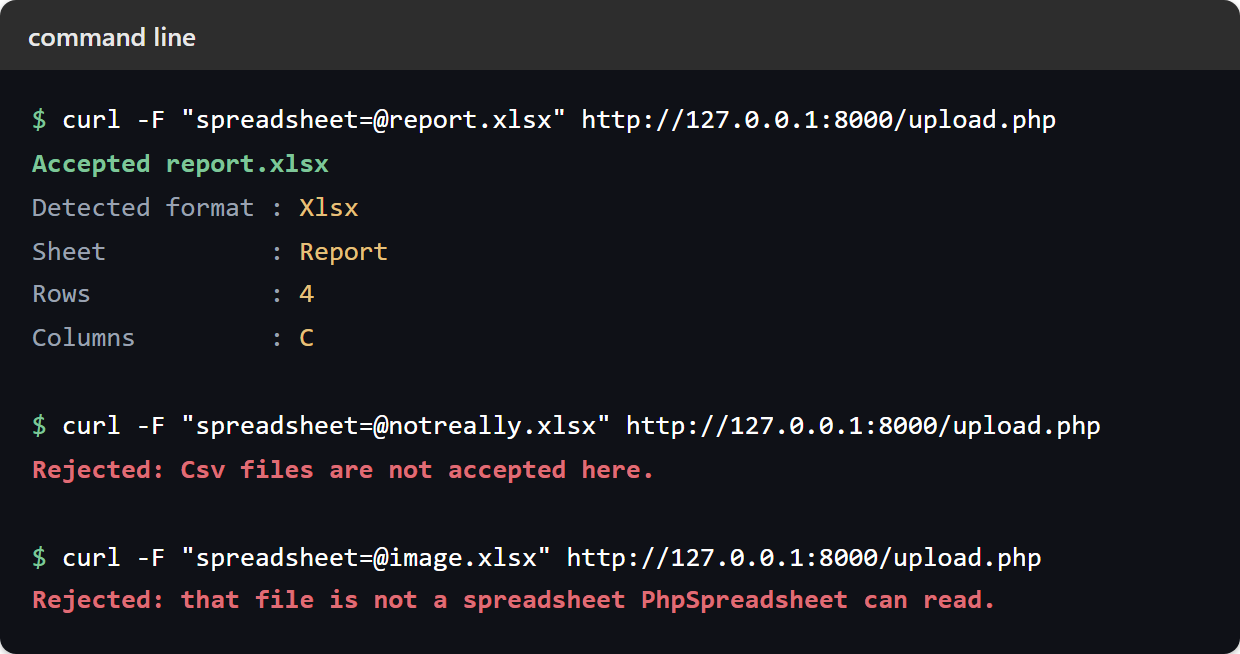
Uploading a real workbook, report.xlsx, passes every check and the handler reads it:
$ curl -F "spreadsheet=@report.xlsx" http://127.0.0.1:8000/upload.php
Accepted report.xlsx
Detected format : Xlsx
Sheet           : Report
Rows            : 4
Columns         : C
The checks earn their keep on everything else. A plain text file renamed to .xlsx is identified by its contents as a CSV and turned away by the allow-list — the extension never got a vote. A PNG renamed the same way matches no reader at all, so identify() throws and the catch handles it. And a form submitted with nothing selected is reported precisely rather than as a generic failure.
$ curl -F "spreadsheet=@notreally.xlsx" http://127.0.0.1:8000/upload.php
Rejected: Csv files are not accepted here.

$ curl -F "spreadsheet=@image.xlsx" http://127.0.0.1:8000/upload.php
Rejected: that file is not a spreadsheet PhpSpreadsheet can read.
Submitting the form with nothing selected reaches the handler too — the field is present, so isset() passes and the error code is what catches it:
Upload failed: the file was not chosen at all.