This article shows how to download Excel files in the browser in PHP: build the spreadsheet with PhpSpreadsheet and send it straight to the browser as a file download, without ever writing it to disk. Instead of saving an .xlsx file to a folder and linking to it, the script streams the file in the response — so the reader clicks a link and their browser saves the spreadsheet.
Only a few pieces do the work. The Spreadsheet class creates the workbook in memory, getActiveSheet() selects the worksheet to fill, and fromArray() writes a whole block of rows at once. The Xlsx writer then does the delivery: $writer->save('php://output') writes the finished file to the response body rather than to a path. Around that, plain PHP sets the stage — header() declares the file’s type and its download name via Content-Type and Content-Disposition, and ob_get_level() with ob_end_clean() throw away any output already buffered so it cannot corrupt the file.
Streaming is what you want whenever you download Excel files in the browser that are built per request — an export button, a report for the logged-in user, a filtered list. There is no file to clean up afterwards and nothing sitting in a public folder for someone else to find. Once you have this working, every existing script that builds a spreadsheet becomes a download by changing a single line.
Requirements to download Excel files in the browser:
- Composer
- PHP 8.2 or newer
- The
gdandzipextensions
PhpSpreadsheet 5 lists both ext-gd and ext-zip as hard requirements, so composer install refuses to run without them — it stops with “ext-gd is missing from your system” rather than installing. Most other extensions it needs (dom, mbstring, simplexml, zlib) are on by default; gd often is not. Enable it in php.ini before step 2.
Tested with PhpSpreadsheet 5.9 on PHP 8.5.
Step 1.
Setup dependencies.
{
    "require": {
        "phpoffice/phpspreadsheet": "^5.0"
    }
}
Step 2.
Install phpspreadsheet.
$ composer install
Step 3.
Create a new PHP file. Load Composer’s autoloader and import the Spreadsheet class and the Xlsx writer.
<?php

require 'vendor/autoload.php';

use \PhpOffice\PhpSpreadsheet\Spreadsheet;
use \PhpOffice\PhpSpreadsheet\Writer\Xlsx;
Step 4.
Build the spreadsheet in memory. fromArray() writes a two-dimensional array to the worksheet starting at a given cell, so one call lays down the header row and the data rows together.
$spreadsheet = new Spreadsheet();
$worksheet = $spreadsheet->getActiveSheet();

// Write the header row and the data rows, starting at A1.
$worksheet->fromArray([
    ['id', 'name', 'email'],
    [1, 'John Doe', 'john@example.com'],
    [2, 'Jane Roe', 'jane@example.com'],
    [3, 'Sam Poe', 'sam@example.com'],
], null, 'A1');
Step 5.
Send the headers that turn the response into a download. Content-Type tells the browser this is an .xlsx workbook, and Content-Disposition: attachment tells it to save the file instead of trying to display it — the filename is the name the browser will offer.
$filename = 'users.xlsx';

header('Content-Type: application/vnd.openxmlformats-officedocument.spreadsheetml.sheet');
header('Content-Disposition: attachment; filename="' . $filename . '"');
header('Cache-Control: max-age=0');
Step 6.
Throw away anything already in the output buffer. An .xlsx file is a ZIP archive, and whatever the script printed earlier is sent first — so it lands in front of the archive’s signature. A blank line after a closing ?>, a stray echo, or a warning printed by another include is enough to do it. Emptying every buffer level makes the writer’s first byte the file’s first byte.
The failure this prevents is worth knowing, because it looks inconsistent. Strict readers reject a prefixed file outright: PHP’s own ZipArchive reports “not a zip archive”, PhpSpreadsheet cannot identify a reader for it, and Excel calls the file corrupt. Lenient tools often open it anyway — a ZIP’s index lives at the end of the file, so an unzip utility that scans backwards finds everything and never notices the junk in front. The same broken download can open fine in one tool and fail in Excel, which is exactly why this bug survives testing.
// Discard any output buffered so far - one stray byte corrupts the archive.
while (ob_get_level() > 0) {
    ob_end_clean();
}
Step 7.
Write the file to the response. This is the line that makes it a download: php://output is a stream that writes directly to the response body, so passing it to save() sends the workbook to the browser instead of to a path on disk. exit stops the script so nothing can append to the file after it.
$writer = new Xlsx($spreadsheet);

// 'php://output' is the response body, not a file on disk.
$writer->save('php://output');

exit;
Complete code to download Excel files in the browser.
<?php

require 'vendor/autoload.php';

use \PhpOffice\PhpSpreadsheet\Spreadsheet;
use \PhpOffice\PhpSpreadsheet\Writer\Xlsx;

$spreadsheet = new Spreadsheet();
$worksheet = $spreadsheet->getActiveSheet();

$worksheet->fromArray([
    ['id', 'name', 'email'],
    [1, 'John Doe', 'john@example.com'],
    [2, 'Jane Roe', 'jane@example.com'],
    [3, 'Sam Poe', 'sam@example.com'],
], null, 'A1');

$filename = 'users.xlsx';

header('Content-Type: application/vnd.openxmlformats-officedocument.spreadsheetml.sheet');
header('Content-Disposition: attachment; filename="' . $filename . '"');
header('Cache-Control: max-age=0');

while (ob_get_level() > 0) {
    ob_end_clean();
}

$writer = new Xlsx($spreadsheet);
$writer->save('php://output');

exit;
Test the Excel file download in the browser.
This script has to be requested by a browser, so serve the folder with PHP’s built-in web server and open the page.
$ php -S localhost:8000
Then visit http://localhost:8000/download-excel.php. The page stays blank and the browser downloads users.xlsx.
Result: the browser downloads the Excel file.
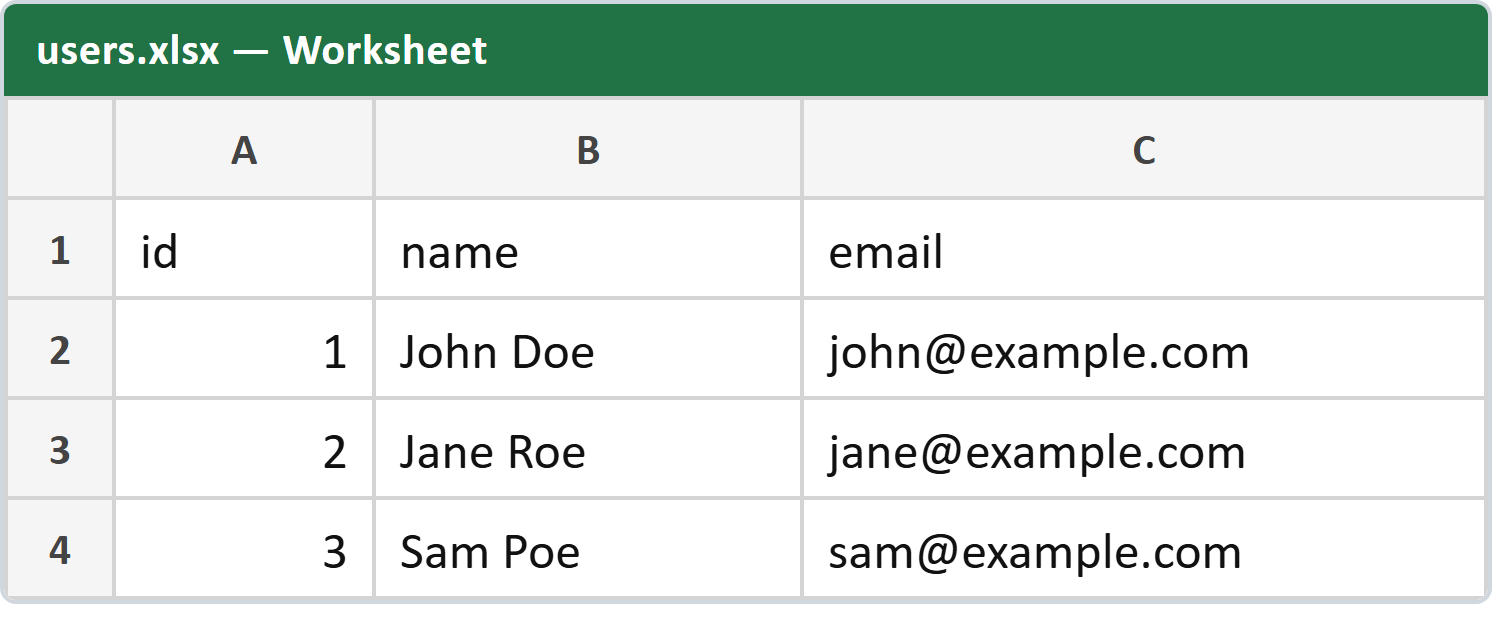
When you download Excel files in the browser this way, the browser saves a file named users.xlsx. Opening it in Excel shows the header row and the three data rows written in step 4:
     A     B          C
1    id    name       email
2     1    John Doe   john@example.com
3     2    Jane Roe   jane@example.com
4     3    Sam Poe    sam@example.com
The ids sit to the right of their cells because fromArray() wrote them as numbers, and Excel right-aligns numbers. The header row is not bold — nothing in the script applies any formatting.
Sending Content-Length for the browser download of the Excel file.
The code above streams the file as it is written, so its size is not known when the headers go out — the browser shows an unknown-size download. If you want a real progress bar, buffer the file first, measure it, then send it.
$writer = new Xlsx($spreadsheet);

// Capture the file instead of streaming it straight out.
ob_start();
$writer->save('php://output');
$contents = ob_get_clean();

header('Content-Length: ' . strlen($contents));

echo $contents;

exit;
The trade-off is memory: the whole workbook is held as a string before any of it is sent. Stream it for large exports, buffer it when the file is small and the progress bar is worth it.