This article shows how to stop formula injection (also called CSV injection) when you export user-supplied data to an Excel file with the latest version of PhpSpreadsheet. First, the threat. Any time you write data a user controls — a name, a comment, a product description — into a spreadsheet, Excel treats a value that begins with =, +, - or @ as a formula the moment someone opens the file. So a field like =HYPERLINK("http://attacker.example","Refund") becomes a live, clickable trap in a file your own application handed out.
PhpSpreadsheet also makes this easy to trigger by accident. For example, fromArray() and setCellValue() auto-detect a leading = and store the value as a real formula. So the default, tutorial-style export is exactly the vulnerable one. Two things fix it, and you often need both. First, write untrusted cells with setCellValueExplicit() as an explicit string, so PhpSpreadsheet never treats them as formulas. Then neutralise the leading character as well, because a CSV re-export throws that type information away.
This also hardens the kind of pipeline in Export MySQL data to Excel files. Once the rows come from somewhere a user can write to, they are untrusted. Below we take four rows — one an obvious attack, and one a legitimate value that merely starts with -. Then we export them the wrong way first, and the right way after.
Requirements to prevent formula injection:
- Composer
- PHP 8.2 or newer
Step 1.
First, set up the dependencies. Here we pin the latest major release of PhpSpreadsheet (the 5.x line, tested with 5.9 on PHP 8.2).
{
    "require": {
        "phpoffice/phpspreadsheet": "^5.0"
    }
}
Step 2.
Next, install phpspreadsheet.
$ composer install
Step 3.
Then create a new PHP file. Import Spreadsheet, the DataType constants, and both the Xlsx and Csv writers.
<?php

require 'vendor/autoload.php';

use PhpOffice\PhpSpreadsheet\Spreadsheet;
use PhpOffice\PhpSpreadsheet\Cell\DataType;
use PhpOffice\PhpSpreadsheet\Writer\Xlsx;
use PhpOffice\PhpSpreadsheet\Writer\Csv;
Step 4.
Set up the untrusted data and a helper that decides whether a value is dangerous. A value is a formula risk when its first character is =, +, -, @, or a leading tab or carriage return that Excel strips before re-reading the character after it.
// Imagine these rows came from a form, an API, or a user-editable column.
$rows = [
    ['Ada Lovelace', 'Great service'],
    ['Grace Hopper', '=2+5'],                          // a harmless-looking sum
    ['Evil User',    '=HYPERLINK("http://attacker.example","Refund")'],
    ['Bjarne S.',    '-7 (owed a credit)'],            // legitimate, starts with -
];

function looksLikeFormula(string $value): bool
{
    return $value !== '' && in_array($value[0], ['=', '+', '-', '@', "\t", "\r"], true);
}
Step 5.
First, the naive export — the one most examples show. fromArray() sees the leading = and stores a real formula, which we prove by reading the cell back with getCalculatedValue(): the user’s text has become live code.
$bad = new Spreadsheet();
$badSheet = $bad->getActiveSheet();
$badSheet->fromArray($rows, null, 'A1');
(new Xlsx($bad))->save('export-unsafe.xlsx');

echo "Naive export — what the cell actually became:\n";
echo "  B2 value          : " . $badSheet->getCell('B2')->getValue() . "\n";
echo "  B2 calculated     : " . $badSheet->getCell('B2')->getCalculatedValue() . "\n";
echo "  (the '=2+5' the user typed is now a LIVE formula that evaluates to 7)\n\n";
Step 6.
Now the XLSX fix. Write every untrusted cell with setCellValueExplicit() and DataType::TYPE_STRING, so PhpSpreadsheet stores the value as text and never guesses that it is a formula. It still displays exactly as the user typed it — but it is inert.
$safe = new Spreadsheet();
$safeSheet = $safe->getActiveSheet();
$r = 1;
foreach ($rows as $line) {
    $col = 'A';
    foreach ($line as $value) {
        $safeSheet->setCellValueExplicit($col . $r, (string) $value, DataType::TYPE_STRING);
        $col++;
    }
    $r++;
}
(new Xlsx($safe))->save('export-safe.xlsx');

echo "Safe XLSX export — same input, forced to text:\n";
echo "  B2 value          : " . $safeSheet->getCell('B2')->getValue() . "\n";
echo "  B2 calculated     : " . $safeSheet->getCell('B2')->getCalculatedValue() . "\n";
echo "  (stored as text, so it is inert and displays exactly as typed)\n\n";
Step 7.
Explicit strings protect the XLSX, but a CSV has no cell types — re-export the same data as CSV and the string-ness is gone, so =2+5 is live again the moment Excel opens the file. Here you must neutralise the leading character itself, by prefixing an apostrophe so the value no longer starts with a formula trigger.
$csv = new Spreadsheet();
$csvSheet = $csv->getActiveSheet();
$r = 1;
foreach ($rows as $line) {
    $col = 'A';
    foreach ($line as $value) {
        $value = (string) $value;
        if (looksLikeFormula($value)) {
            $value = "'" . $value;   // '=2+5  — no longer starts with '='
        }
        $csvSheet->setCellValueExplicit($col . $r, $value, DataType::TYPE_STRING);
        $col++;
    }
    $r++;
}
(new Csv($csv))->save('export-safe.csv');

echo "Safe CSV export (export-safe.csv):\n";
echo rtrim(file_get_contents('export-safe.csv')) . "\n";
Complete code to prevent formula injection.
<?php

require 'vendor/autoload.php';

use PhpOffice\PhpSpreadsheet\Spreadsheet;
use PhpOffice\PhpSpreadsheet\Cell\DataType;
use PhpOffice\PhpSpreadsheet\Writer\Xlsx;
use PhpOffice\PhpSpreadsheet\Writer\Csv;

$rows = [
    ['Ada Lovelace', 'Great service'],
    ['Grace Hopper', '=2+5'],
    ['Evil User',    '=HYPERLINK("http://attacker.example","Refund")'],
    ['Bjarne S.',    '-7 (owed a credit)'],
];

function looksLikeFormula(string $value): bool
{
    return $value !== '' && in_array($value[0], ['=', '+', '-', '@', "\t", "\r"], true);
}

// 1. Naive export: fromArray auto-detects "=..." as a formula.
$bad = new Spreadsheet();
$badSheet = $bad->getActiveSheet();
$badSheet->fromArray($rows, null, 'A1');
(new Xlsx($bad))->save('export-unsafe.xlsx');

echo "Naive export — what the cell actually became:\n";
echo "  B2 value          : " . $badSheet->getCell('B2')->getValue() . "\n";
echo "  B2 calculated     : " . $badSheet->getCell('B2')->getCalculatedValue() . "\n";
echo "  (the '=2+5' the user typed is now a LIVE formula that evaluates to 7)\n\n";

// 2. XLSX fix: force untrusted cells to explicit strings.
$safe = new Spreadsheet();
$safeSheet = $safe->getActiveSheet();
$r = 1;
foreach ($rows as $line) {
    $col = 'A';
    foreach ($line as $value) {
        $safeSheet->setCellValueExplicit($col . $r, (string) $value, DataType::TYPE_STRING);
        $col++;
    }
    $r++;
}
(new Xlsx($safe))->save('export-safe.xlsx');

echo "Safe XLSX export — same input, forced to text:\n";
echo "  B2 value          : " . $safeSheet->getCell('B2')->getValue() . "\n";
echo "  B2 calculated     : " . $safeSheet->getCell('B2')->getCalculatedValue() . "\n";
echo "  (stored as text, so it is inert and displays exactly as typed)\n\n";

// 3. CSV has no types: neutralise the leading character with an apostrophe.
$csv = new Spreadsheet();
$csvSheet = $csv->getActiveSheet();
$r = 1;
foreach ($rows as $line) {
    $col = 'A';
    foreach ($line as $value) {
        $value = (string) $value;
        if (looksLikeFormula($value)) {
            $value = "'" . $value;
        }
        $csvSheet->setCellValueExplicit($col . $r, $value, DataType::TYPE_STRING);
        $col++;
    }
    $r++;
}
(new Csv($csv))->save('export-safe.csv');

echo "Safe CSV export (export-safe.csv):\n";
echo rtrim(file_get_contents('export-safe.csv')) . "\n";
Test preventing formula injection.
Command line testing.
$ php injection.php
Result of preventing formula injection.
First, the naive export turns the user’s =2+5 into a live formula, so getCalculatedValue() returns 7. Forced to an explicit string, by contrast, it stays the literal text =2+5. Finally, in the CSV an apostrophe now prefixes every dangerous field ('=2+5, '=HYPERLINK(...), '-7 ...), so nothing executes when someone opens the file:
Naive export — what the cell actually became:
  B2 value          : =2+5
  B2 calculated     : 7
  (the '=2+5' the user typed is now a LIVE formula that evaluates to 7)

Safe XLSX export — same input, forced to text:
  B2 value          : =2+5
  B2 calculated     : =2+5
  (stored as text, so it is inert and displays exactly as typed)

Safe CSV export (export-safe.csv):
"Ada Lovelace","Great service"
"Grace Hopper","'=2+5"
"Evil User","'=HYPERLINK(""http://attacker.example"",""Refund"")"
"Bjarne S.","'-7 (owed a credit)"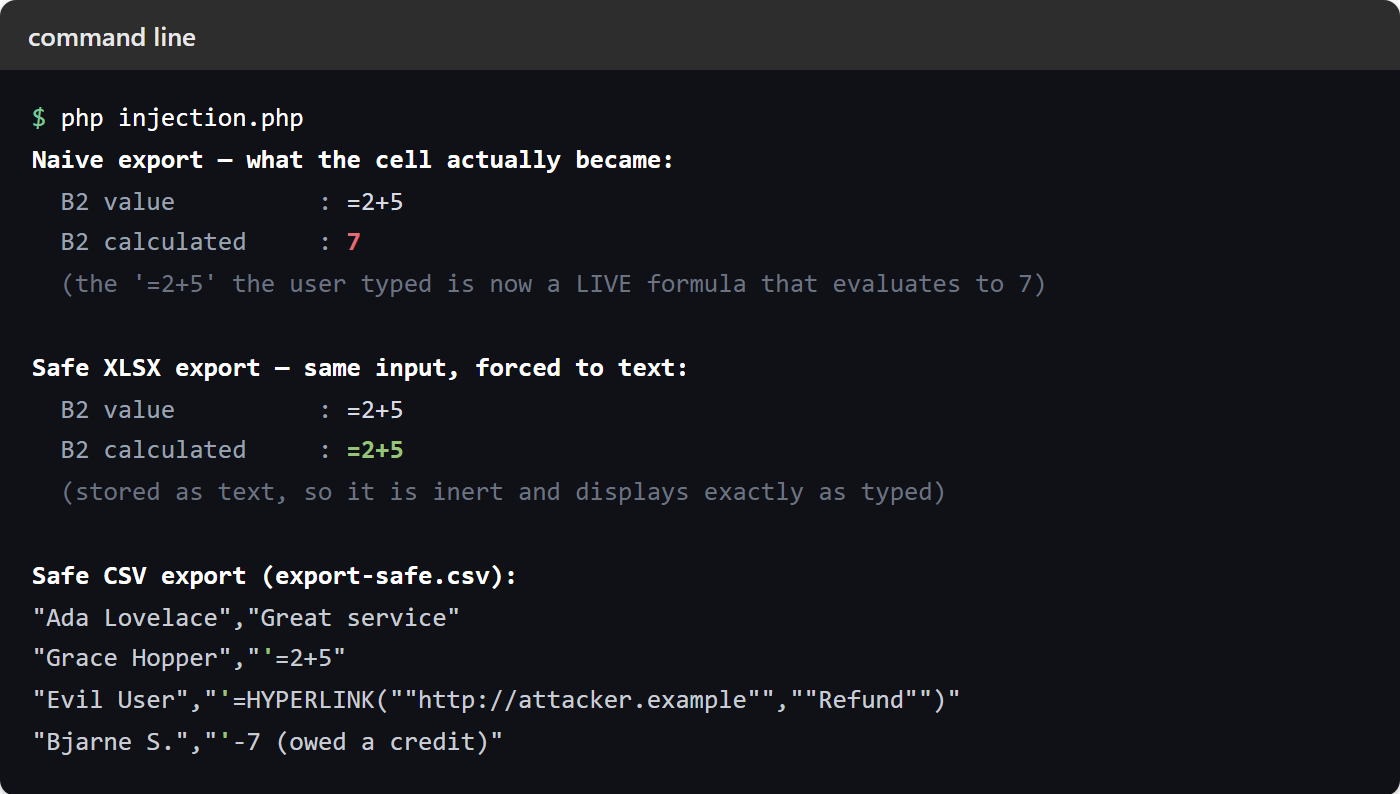
You can also see the trade-off in the CSV. The apostrophe becomes part of the stored text, so a legitimate -7 now reads as '-7. That is the honest cost of a safe CSV export — a little cosmetic noise, in exchange for never executing a stranger’s formula on your users’ machines. For XLSX only, of course, the explicit-string approach avoids even that.