A sheet with two hundred rows is unreadable the moment you scroll, because the header goes with it. This article shows how to freeze rows and columns in a Google Sheet from PHP, so the header row and the first column stay put while everything else moves.
This site already covers freezing the header row in Excel files. Same job, different API, and one real difference worth knowing about: in Excel a freeze is a view setting, a property of how the file is being looked at. In Google Sheets it is a property of the sheet itself, stored beside the row and column counts, so everybody opening the document gets it.
The request is updateSheetProperties, carrying a gridProperties object with frozenRowCount and frozenColumnCount. As with every property write in this API, a fields mask says which part you are replacing — and here a mask one level too wide produces one of the strangest error messages the Sheets API can give you.
Requirements to freeze rows and columns:
- Authenticate With A Service Account
- Create A Google Cloud Project
- Enable Google Sheets API Library
- Install The Google Client Library Specifying Google Sheets
- Composer
- PHP 8.1 or newer
Step 1.
First, set up the dependencies. This is the Sheets-only install used across this series. Tested with google/apiclient 2.19 on PHP 8.5.
{
    "require": {
        "google/apiclient": "^2.12.1"
    },
    "scripts": {
        "pre-autoload-dump": "Google\\Task\\Composer::cleanup"
    },
    "extra": {
        "google/apiclient-services": [
            "Sheets"
        ]
    }
}
Step 2.
Next, install the Google Client Library.
$ composer install
Step 3.
Then build the client and find the tab’s numeric id, which every property request needs.
<?php

require 'vendor/autoload.php';

use Google\Client;
use Google\Service\Sheets;
use Google\Service\Sheets\BatchUpdateSpreadsheetRequest;
use Google\Service\Sheets\Request;
use Google\Service\Sheets\ValueRange;

$spreadsheetId = 'YOUR_SPREADSHEET_ID';
$keyFile = 'service-account.json';
$tabName = 'Ledger';

$client = new Client();
$client->setApplicationName('Freeze Rows And Columns');
$client->setAuthConfig($keyFile);
$client->addScope(Sheets::SPREADSHEETS);

$service = new Sheets($client);

/**
 * Return a brand-new tab with this name, deleting any previous one.
 *
 * The freeze counts are stored ON the sheet, so a tab left over from an
 * earlier run is already frozen and the "before" reading would be a lie.
 */
function freshSheetId(Sheets $service, string $spreadsheetId, string $title): int
{
    $requests = [];

    foreach ($service->spreadsheets->get($spreadsheetId)->getSheets() as $sheet) {
        if ($sheet->getProperties()->getTitle() === $title) {
            $requests[] = new Request([
                'deleteSheet' => ['sheetId' => $sheet->getProperties()->getSheetId()],
            ]);
        }
    }

    $requests[] = new Request(['addSheet' => ['properties' => ['title' => $title]]]);

    $response = $service->spreadsheets->batchUpdate($spreadsheetId, new BatchUpdateSpreadsheetRequest([
        'requests' => $requests,
    ]));

    $replies = $response->getReplies();

    return end($replies)->getAddSheet()->getProperties()->getSheetId();
}

$sheetId = freshSheetId($service, $spreadsheetId, $tabName);
Step 4.
Write a small ledger in, so there is a header worth keeping on screen.
$service->spreadsheets_values->update(
    $spreadsheetId,
    $tabName . '!A1',
    new ValueRange(['values' => [
        ['Date', 'Reference', 'Debit', 'Credit'],
        ['2026-08-01', 'INV-1001', 0, 240.00],
        ['2026-08-02', 'INV-1002', 0, 95.50],
        ['2026-08-03', 'PAY-0007', 180.00, 0],
    ]]),
    ['valueInputOption' => 'USER_ENTERED']
);
Step 5.
Add a helper that prints the grid properties. Freezing has no visible output in a terminal, so reading the value back is the only honest way to know it worked.
function showGrid(Sheets $service, string $spreadsheetId, int $sheetId, string $label): void
{
    foreach ($service->spreadsheets->get($spreadsheetId)->getSheets() as $sheet) {
        if ($sheet->getProperties()->getSheetId() !== $sheetId) {
            continue;
        }

        $grid = $sheet->getProperties()->getGridProperties();

        printf("%s\n", $label);
        printf("  frozen rows    : %d\n", $grid->getFrozenRowCount() ?? 0);
        printf("  frozen columns : %d\n", $grid->getFrozenColumnCount() ?? 0);
        printf("  grid size      : %d rows x %d columns\n",
            $grid->getRowCount(), $grid->getColumnCount());
    }
}
Both counts come back as null rather than 0 on a sheet that has never been frozen, which is why the ?? 0 is there.
Step 6.
Now the request itself. Two integers and a mask that names exactly those two integers.
$service->spreadsheets->batchUpdate($spreadsheetId, new BatchUpdateSpreadsheetRequest([
    'requests' => [
        new Request(['updateSheetProperties' => [
            'properties' => [
                'sheetId'        => $sheetId,
                'gridProperties' => [
                    'frozenRowCount'    => 1,
                    'frozenColumnCount' => 1,
                ],
            ],
            'fields' => 'gridProperties.frozenRowCount,gridProperties.frozenColumnCount',
        ]]),
    ],
]));
These are counts, not indexes. frozenRowCount => 1 freezes the first row; 2 freezes the first two. Passing 0 is how you unfreeze, and it is a perfectly valid request rather than a special case.
Complete code to freeze rows and columns.
<?php

require 'vendor/autoload.php';

use Google\Client;
use Google\Service\Sheets;
use Google\Service\Sheets\BatchUpdateSpreadsheetRequest;
use Google\Service\Sheets\Request;
use Google\Service\Sheets\ValueRange;

$spreadsheetId = 'YOUR_SPREADSHEET_ID';
$keyFile = 'service-account.json';
$tabName = 'Ledger';

$client = new Client();
$client->setApplicationName('Freeze Rows And Columns');
$client->setAuthConfig($keyFile);
$client->addScope(Sheets::SPREADSHEETS);

$service = new Sheets($client);

/**
 * Return a brand-new tab with this name, deleting any previous one.
 *
 * The freeze counts are stored ON the sheet, so a tab left over from an
 * earlier run is already frozen and the "before" reading would be a lie.
 */
function freshSheetId(Sheets $service, string $spreadsheetId, string $title): int
{
    $requests = [];

    foreach ($service->spreadsheets->get($spreadsheetId)->getSheets() as $sheet) {
        if ($sheet->getProperties()->getTitle() === $title) {
            $requests[] = new Request([
                'deleteSheet' => ['sheetId' => $sheet->getProperties()->getSheetId()],
            ]);
        }
    }

    $requests[] = new Request(['addSheet' => ['properties' => ['title' => $title]]]);

    $response = $service->spreadsheets->batchUpdate($spreadsheetId, new BatchUpdateSpreadsheetRequest([
        'requests' => $requests,
    ]));

    $replies = $response->getReplies();

    return end($replies)->getAddSheet()->getProperties()->getSheetId();
}

/** Print the tab's grid properties, straight from the spreadsheet. */
function showGrid(Sheets $service, string $spreadsheetId, int $sheetId, string $label): void
{
    foreach ($service->spreadsheets->get($spreadsheetId)->getSheets() as $sheet) {
        if ($sheet->getProperties()->getSheetId() !== $sheetId) {
            continue;
        }

        $grid = $sheet->getProperties()->getGridProperties();

        printf("%s\n", $label);
        printf("  frozen rows    : %d\n", $grid->getFrozenRowCount() ?? 0);
        printf("  frozen columns : %d\n", $grid->getFrozenColumnCount() ?? 0);
        printf("  grid size      : %d rows x %d columns\n",
            $grid->getRowCount(), $grid->getColumnCount());
    }
}

$sheetId = freshSheetId($service, $spreadsheetId, $tabName);

$service->spreadsheets_values->update(
    $spreadsheetId,
    $tabName . '!A1',
    new ValueRange(['values' => [
        ['Date', 'Reference', 'Debit', 'Credit'],
        ['2026-08-01', 'INV-1001', 0, 240.00],
        ['2026-08-02', 'INV-1002', 0, 95.50],
        ['2026-08-03', 'PAY-0007', 180.00, 0],
    ]]),
    ['valueInputOption' => 'USER_ENTERED']
);

showGrid($service, $spreadsheetId, $sheetId, "Before freezing:");

// Freeze the header row and the first column.
$service->spreadsheets->batchUpdate($spreadsheetId, new BatchUpdateSpreadsheetRequest([
    'requests' => [
        new Request(['updateSheetProperties' => [
            'properties' => [
                'sheetId'        => $sheetId,
                'gridProperties' => [
                    'frozenRowCount'    => 1,
                    'frozenColumnCount' => 1,
                ],
            ],
            'fields' => 'gridProperties.frozenRowCount,gridProperties.frozenColumnCount',
        ]]),
    ],
]));

echo "\n";
showGrid($service, $spreadsheetId, $sheetId, "After freezing:");

// The same change with a mask one level too wide.
echo "\nThe same change with fields => 'gridProperties':\n";

try {
    $service->spreadsheets->batchUpdate($spreadsheetId, new BatchUpdateSpreadsheetRequest([
        'requests' => [
            new Request(['updateSheetProperties' => [
                'properties' => [
                    'sheetId'        => $sheetId,
                    'gridProperties' => ['frozenRowCount' => 2],
                ],
                'fields' => 'gridProperties',
            ]]),
        ],
    ]));

    echo "  accepted\n";
} catch (Google\Service\Exception $e) {
    $error = json_decode($e->getMessage(), true)['error'] ?? [];
    printf("  HTTP %d: %s\n", $e->getCode(), $error['message'] ?? $e->getMessage());
}

// And the ceiling: you cannot freeze the whole sheet.
echo "\nAsking for 9999 frozen rows:\n";

try {
    $service->spreadsheets->batchUpdate($spreadsheetId, new BatchUpdateSpreadsheetRequest([
        'requests' => [
            new Request(['updateSheetProperties' => [
                'properties' => [
                    'sheetId'        => $sheetId,
                    'gridProperties' => ['frozenRowCount' => 9999],
                ],
                'fields' => 'gridProperties.frozenRowCount',
            ]]),
        ],
    ]));

    echo "  accepted\n";
} catch (Google\Service\Exception $e) {
    $error = json_decode($e->getMessage(), true)['error'] ?? [];
    printf("  HTTP %d: %s\n", $e->getCode(), $error['message'] ?? $e->getMessage());
}
Test how to freeze rows and columns.
$ php freeze.php
Result of the code to freeze rows and columns.
Before freezing:
  frozen rows    : 0
  frozen columns : 0
  grid size      : 1000 rows x 26 columns

After freezing:
  frozen rows    : 1
  frozen columns : 1
  grid size      : 1000 rows x 26 columns

The same change with fields => 'gridProperties':
  HTTP 400: Invalid requests[0].updateSheetProperties: You can't delete all the rows on the sheet.

Asking for 9999 frozen rows:
  HTTP 400: Invalid requests[0].updateSheetProperties: You can't freeze all visible rows on the sheet.
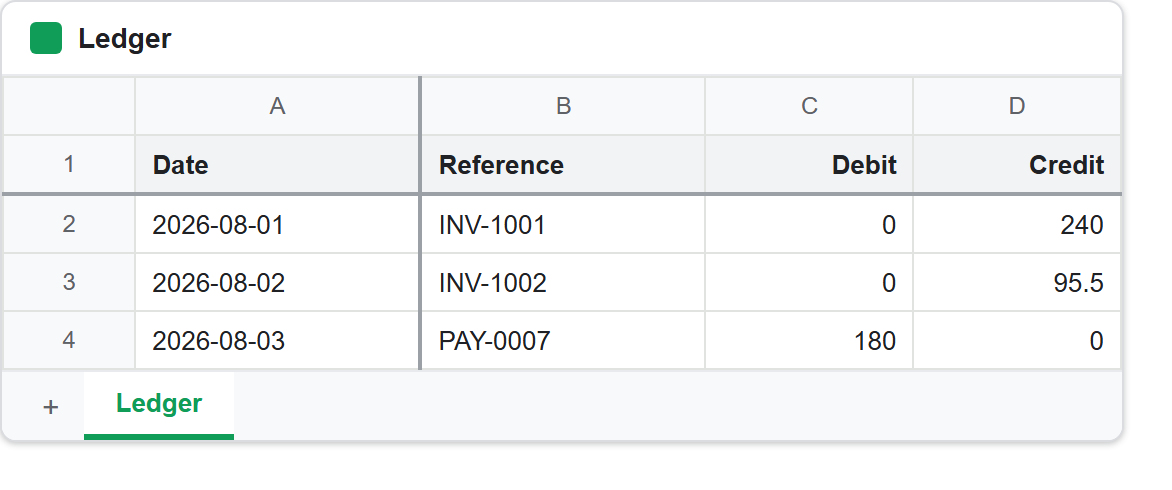
The grid size is worth noticing. It does not change, and it will matter in a moment.
Why the wide mask complains about rows.
The third block is the interesting one. All that request wanted was two frozen rows instead of one, and the API answered:
You can't delete all the rows on the sheet.
Nothing in that request mentioned deleting anything. The mask is what caused it. fields => 'gridProperties' claims the whole object, so the API replaces every property in it — and the properties you did not send default to zero. rowCount and columnCount live in that same object, so a request that reads as “freeze two rows” arrives as “freeze two rows and resize this sheet to nothing”.
This is the same mistake described in formatting cells, where a wide mask silently strips a header’s colours. Here it fails loudly instead, and about something you never touched. Both come from the same rule: the mask names what the request owns, and it owns it completely. Name the leaves you are changing, never the branch.
The last block is a genuine limit rather than a mask problem. Freezing every visible row leaves nothing to scroll, so the API refuses. There is no documented magic number here — keep the frozen count well under the number of rows with data in them and it will not come up.
Freeze rows and columns on a sheet somebody else owns.
Two habits make this safe on a shared document. Read the grid properties first, since the counts arrive as null rather than 0 and a script that assumes an integer will misreport an untouched sheet. Then send only the counts you mean to change: freezing rows and freezing columns are separate fields, so naming just one in the mask leaves the other exactly as the owner set it.
Because the freeze is stored on the sheet rather than in a view, it is visible to every collaborator immediately, and it survives being exported. That is the opposite of the Excel behaviour, where the equivalent setting belongs to the window rather than to the data.