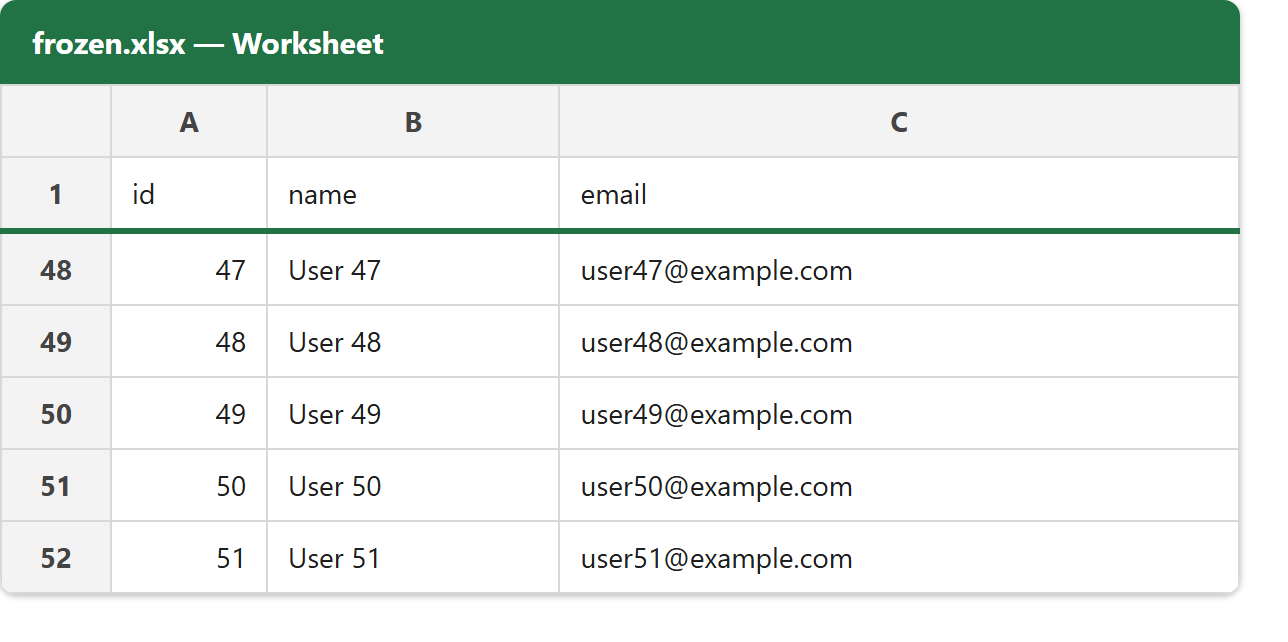
This article shows how to freeze the header row of an Excel file with the latest version of PhpSpreadsheet, so that row 1 stays in view while the rest of the sheet scrolls. It is the same “Freeze Panes” feature you would reach for in Excel itself, set from PHP with a single call.
The whole thing is one method: freezePane(). You pass it the cell that should be the top-left of the scrolling area, and everything above and to the left of that cell is frozen. freezePane('A2') freezes row 1 only — the classic frozen header. freezePane('B2') would additionally freeze column A, handy when the first column is a label you always want visible.
A frozen header is the difference between a long export that is readable and one where you lose track of which column is which by row 40. It costs one line, so there is no reason not to add it to any sheet with more rows than fit on screen — try it on a real export and scroll.
Requirements to freeze the header row:
- Composer
- PHP 8.2 or newer
Step 1.
First, set up the dependencies. Here we pin the latest major release of PhpSpreadsheet (the 5.x line).
{
    "require": {
        "phpoffice/phpspreadsheet": "^5.0"
    }
}
Step 2.
Next, install phpspreadsheet.
$ composer install
Step 3.
Then create a new PHP file. Load Composer’s autoloader and import the Spreadsheet class and the Xlsx writer.
<?php

require 'vendor/autoload.php';

use \PhpOffice\PhpSpreadsheet\Spreadsheet;
use \PhpOffice\PhpSpreadsheet\Writer\Xlsx;
Step 4.
Create the workbook and add a header row plus enough data rows that scrolling actually matters — here a header and 100 rows.
$spreadsheet = new Spreadsheet();
$worksheet = $spreadsheet->getActiveSheet();

// A header row plus enough data rows to make scrolling meaningful.
$worksheet->fromArray([['id', 'name', 'email']]);

$row = 2;
for ($i = 1; $i <= 100; $i++) {
    $worksheet->fromArray(
        [[$i, "User $i", "user$i@example.com"]],
        null,
        "A$row"
    );
    $row++;
}
Step 5.
Freeze the header. freezePane('A2') makes A2 the top-left of the scrolling region, which pins everything above it — row 1 — in place. Use freezePane('B2') instead to also keep column A visible.
// Freeze everything above row 2 — i.e. keep row 1 (the header) in view.
$worksheet->freezePane('A2');
Step 6.
Finally, save the file.
$writer = new Xlsx($spreadsheet);
$writer->save('frozen.xlsx');

echo "Done. Wrote frozen.xlsx with the header row frozen.\n";
Complete code to freeze the header row.
<?php

require 'vendor/autoload.php';

use \PhpOffice\PhpSpreadsheet\Spreadsheet;
use \PhpOffice\PhpSpreadsheet\Writer\Xlsx;

$spreadsheet = new Spreadsheet();
$worksheet = $spreadsheet->getActiveSheet();

// A header row plus enough data rows to make scrolling meaningful.
$worksheet->fromArray([['id', 'name', 'email']]);

$row = 2;
for ($i = 1; $i <= 100; $i++) {
    $worksheet->fromArray(
        [[$i, "User $i", "user$i@example.com"]],
        null,
        "A$row"
    );
    $row++;
}

// Freeze everything above row 2 — i.e. keep row 1 (the header) in view.
$worksheet->freezePane('A2');

$writer = new Xlsx($spreadsheet);
$writer->save('frozen.xlsx');

echo "Done. Wrote frozen.xlsx with the header row frozen.\n";
Test freezing the header row.
Command line testing.
$ php freeze-panes.php
Result of freezing the header row.
Running the script to freeze the header row writes frozen.xlsx. Opening it and scrolling down keeps row 1 — id, name, email — pinned at the top while rows 2 onward slide underneath it, so the column headings never leave the screen.
$ php freeze-panes.php
Done. Wrote frozen.xlsx with the header row frozen.