This article shows how to loop through cells with iterators — the row and cell iterators in the latest version of PhpSpreadsheet, using plain PHP. Of course, toArray() already turns a sheet into a nested array in one call, and for most jobs that is the right tool. The iterators exist for the jobs where it is not: when you need the cell itself rather than its value, when the sheet has gaps, or when you want to stop before the end.
There are two of them, nested. getRowIterator() walks the rows and hands you a Row object; getCellIterator() on that row walks its cells and hands you a Cell. Both take a start and an end, so getRowIterator(2) skips a header row without a counter. In addition, a Cell knows things a value does not — its coordinate, its data type, whether it holds a formula.
The setting that decides how the loop behaves is setIterateOnlyExistingCells(). It controls whether the loop visits a gap in a row as an empty cell or skips it entirely. As a result, that choice carries a side effect worth knowing about before you meet it in production — and the run below shows exactly what it is.
Requirements to loop through cells with iterators:
- Composer
- PHP 8.2 or newer
Step 1.
First, set up the dependencies. Here we pin the latest major release of PhpSpreadsheet (the 5.x line).
{
    "require": {
        "phpoffice/phpspreadsheet": "^5.0"
    }
}
Step 2.
Next, install phpspreadsheet.
$ composer install
Step 3.
Then create a new PHP file and load the workbook. The sheet used here is a small inventory whose row 3 has no value in column B — the gap is what makes the difference between the two loops visible.
<?php

require 'vendor/autoload.php';

use \PhpOffice\PhpSpreadsheet\IOFactory;

$spreadsheet = IOFactory::load('inventory.xlsx');
$worksheet = $spreadsheet->getActiveSheet();

// Row 3 of this sheet has no value in column B.
echo 'B3 exists at the start? ' . var_export($worksheet->cellExists('B3'), true) . "\n";
Step 4.
Walk the rows, and the cells inside each one. getRowIterator(2) starts at row 2, so the header never enters the loop. setIterateOnlyExistingCells(true) also visits only the cells that actually hold a value, which is what you want when a sheet is sparse and the empty positions mean nothing.
// Only the cells that were actually given a value.
echo "\nIterating existing cells only:\n";

foreach ($worksheet->getRowIterator(2) as $row) {
    $cells = $row->getCellIterator();
    $cells->setIterateOnlyExistingCells(true);

    $line = [];
    foreach ($cells as $cell) {
        $line[] = $cell->getCoordinate() . '=' . var_export($cell->getValue(), true);
    }

    echo '  row ' . $row->getRowIndex() . ': ' . implode('  ', $line) . "\n";
}

echo "\nB3 exists now? " . var_export($worksheet->cellExists('B3'), true) . "\n";
Step 5.
Now the other mode, which is the default. With setIterateOnlyExistingCells(false) the iterator instead covers the row’s full range, handing you the missing positions as cells whose value is null. So this is what you want when the columns are fixed — a report where every row must produce three fields whether or not the file bothered to fill them in.
// The default: every cell in the row's range, gaps included.
echo "\nIterating the whole range (the default):\n";

foreach ($worksheet->getRowIterator(2) as $row) {
    $cells = $row->getCellIterator();
    $cells->setIterateOnlyExistingCells(false);

    $line = [];
    foreach ($cells as $cell) {
        $line[] = $cell->getCoordinate() . '=' . var_export($cell->getValue(), true);
    }

    echo '  row ' . $row->getRowIndex() . ': ' . implode('  ', $line) . "\n";
}

// Walking the gaps did not just report them - it created them.
echo "\nB3 exists after the full-range walk? "
    . var_export($worksheet->cellExists('B3'), true) . "\n";
Step 6.
Finally, the thing an iterator can do that toArray() cannot: give up early. toArray() builds the entire sheet before you can look at any of it, so a search that ends on row 3 still pays for row 300,000. A loop with a break pays for what it read.
// What an iterator can do that toArray() cannot: stop early.
echo "\nStopping at the first row with qty under 10:\n";

foreach ($worksheet->getRowIterator(2) as $row) {
    $qty = $worksheet->getCell('C' . $row->getRowIndex())->getValue();

    if ($qty < 10) {
        echo '  row ' . $row->getRowIndex() . ' has qty ' . $qty . " - stopping.\n";
        break;
    }

    echo '  row ' . $row->getRowIndex() . " ok.\n";
}
Complete code to loop through cells with iterators.
<?php

require 'vendor/autoload.php';

use \PhpOffice\PhpSpreadsheet\IOFactory;

$spreadsheet = IOFactory::load('inventory.xlsx');
$worksheet = $spreadsheet->getActiveSheet();

// Row 3 of this sheet has no value in column B.
echo 'B3 exists at the start? ' . var_export($worksheet->cellExists('B3'), true) . "\n";

// Only the cells that were actually given a value.
echo "\nIterating existing cells only:\n";

foreach ($worksheet->getRowIterator(2) as $row) {
    $cells = $row->getCellIterator();
    $cells->setIterateOnlyExistingCells(true);

    $line = [];
    foreach ($cells as $cell) {
        $line[] = $cell->getCoordinate() . '=' . var_export($cell->getValue(), true);
    }

    echo '  row ' . $row->getRowIndex() . ': ' . implode('  ', $line) . "\n";
}

echo "\nB3 exists now? " . var_export($worksheet->cellExists('B3'), true) . "\n";

// The default: every cell in the row's range, gaps included.
echo "\nIterating the whole range (the default):\n";

foreach ($worksheet->getRowIterator(2) as $row) {
    $cells = $row->getCellIterator();
    $cells->setIterateOnlyExistingCells(false);

    $line = [];
    foreach ($cells as $cell) {
        $line[] = $cell->getCoordinate() . '=' . var_export($cell->getValue(), true);
    }

    echo '  row ' . $row->getRowIndex() . ': ' . implode('  ', $line) . "\n";
}

// Walking the gaps did not just report them - it created them.
echo "\nB3 exists after the full-range walk? "
    . var_export($worksheet->cellExists('B3'), true) . "\n";

// What an iterator can do that toArray() cannot: stop early.
echo "\nStopping at the first row with qty under 10:\n";

foreach ($worksheet->getRowIterator(2) as $row) {
    $qty = $worksheet->getCell('C' . $row->getRowIndex())->getValue();

    if ($qty < 10) {
        echo '  row ' . $row->getRowIndex() . ' has qty ' . $qty . " - stopping.\n";
        break;
    }

    echo '  row ' . $row->getRowIndex() . " ok.\n";
}
Test looping through cells with iterators.
Command line testing.
$ php iterate-cells.php
Result of looping through cells with iterators.
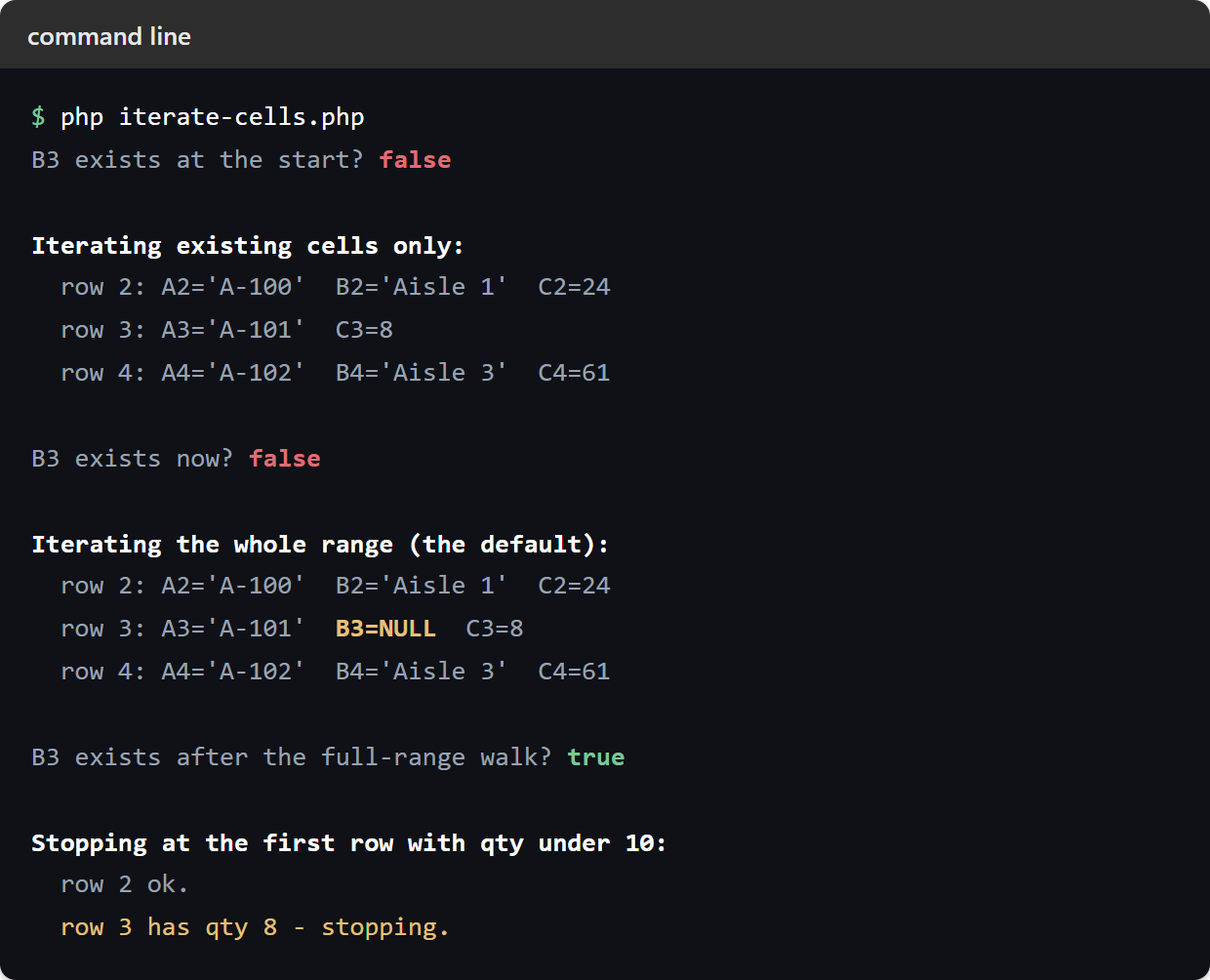
Once it runs, the script shows the two modes back to back on the same sheet, with the cellExists() checks between them.
$ php iterate-cells.php
B3 exists at the start? false

Iterating existing cells only:
  row 2: A2='A-100'  B2='Aisle 1'  C2=24
  row 3: A3='A-101'  C3=8
  row 4: A4='A-102'  B4='Aisle 3'  C4=61

B3 exists now? false

Iterating the whole range (the default):
  row 2: A2='A-100'  B2='Aisle 1'  C2=24
  row 3: A3='A-101'  B3=NULL  C3=8
  row 4: A4='A-102'  B4='Aisle 3'  C4=61

B3 exists after the full-range walk? true

Stopping at the first row with qty under 10:
  row 2 ok.
  row 3 has qty 8 - stopping.
Row 3 tells the story. First, iterating existing cells only, it has two cells and no B3 at all. Then, iterating the full range, it has three, and the middle one is null.
Then there is the part that surprises people. B3 did not exist before the loops, and still did not after the existing-cells-only pass — but after the full-range pass it does. In fact, visiting a missing cell creates it. On a small sheet that is harmless; on a sparse sheet of many thousands of rows it quietly turns empty positions into real cell objects, and the memory costs you as much as a full file would. So if you are walking a large sparse sheet and do not need the gaps, ask for existing cells only, and you avoid both the visits and the objects.
A loop is the right tool when a program owns the file. When the values are a rule rather than data, such as row numbers, a scale or a run of dates, the workbook can produce them itself with no loop at all. Generate A Grid With The SEQUENCE Function In Excel builds a whole block from one cell, sized from the data so it grows when rows are added.