This article shows how to export MySQL data to Excel in PHP: run a query against MySQL and turn the result into a formatted .xlsx file with PhpSpreadsheet. The column names become the header row, every record becomes a row underneath, and the finished sheet gets the touches that make a spreadsheet usable — a bold header, columns wide enough to read, and a header row that stays put when you scroll.
PDO does the fetching and PhpSpreadsheet does the writing. query() runs the SELECT and fetch(PDO::FETCH_ASSOC) walks the result one record at a time, so the rows are never all held in memory at once. On the spreadsheet side, new Spreadsheet() creates the workbook, getActiveSheet() selects the sheet and setTitle() names its tab, fromArray() writes a row at a time, and getStyle() with getFont()->setBold(true) and a Fill makes the header stand out. setAutoSize(true) sizes each column to its content, freezePane() pins the header, and the Xlsx writer’s save() writes the file.
Exporting MySQL data to Excel is the request every application eventually gets, because a spreadsheet is where people actually want their data — to filter it, chart it, or send it to someone who will never log in. This is the reverse of importing a spreadsheet into MySQL, and the two together cover most of what a database and a spreadsheet have to say to each other. Start with the query below, then swap in your own.
Requirements to export MySQL data to Excel:
- Composer
- PHP 8.2 or newer
- The
gdandzipextensions - The
pdo_mysqlextension - A MySQL server with some data to export
PhpSpreadsheet 5 lists ext-gd and ext-zip as hard requirements, so composer install refuses to run without them. Enable gd in php.ini before step 2 if it is off.
Tested with PhpSpreadsheet 5.9 on PHP 8.5 and MySQL 8.4.
Step 1.
Setup dependencies.
{
    "require": {
        "phpoffice/phpspreadsheet": "^5.0"
    }
}
Step 2.
Install phpspreadsheet.
$ composer install
Step 3.
Create a new PHP file. Load Composer’s autoloader and import the Spreadsheet class, the Xlsx writer, and the Fill style class used to shade the header row.
<?php

require 'vendor/autoload.php';

use \PhpOffice\PhpSpreadsheet\Spreadsheet;
use \PhpOffice\PhpSpreadsheet\Writer\Xlsx;
use \PhpOffice\PhpSpreadsheet\Style\Fill;
Step 4.
Connect to MySQL and run the query. ERRMODE_EXCEPTION turns database problems into exceptions instead of silence, and charset=utf8mb4 keeps non-ASCII text intact on the way out. Naming the columns in the SELECT rather than using * is worth the typing: it fixes their order in the sheet, so adding a column to the table later cannot quietly rearrange your export.
$pdo = new PDO('mysql:host=localhost;dbname=demo;charset=utf8mb4', 'root', '', [
    PDO::ATTR_ERRMODE => PDO::ERRMODE_EXCEPTION,
]);

// Name the columns: the SELECT decides the sheet's column order.
$statement = $pdo->query('SELECT id, name, email FROM users ORDER BY id');
If the query takes user input — a date range, a customer id — use prepare() and execute() with bound parameters instead of pasting the value into the SQL string.
Step 5.
Create the workbook and write the header row. setTitle() names the tab at the bottom of the window; the default is “Worksheet”, and a real name is free to set and nicer to receive.
$spreadsheet = new Spreadsheet();
$worksheet = $spreadsheet->getActiveSheet();

// Names the tab, not the file.
$worksheet->setTitle('Users');

$columns = ['id', 'name', 'email'];

// Row 1 is the header.
$worksheet->fromArray($columns, null, 'A1');
Step 6.
Write the records, starting at row 2. Fetching one record at a time inside the loop is the point: fetchAll() would build a PHP array of the entire result set and then copy it into the sheet, holding the export twice over. This way each record is written and released.
$rowNumber = 2;

// fetch() pulls one record at a time - fetchAll() would hold them all.
while ($record = $statement->fetch(PDO::FETCH_ASSOC)) {
    $worksheet->fromArray(array_values($record), null, 'A' . $rowNumber);

    $rowNumber++;
}
Step 7.
Style the header row so it reads as a header: bold text on a light grey fill, across the three columns it occupies.
$worksheet->getStyle('A1:C1')->getFont()->setBold(true);

$worksheet->getStyle('A1:C1')->getFill()
    ->setFillType(Fill::FILL_SOLID)
    ->getStartColor()->setRGB('EEEEEE');
Step 8.
Size the columns and freeze the header. Without setAutoSize(true) every column keeps its default width and longer values show as #### or spill over. freezePane('A2') freezes everything above row 2 — you name the first cell that scrolls, not the row you want to keep — so the header stays visible however far down the file the reader goes.
foreach (range('A', 'C') as $column) {
    $worksheet->getColumnDimension($column)->setAutoSize(true);
}

// Everything above row 2 stays put while the rest scrolls.
$worksheet->freezePane('A2');
Step 9.
Write the file to disk with the Xlsx writer.
$writer = new Xlsx($spreadsheet);
$writer->save('users-export.xlsx');

echo 'Done. Wrote ' . ($rowNumber - 2) . " rows to users-export.xlsx\n";
Complete code to export MySQL data to Excel.
<?php

require 'vendor/autoload.php';

use \PhpOffice\PhpSpreadsheet\Spreadsheet;
use \PhpOffice\PhpSpreadsheet\Writer\Xlsx;
use \PhpOffice\PhpSpreadsheet\Style\Fill;

$pdo = new PDO('mysql:host=localhost;dbname=demo;charset=utf8mb4', 'root', '', [
    PDO::ATTR_ERRMODE => PDO::ERRMODE_EXCEPTION,
]);

$statement = $pdo->query('SELECT id, name, email FROM users ORDER BY id');

$spreadsheet = new Spreadsheet();
$worksheet = $spreadsheet->getActiveSheet();
$worksheet->setTitle('Users');

$columns = ['id', 'name', 'email'];
$worksheet->fromArray($columns, null, 'A1');

$rowNumber = 2;

while ($record = $statement->fetch(PDO::FETCH_ASSOC)) {
    $worksheet->fromArray(array_values($record), null, 'A' . $rowNumber);

    $rowNumber++;
}

$worksheet->getStyle('A1:C1')->getFont()->setBold(true);
$worksheet->getStyle('A1:C1')->getFill()
    ->setFillType(Fill::FILL_SOLID)
    ->getStartColor()->setRGB('EEEEEE');

foreach (range('A', 'C') as $column) {
    $worksheet->getColumnDimension($column)->setAutoSize(true);
}

$worksheet->freezePane('A2');

$writer = new Xlsx($spreadsheet);
$writer->save('users-export.xlsx');

echo 'Done. Wrote ' . ($rowNumber - 2) . " rows to users-export.xlsx\n";
Test the export of MySQL data to Excel.
Command line testing.
$ php mysql-to-excel.php
Result: MySQL data exported to Excel.
The script reports what it wrote:
Done. Wrote 3 rows to users-export.xlsx
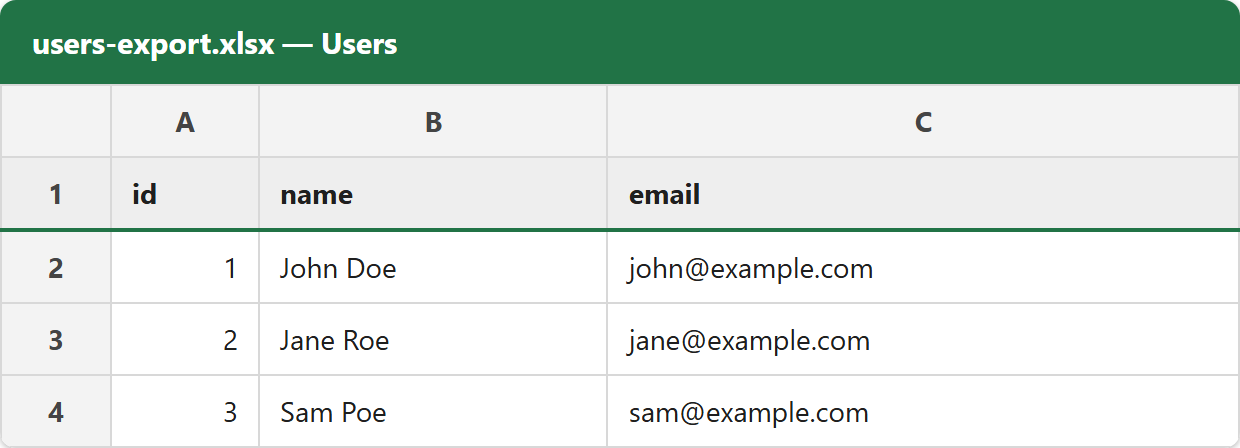
Opening users-export.xlsx shows the query’s result on a tab named Users, with a bold, shaded, frozen header row:
     A    B          C
1    id   name       email
2    1    John Doe   john@example.com
3    2    Jane Roe   jane@example.com
4    3    Sam Poe    sam@example.com
Export MySQL data to Excel and send it to the browser.
An export is usually something a user clicks a button for, not a file left on the server. The change is small — send the download headers, empty the output buffer, and hand save() the output stream instead of a path:
$filename = 'users-export.xlsx';

header('Content-Type: application/vnd.openxmlformats-officedocument.spreadsheetml.sheet');
header('Content-Disposition: attachment; filename="' . $filename . '"');
header('Cache-Control: max-age=0');

while (ob_get_level() > 0) {
    ob_end_clean();
}

$writer = new Xlsx($spreadsheet);

// 'php://output' is the response body, not a file on disk.
$writer->save('php://output');

exit;
The full explanation of those headers, and of why a stray byte of output corrupts the file, is in the download article linked below.
Exporting MySQL date and money data to Excel.
MySQL hands PHP a DATE as the string 2026-03-14, and writing a string into a cell gives you a cell containing text that merely looks like a date — Excel will not sort or filter it as one. Convert it and apply a format:
use \PhpOffice\PhpSpreadsheet\Shared\Date;
use \PhpOffice\PhpSpreadsheet\Style\NumberFormat;

$worksheet->setCellValue('D2', Date::PHPToExcel(new DateTime($record['joined'])));
$worksheet->getStyle('D2')
    ->getNumberFormat()
    ->setFormatCode(NumberFormat::FORMAT_DATE_YYYYMMDD);
A DECIMAL column arrives as a string too, for a good reason — it is exact and a float is not. Cast it with (float) only when you need Excel to do arithmetic on it, and give the cell a currency format rather than rounding the number yourself.