This article shows how to copy a worksheet out of one Excel file and into another with PhpSpreadsheet. Merging several workbooks into one is a job most people hit eventually. Monthly reports arrive as separate files, and somebody wants them as tabs in a single workbook.
The obvious guess is $target->addSheet($sheetFromTheOtherFile). That guess is wrong, and it is wrong in the worst way: it does not complain. No exception, no warning, nothing. The script runs to the end and only breaks when you save, with a TypeError thrown from deep inside the library about an argument that must be an int.
The call you want is addExternalSheet(). So the short answer, if you only want to copy a worksheet and get on with your day, is to use that instead. There is one more thing to know about it, which the name does not hint at, and we will get to it in Step 5.
Requirements to copy a worksheet:
- Composer
- PHP 8.2 or newer
- The
gdandzipextensions, which PhpSpreadsheet 5 requires
Step 1.
First, set up the dependencies. Here we pin the latest major release, the 5.x line, tested with 5.9 on PHP 8.5. Note that 5.9.0 raised its floor to PHP 8.2, while 5.8.1 and earlier still run on 8.1.
{
    "require": {
        "phpoffice/phpspreadsheet": "^5.0"
    }
}
Step 2.
Next, install phpspreadsheet.
$ composer install
Step 3.
Then build the two workbooks this example moves a sheet between. The first, quarters.xlsx, holds three quarterly tabs with a bold header row and a thousands separator on the numbers. Those styles matter later, because we want to prove they survive the trip.
<?php

require 'vendor/autoload.php';

use PhpOffice\PhpSpreadsheet\IOFactory;
use PhpOffice\PhpSpreadsheet\Spreadsheet;
use PhpOffice\PhpSpreadsheet\Writer\Xlsx;

// Build two workbooks to work with: quarters.xlsx and annual.xlsx.
$quarters = new Spreadsheet();
$first = true;
foreach (['Q1' => 1200, 'Q2' => 1450, 'Q3' => 1310] as $name => $revenue) {
    $sheet = $first ? $quarters->getActiveSheet() : $quarters->createSheet();
    $first = false;
    $sheet->setTitle($name);
    $sheet->fromArray([['Region', 'Revenue'], ['North', $revenue], ['South', $revenue - 300]], null, 'A1');
    $sheet->getStyle('A1:B1')->getFont()->setBold(true);
    $sheet->getStyle('B2:B3')->getNumberFormat()->setFormatCode('#,##0');
}
(new Xlsx($quarters))->save('quarters.xlsx');
$quarters->disconnectWorksheets();

$annual = new Spreadsheet();
$annual->getActiveSheet()->setTitle('Summary');
$annual->getActiveSheet()->setCellValue('A1', 'Annual summary');
(new Xlsx($annual))->save('annual.xlsx');
$annual->disconnectWorksheets();
Step 4.
Now the wrong way, because it is worth understanding before you meet it by accident.
// DO NOT DO THIS - it appears to work and then breaks on save.
$target->addSheet($donor->getSheetByName('Q2'));
A worksheet keeps a reference to the workbook that owns it. addSheet() simply pushes the object into the target’s list without touching that reference. So the sheet is now listed in two workbooks while still belonging to the first. Everything looks fine until the writer asks the target workbook for the sheet’s style index, gets nothing back, and dies:
Warning: Undefined array key 1 in .../Spreadsheet.php on line 1440
TypeError: PhpOffice\PhpSpreadsheet\Cell\Cell::setXfIndex():
  Argument #1 ($indexValue) must be of type int, null given
Notice where that lands. The error names a cell method and an integer argument, and mentions neither addSheet() nor worksheets nor workbooks. Also, saving the source still works, so only one of your two files is broken. Consequently this is a genuinely hard bug to trace back to its cause, which is why it is worth reading about rather than discovering.
Step 5.
Then do it properly. addExternalSheet() rebinds the sheet to its new owner, which is exactly the step addSheet() skips.
$target = IOFactory::load('annual.xlsx');
$donor  = IOFactory::load('quarters.xlsx');

$sheet = $donor->getSheetByName('Q2');

// Rename BEFORE adding if the target already uses that name.
if ($target->getSheetByName($sheet->getTitle()) !== null) {
    $sheet->setTitle($sheet->getTitle() . ' (copy)');
}

$target->addExternalSheet($sheet);
Here is the thing the name does not tell you. addExternalSheet() moves the sheet, it does not copy it. The donor workbook loses it. In this example the donor drops from three sheets to two, so saving the donor afterwards would write a file with Q2 missing.
That is usually harmless, because the donor is normally a file you loaded and never save again. The disk copy is untouched, which the last line of the script proves. But if your script writes both workbooks, load the source twice: give one copy away and keep the other.
Note also the rename. A workbook cannot hold two sheets with the same name, and the library says so clearly rather than silently renaming: Workbook already contains a worksheet named ‘Q2’. Rename the external sheet first. So set the title before you add, never after. If you want the sheet in a particular position rather than at the end, addExternalSheet($sheet, 0) takes an index too.
Step 6.
Finally, save and read both files back off disk. A workbook in memory is a claim, while the file is the fact.
(new Xlsx($target))->save('annual.xlsx');
$target->disconnectWorksheets();
$donor->disconnectWorksheets();

$check = IOFactory::load('annual.xlsx');
$copied = $check->getSheetByName('Q2');

echo "annual.xlsx now contains: " . implode(', ', $check->getSheetNames()) . "\n";
printf("  Q2!A1 = %s   (bold: %s)\n",
    $copied->getCell('A1')->getValue(),
    $copied->getStyle('A1')->getFont()->getBold() ? 'yes' : 'no');
printf("  Q2!B2 = %s   (format: %s)\n",
    $copied->getCell('B2')->getValue(),
    $copied->getStyle('B2')->getNumberFormat()->getFormatCode());

$sourceStillThere = IOFactory::load('quarters.xlsx');
printf("\nquarters.xlsx on disk is untouched: %s\n",
    implode(', ', $sourceStillThere->getSheetNames()));
Complete code to copy a worksheet.
<?php

require 'vendor/autoload.php';

use PhpOffice\PhpSpreadsheet\IOFactory;
use PhpOffice\PhpSpreadsheet\Spreadsheet;
use PhpOffice\PhpSpreadsheet\Writer\Xlsx;

// Build two workbooks to work with: quarters.xlsx and annual.xlsx.
$quarters = new Spreadsheet();
$first = true;
foreach (['Q1' => 1200, 'Q2' => 1450, 'Q3' => 1310] as $name => $revenue) {
    $sheet = $first ? $quarters->getActiveSheet() : $quarters->createSheet();
    $first = false;
    $sheet->setTitle($name);
    $sheet->fromArray([['Region', 'Revenue'], ['North', $revenue], ['South', $revenue - 300]], null, 'A1');
    $sheet->getStyle('A1:B1')->getFont()->setBold(true);
    $sheet->getStyle('B2:B3')->getNumberFormat()->setFormatCode('#,##0');
}
(new Xlsx($quarters))->save('quarters.xlsx');
$quarters->disconnectWorksheets();

$annual = new Spreadsheet();
$annual->getActiveSheet()->setTitle('Summary');
$annual->getActiveSheet()->setCellValue('A1', 'Annual summary');
(new Xlsx($annual))->save('annual.xlsx');
$annual->disconnectWorksheets();

echo "Built quarters.xlsx and annual.xlsx\n\n";

// Copy Q2 out of quarters.xlsx and into annual.xlsx.
$target = IOFactory::load('annual.xlsx');
$donor  = IOFactory::load('quarters.xlsx');

$sheet = $donor->getSheetByName('Q2');

// Rename BEFORE adding if the target already uses that name.
if ($target->getSheetByName($sheet->getTitle()) !== null) {
    $sheet->setTitle($sheet->getTitle() . ' (copy)');
}

$target->addExternalSheet($sheet);

printf("donor  after addExternalSheet: %d sheet(s) [%s]\n",
    $donor->getSheetCount(), implode(', ', $donor->getSheetNames()));
printf("target after addExternalSheet: %d sheet(s) [%s]\n\n",
    $target->getSheetCount(), implode(', ', $target->getSheetNames()));

(new Xlsx($target))->save('annual.xlsx');
$target->disconnectWorksheets();
$donor->disconnectWorksheets();

// Verify: read both files back off disk.
$check = IOFactory::load('annual.xlsx');
$copied = $check->getSheetByName('Q2');

echo "annual.xlsx now contains: " . implode(', ', $check->getSheetNames()) . "\n";
printf("  Q2!A1 = %s   (bold: %s)\n",
    $copied->getCell('A1')->getValue(),
    $copied->getStyle('A1')->getFont()->getBold() ? 'yes' : 'no');
printf("  Q2!B2 = %s   (format: %s)\n",
    $copied->getCell('B2')->getValue(),
    $copied->getStyle('B2')->getNumberFormat()->getFormatCode());

$sourceStillThere = IOFactory::load('quarters.xlsx');
printf("\nquarters.xlsx on disk is untouched: %s\n",
    implode(', ', $sourceStillThere->getSheetNames()));
Test the script to copy a worksheet.
Command line testing.
$ php copy-worksheet.php
Result when you copy a worksheet.
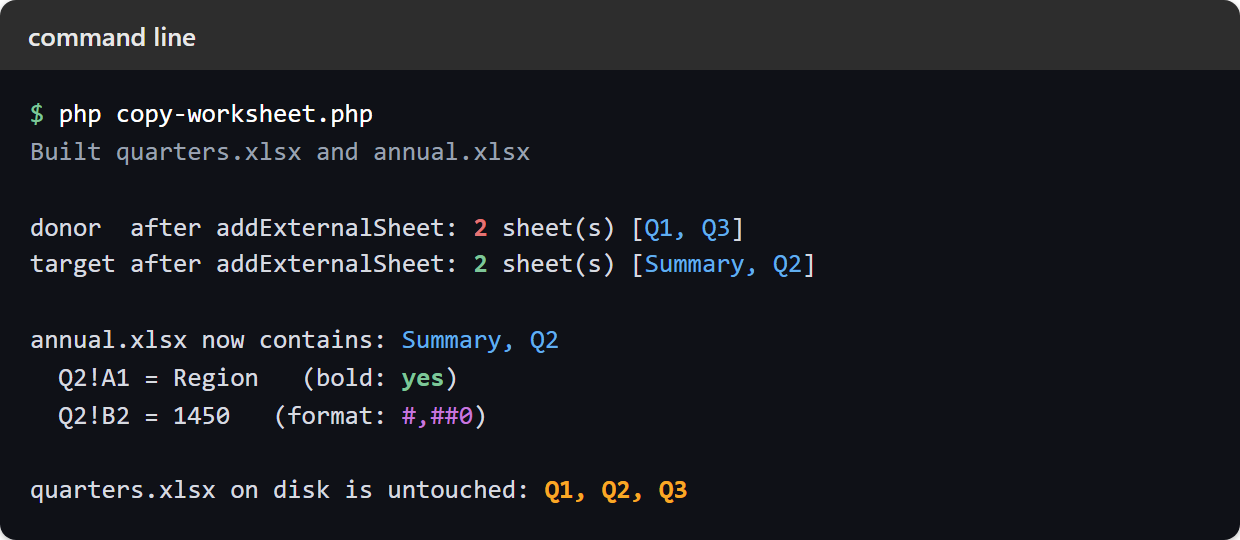
The donor drops to two sheets, the target gains Q2, and both the bold header and the #,##0 number format survive the save and the reload. Meanwhile the file on disk still has all three quarters, because we never saved the donor:
Built quarters.xlsx and annual.xlsx

donor  after addExternalSheet: 2 sheet(s) [Q1, Q3]
target after addExternalSheet: 2 sheet(s) [Summary, Q2]

annual.xlsx now contains: Summary, Q2
  Q2!A1 = Region   (bold: yes)
  Q2!B2 = 1450   (format: #,##0)

quarters.xlsx on disk is untouched: Q1, Q2, Q3
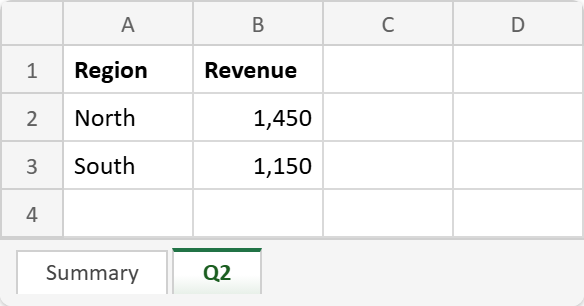
Open annual.xlsx and the tab strip tells the same story. The workbook opens on its own Summary sheet, and Q2 now sits beside it. Click that tab and the copied data is there, with the header still bold and the revenue still carrying its thousands separator:
Duplicating a sheet inside one workbook.
Copying within a single file is a different problem with a simpler answer, because there is no second workbook to rebind to. Clone the sheet, rename the clone, then add it with plain addSheet().
$clone = clone $spreadsheet->getSheetByName('Q1');
$clone->setTitle('Q1 copy');
$spreadsheet->addSheet($clone);
The two sheets are then fully independent, so editing the clone leaves the original alone. Note that this only works within one workbook. Cloning a sheet and passing it to addExternalSheet() fails with Sheet does not exist, because the library tries to look the clone up in the workbook it was cloned from and cannot find it there.
So there are really two jobs wearing one name. To copy a worksheet within a file, clone it. To copy a worksheet between files, hand the original to addExternalSheet() and let the donor go.