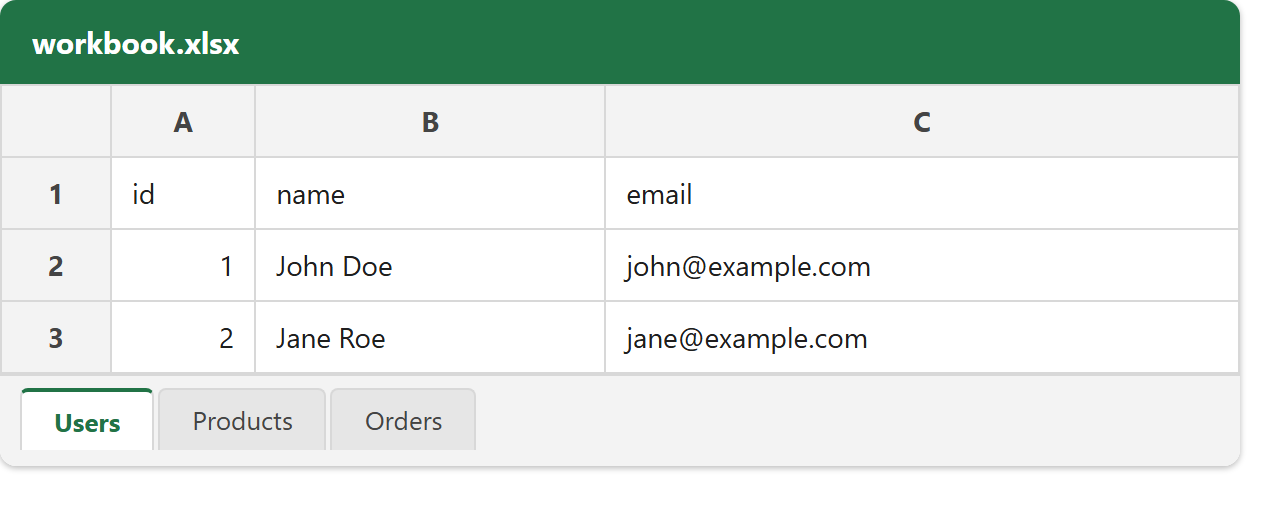
This article shows how to create an Excel file with multiple worksheets — the tabs along the bottom of the window — using the latest version of PhpSpreadsheet. A new spreadsheet starts with one sheet; here we rename it, add two more, give each its own data, and choose which one is selected when the file opens.
A few methods cover everything. getActiveSheet() hands back the sheet the workbook already has, and setTitle() names it — that name is the tab label. createSheet() appends a new, empty worksheet and returns it, so you can title and fill it the same way. Finally, setActiveSheetIndex() picks the sheet that is active (selected) when someone opens the file, while getSheetCount() and getSheetNames() report what the workbook now contains.
Splitting data across worksheets is how a single file holds related-but-separate tables — users on one tab, products on another, orders on a third — instead of cramming them onto one crowded sheet. The pattern scales to as many tabs as you need, so once you have three working, a dozen is the same code in a loop.
Requirements to work with multiple worksheets:
- Composer
- PHP 8.2 or newer
Step 1.
First, set up the dependencies. Here we pin the latest major release of PhpSpreadsheet (the 5.x line).
{
    "require": {
        "phpoffice/phpspreadsheet": "^5.0"
    }
}
Step 2.
Next, install phpspreadsheet.
$ composer install
Step 3.
Then create a new PHP file. Load Composer’s autoloader and import the Spreadsheet class and the Xlsx writer.
<?php

require 'vendor/autoload.php';

use \PhpOffice\PhpSpreadsheet\Spreadsheet;
use \PhpOffice\PhpSpreadsheet\Writer\Xlsx;
Step 4.
Create the workbook. It comes with one sheet already; grab it with getActiveSheet(), name it with setTitle() (the name becomes the tab label), and fill it with fromArray().
$spreadsheet = new Spreadsheet();

// The workbook already has one sheet — rename it and fill it.
$users = $spreadsheet->getActiveSheet();
$users->setTitle('Users');
$users->fromArray([
    ['id', 'name', 'email'],
    [1, 'John Doe', 'john@example.com'],
    [2, 'Jane Roe', 'jane@example.com'],
]);
Step 5.
Add a second worksheet with createSheet(). It appends a new empty sheet and returns it, so you can title and populate it exactly like the first.
// Add a second sheet with createSheet() and give it a name.
$products = $spreadsheet->createSheet();
$products->setTitle('Products');
$products->fromArray([
    ['sku', 'product', 'price'],
    ['A-100', 'Keyboard', 49.90],
    ['A-200', 'Mouse', 24.50],
]);
Step 6.
Add a third worksheet the same way. Every createSheet() call adds one more tab to the workbook.
// Add a third sheet the same way.
$orders = $spreadsheet->createSheet();
$orders->setTitle('Orders');
$orders->fromArray([
    ['order_id', 'sku', 'qty'],
    [5001, 'A-100', 2],
    [5002, 'A-200', 1],
]);
Step 7.
Finally, choose which sheet is selected when the file opens with setActiveSheetIndex() (0 is the first tab), then save the workbook. getSheetCount() and getSheetNames() confirm what it contains.
// Choose which sheet is active (selected) when the file opens.
$spreadsheet->setActiveSheetIndex(0);

$writer = new Xlsx($spreadsheet);
$writer->save('workbook.xlsx');

echo "Done. Wrote workbook.xlsx with "
    . $spreadsheet->getSheetCount() . " sheets: "
    . implode(', ', $spreadsheet->getSheetNames()) . "\n";
Complete code to work with multiple worksheets.
<?php

require 'vendor/autoload.php';

use \PhpOffice\PhpSpreadsheet\Spreadsheet;
use \PhpOffice\PhpSpreadsheet\Writer\Xlsx;

$spreadsheet = new Spreadsheet();

// The workbook already has one sheet — rename it and fill it.
$users = $spreadsheet->getActiveSheet();
$users->setTitle('Users');
$users->fromArray([
    ['id', 'name', 'email'],
    [1, 'John Doe', 'john@example.com'],
    [2, 'Jane Roe', 'jane@example.com'],
]);

// Add a second sheet with createSheet() and give it a name.
$products = $spreadsheet->createSheet();
$products->setTitle('Products');
$products->fromArray([
    ['sku', 'product', 'price'],
    ['A-100', 'Keyboard', 49.90],
    ['A-200', 'Mouse', 24.50],
]);

// Add a third sheet the same way.
$orders = $spreadsheet->createSheet();
$orders->setTitle('Orders');
$orders->fromArray([
    ['order_id', 'sku', 'qty'],
    [5001, 'A-100', 2],
    [5002, 'A-200', 1],
]);

// Choose which sheet is active (selected) when the file opens.
$spreadsheet->setActiveSheetIndex(0);

$writer = new Xlsx($spreadsheet);
$writer->save('workbook.xlsx');

echo "Done. Wrote workbook.xlsx with "
    . $spreadsheet->getSheetCount() . " sheets: "
    . implode(', ', $spreadsheet->getSheetNames()) . "\n";
Test working with multiple worksheets.
Command line testing.
$ php multiple-worksheets.php
Result: an Excel file with multiple worksheets.
Running the script to create multiple worksheets writes workbook.xlsx and reports the tabs it created. Opening the file shows three worksheets — Users, Products and Orders — along the bottom, with Users selected because it is at index 0.
$ php multiple-worksheets.php
Done. Wrote workbook.xlsx with 3 sheets: Users, Products, Orders