This article shows how to print gridlines in Excel files in PHP with the latest version of PhpSpreadsheet. Excel keeps two separate switches for gridlines, and confusing them is why a checklist that looks perfectly ruled on screen comes out of the printer as words floating in white space. The screen switch is not the paper switch.
One call does the work: $worksheet->setPrintGridlines(true). Its counterpart, setShowGridlines(), controls what you see in the window and is covered by hiding the gridlines. Because the two are independent, you can combine them freely — including the useful pairing of a clean workbook on screen that still prints ruled.
Below we set both, deliberately in opposite directions, and then look inside the saved .xlsx to see where each one landed. That last step matters, because the file itself settles the question the method names only hint at. Finally we deal with row and column headings, where PhpSpreadsheet has a real limitation worth knowing before you plan around it.
Requirements to print gridlines in Excel files:
- Composer
- PHP 8.2 or newer
Tested with PhpSpreadsheet 5.9 on PHP 8.5.
Step 1.
First, set up the dependencies. Here we pin the latest major release of PhpSpreadsheet (the 5.x line).
{
    "require": {
        "phpoffice/phpspreadsheet": "^5.0"
    }
}
Step 2.
Next, install phpspreadsheet.
$ composer install
Step 3.
Then create a new PHP file. Load Composer’s autoloader and import Spreadsheet, the Xlsx writer and IOFactory.
<?php

require 'vendor/autoload.php';

use PhpOffice\PhpSpreadsheet\IOFactory;
use PhpOffice\PhpSpreadsheet\Spreadsheet;
use PhpOffice\PhpSpreadsheet\Writer\Xlsx;
Step 4.
Build a small checklist. This is the kind of sheet that genuinely needs printed gridlines, because the empty Done column is only useful if there is a box to tick.
$spreadsheet = new Spreadsheet();
$worksheet = $spreadsheet->getActiveSheet();
$worksheet->setTitle('Checklist');

$worksheet->fromArray([
    ['Task', 'Owner', 'Done'],
    ['Book venue', 'Alice', ''],
    ['Send invites', 'Bob', ''],
    ['Order catering', 'Carol', ''],
], null, 'A1');
Step 5.
Now set the two gridline switches in opposite directions. As a result the workbook looks clean on screen, and still prints with every cell ruled.
// The print setting: gridlines appear on paper.
$worksheet->setPrintGridlines(true);

// The screen setting, deliberately the opposite.
$worksheet->setShowGridlines(false);

// This one is ALSO a screen setting, despite what you might expect.
$worksheet->setShowRowColHeaders(true);
Note the third line. Its name suggests paper, and it is easy to reach for when you want the A/B/C letters printed down the margin. However, it controls the headings in the Excel window instead. The next section explains what that means for printing them.
Step 6.
Save the file, then read the three settings back to confirm they persisted.
(new Xlsx($spreadsheet))->save('checklist.xlsx');
echo "Wrote checklist.xlsx\n\n";

$reloaded = IOFactory::load('checklist.xlsx');
$sheet = $reloaded->getActiveSheet();

printf("getPrintGridlines()    : %s\n", var_export($sheet->getPrintGridlines(), true));
printf("getShowGridlines()     : %s\n", var_export($sheet->getShowGridlines(), true));
printf("getShowRowColHeaders() : %s\n", var_export($sheet->getShowRowColHeaders(), true));
Step 7.
Finally, open the saved workbook as the ZIP archive it is and print the two XML elements that matter. This is the step that proves the split rather than asserting it.
$zip = new ZipArchive();
$zip->open('checklist.xlsx');
$xml = $zip->getFromName('xl/worksheets/sheet1.xml');
$zip->close();

echo "\nIn xl/worksheets/sheet1.xml:\n";
foreach (['sheetView', 'printOptions'] as $element) {
    if (preg_match('/<' . $element . '\s[^>]*>/', $xml, $m)) {
        echo '  ' . $m[0] . "\n";
    }
}
Complete code to print gridlines in Excel files.
<?php

require 'vendor/autoload.php';

use PhpOffice\PhpSpreadsheet\IOFactory;
use PhpOffice\PhpSpreadsheet\Spreadsheet;
use PhpOffice\PhpSpreadsheet\Writer\Xlsx;

$spreadsheet = new Spreadsheet();
$worksheet = $spreadsheet->getActiveSheet();
$worksheet->setTitle('Checklist');

$worksheet->fromArray([
    ['Task', 'Owner', 'Done'],
    ['Book venue', 'Alice', ''],
    ['Send invites', 'Bob', ''],
    ['Order catering', 'Carol', ''],
], null, 'A1');

// The print setting: gridlines appear on paper.
$worksheet->setPrintGridlines(true);

// The screen setting, deliberately the opposite - a clean workbook on screen
// that still prints ruled. These two are independent.
$worksheet->setShowGridlines(false);

// This one is ALSO a screen setting, despite what you might expect.
$worksheet->setShowRowColHeaders(true);

(new Xlsx($spreadsheet))->save('checklist.xlsx');
echo "Wrote checklist.xlsx\n\n";

// Read the settings back.
$reloaded = IOFactory::load('checklist.xlsx');
$sheet = $reloaded->getActiveSheet();

printf("getPrintGridlines()    : %s\n", var_export($sheet->getPrintGridlines(), true));
printf("getShowGridlines()     : %s\n", var_export($sheet->getShowGridlines(), true));
printf("getShowRowColHeaders() : %s\n", var_export($sheet->getShowRowColHeaders(), true));

// Now look at the XML the writer actually produced, which is where the
// screen/print split becomes visible.
$zip = new ZipArchive();
$zip->open('checklist.xlsx');
$xml = $zip->getFromName('xl/worksheets/sheet1.xml');
$zip->close();

echo "\nIn xl/worksheets/sheet1.xml:\n";
foreach (['sheetView', 'printOptions'] as $element) {
    if (preg_match('/<' . $element . '\s[^>]*>/', $xml, $m)) {
        echo '  ' . $m[0] . "\n";
    }
}
Test how to print gridlines in Excel files.
Command line testing.
$ php print-gridlines.php
Result of the setting to print gridlines in Excel files.
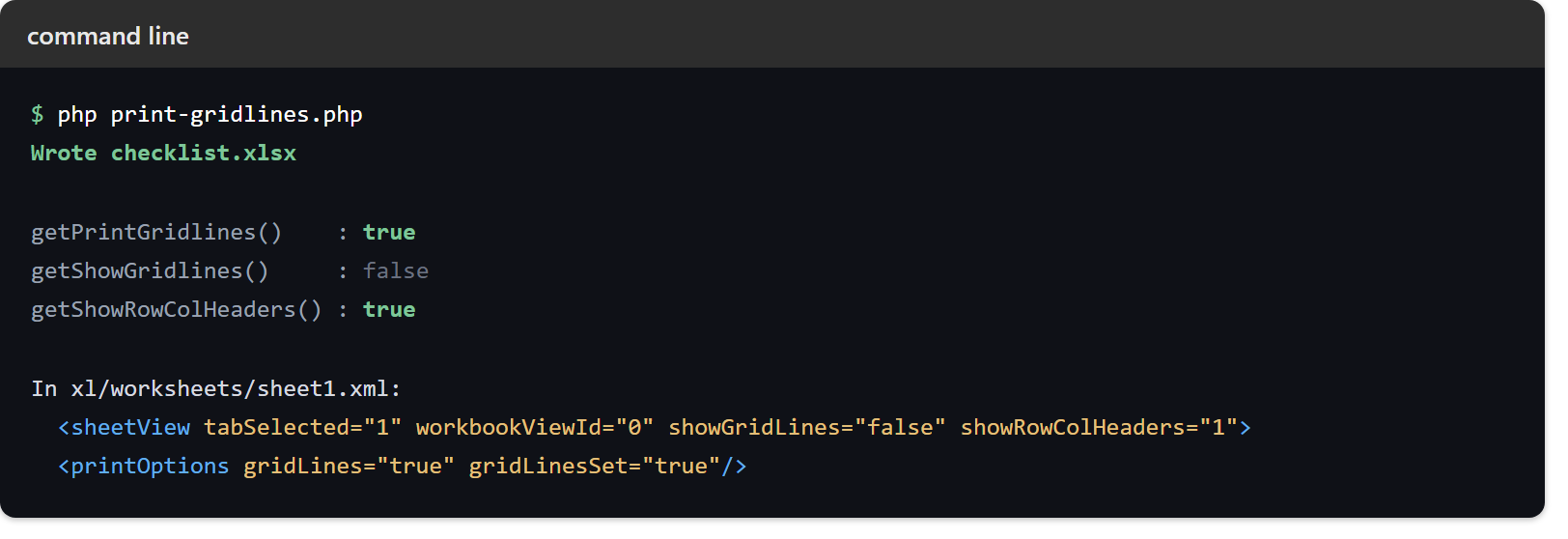
All three settings survive the save, and the XML shows precisely where each one went. The screen settings are attributes of sheetView, while the print setting is an attribute of printOptions — two different elements, which is why they never interfere with each other:
Wrote checklist.xlsx

getPrintGridlines()    : true
getShowGridlines()     : false
getShowRowColHeaders() : true

In xl/worksheets/sheet1.xml:
  <sheetView tabSelected="1" workbookViewId="0" showGridLines="false" showRowColHeaders="1">
  <printOptions gridLines="true" gridLinesSet="true"/>
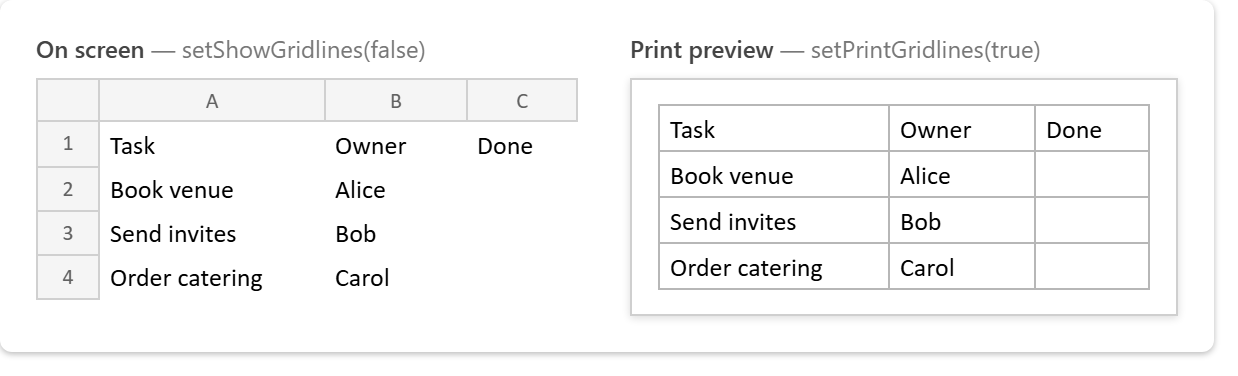
Open the workbook and the effect is exactly what the XML promised. On screen the sheet is bare, with no ruling between the cells. In print preview the same sheet is fully ruled, so every empty Done box has a border to tick:
Why row and column headings will not print.
Here is the limitation to plan around. In the file format, printed headings are a separate attribute called headings on that same printOptions element — and PhpSpreadsheet 5.9 never writes it. The printOptions line above carries gridLines and gridLinesSet, and nothing else.
So setShowRowColHeaders() is not the method you want, because it is the screen toggle and lands in sheetView. There is currently no method that is the one you want.
Worse, setting it in Excel by hand does not survive either. If you tick Page Layout → Sheet Options → Headings → Print, save, and then let any PhpSpreadsheet script load and re-save that file, the writer rebuilds printOptions from its own model and the attribute simply disappears:
$ php headings-roundtrip.php
Injected headings="true" by hand.
  before round trip : <printOptions gridLines="true" gridLinesSet="true" headings="true"/>
  after  round trip : <printOptions gridLines="true" gridLinesSet="true"/>
Therefore, if printed headings genuinely matter, the practical answer is to stop relying on them. Instead put your own header row in the sheet and freeze it, which prints reliably and reads better anyway — see freezing the header row. Otherwise, make Excel the last tool to touch the file, and let no script re-save it afterwards.