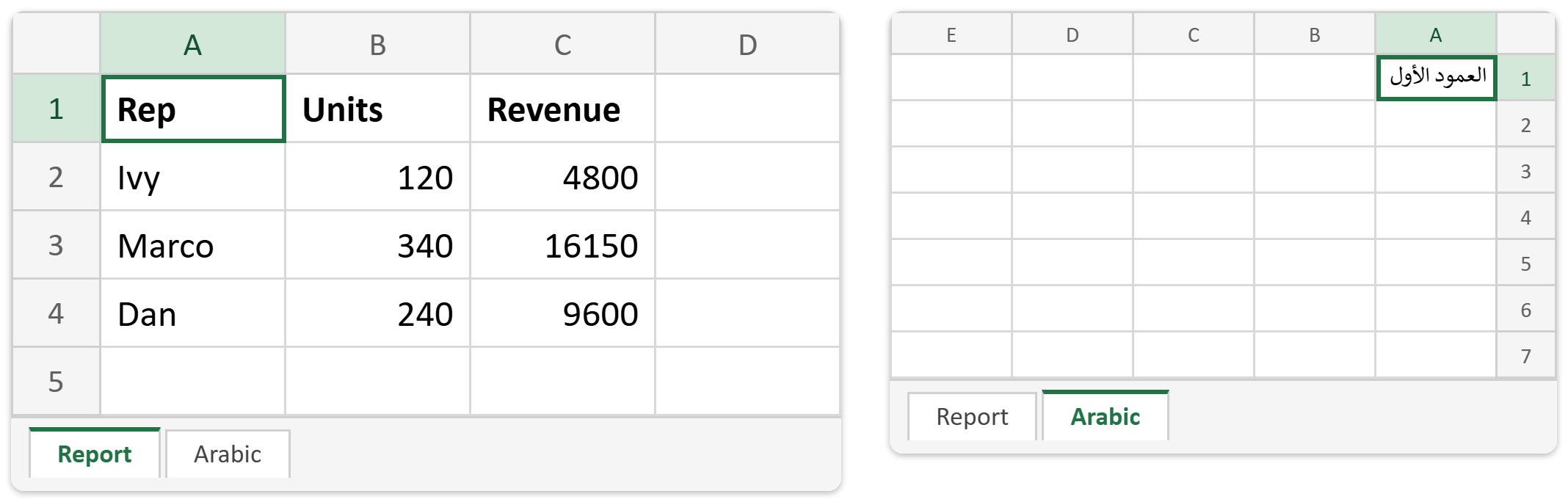
This article shows how to set sheet view options in PHP with the latest version of PhpSpreadsheet. These settings decide what the reader sees in the first second after double-clicking your file. In other words, they control the zoom level and the cell the cursor lands on. They also set whether the columns run left to right or right to left. None of them changes a single value in the workbook. However, together they separate two very different files. One opens ready to read; the other opens at 70% zoom, halfway down column R.
Two live on a SheetView object you reach with getSheetView(), and one sits directly on the worksheet. This article covers all three together, because none of them carries a post by itself. In the same way, the site’s gridlines post covers a single toggle.
There is also a trap here, and it is easy to hit but hard to spot afterwards. For that reason we prove it rather than assert it. Setting the selected cell works exactly as you would expect — until you style something. getStyle() moves the selection to whatever range you just styled, because internally it marks that range as active. Consequently the tidy A1 you set at the top of your script disappears by the time you save. The file then opens on the header row you formatted last.
Requirements to set sheet view options in PHP:
- Composer
- PHP 8.2 or newer
Step 1.
First, set up the dependencies. Here we pin the latest major release of PhpSpreadsheet (the 5.x line, tested with 5.9).
{
    "require": {
        "phpoffice/phpspreadsheet": "^5.0"
    }
}
Step 2.
Next, install phpspreadsheet.
$ composer install
Step 3.
Then create a new PHP file with the usual imports. Also lay down a little data, so the view settings have something to show.
<?php

require 'vendor/autoload.php';

use PhpOffice\PhpSpreadsheet\IOFactory;
use PhpOffice\PhpSpreadsheet\Spreadsheet;
use PhpOffice\PhpSpreadsheet\Writer\Xlsx;

$spreadsheet = new Spreadsheet();
$worksheet = $spreadsheet->getActiveSheet();
$worksheet->setTitle('Report');
$worksheet->fromArray([
    ['Rep', 'Units', 'Revenue'],
    ['Ivy', 120, 4800],
    ['Marco', 340, 16150],
    ['Dan', 240, 9600],
], null, 'A1');
Step 4.
Next, set the zoom. 100 is Excel’s default and the interface offers 10 to 400. So 130 makes a comfortable nudge for a dense table. Note that PhpSpreadsheet is looser than Excel here. In fact it accepts anything from 1 upward and throws only below that. As a result, a bad calculation can produce a technically valid file that opens uselessly small.
// 1. Zoom. 100 is Excel's default; the UI allows 10 to 400.
$worksheet->getSheetView()->setZoomScale(130);
Step 5.
Then set the selected cell — and watch it move. The first echo shows A1, exactly as asked. However, the very next line styles the header row. The second echo then shows the selection has followed the style to A1:C1. Nothing warns you. Therefore the fix is simply ordering: set the selected cell last, once you have finished all the styling.
// 2. Where the file opens. Without this it opens wherever you last saved it.
$worksheet->setSelectedCell('A1');
echo "Selected after setSelectedCell('A1'): " . $worksheet->getSelectedCells() . "\n";

// ...but styling anything moves the selection there.
$worksheet->getStyle('A1:C1')->getFont()->setBold(true);
echo "Selected after getStyle('A1:C1'):     " . $worksheet->getSelectedCells() . "\n";

// So set it last.
$worksheet->setSelectedCell('A1');
echo "Selected after setting it again:      " . $worksheet->getSelectedCells() . "\n";
Step 6.
Next, the right-to-left setting, on a second sheet so you can compare the two. setRightToLeft(true) flips the whole grid. Column A moves to the right edge, the columns march leftward, and the scroll bar and freeze panes follow. Also note this is a view setting, not a text setting. It does not change cell contents or alignment. Moreover it applies per worksheet rather than per workbook, so a bilingual file can have one sheet each way.
// 3. Right-to-left, on a second sheet.
$rtl = $spreadsheet->createSheet();
$rtl->setTitle('Arabic');
$rtl->setRightToLeft(true);
$rtl->setCellValue('A1', 'العمود الأول');
$rtl->getSheetView()->setZoomScale(85);
$rtl->setSelectedCell('A1');
Step 7.
Finally, choose which sheet opens first, save, and read everything back. setActiveSheetIndexByName() is the workbook-level companion to setSelectedCell(): one picks the tab, the other picks the cell within it.
$spreadsheet->setActiveSheetIndexByName('Report');
(new Xlsx($spreadsheet))->save('view.xlsx');
echo "\nWrote view.xlsx\n\n";

$reloaded = IOFactory::load('view.xlsx');
printf("%-8s %-6s %-9s %s\n", 'Sheet', 'Zoom', 'Selected', 'Right to left');
foreach ($reloaded->getAllSheets() as $sheet) {
    printf("%-8s %-6s %-9s %s\n",
        $sheet->getTitle(),
        $sheet->getSheetView()->getZoomScale(),
        $sheet->getSelectedCells(),
        $sheet->getRightToLeft() ? 'yes' : 'no'
    );
}
Complete code to set sheet view options in PHP.
<?php

require 'vendor/autoload.php';

use PhpOffice\PhpSpreadsheet\IOFactory;
use PhpOffice\PhpSpreadsheet\Spreadsheet;
use PhpOffice\PhpSpreadsheet\Writer\Xlsx;

$spreadsheet = new Spreadsheet();
$worksheet = $spreadsheet->getActiveSheet();
$worksheet->setTitle('Report');
$worksheet->fromArray([
    ['Rep', 'Units', 'Revenue'],
    ['Ivy', 120, 4800],
    ['Marco', 340, 16150],
    ['Dan', 240, 9600],
], null, 'A1');

// 1. Zoom. 100 is Excel's default; the UI allows 10 to 400.
$worksheet->getSheetView()->setZoomScale(130);

// 2. Where the file opens. Without this it opens wherever you last saved it.
$worksheet->setSelectedCell('A1');
echo "Selected after setSelectedCell('A1'): " . $worksheet->getSelectedCells() . "\n";

// ...but styling anything moves the selection there.
$worksheet->getStyle('A1:C1')->getFont()->setBold(true);
echo "Selected after getStyle('A1:C1'):     " . $worksheet->getSelectedCells() . "\n";

// So set it last.
$worksheet->setSelectedCell('A1');
echo "Selected after setting it again:      " . $worksheet->getSelectedCells() . "\n";

// 3. Right-to-left, on a second sheet.
$rtl = $spreadsheet->createSheet();
$rtl->setTitle('Arabic');
$rtl->setRightToLeft(true);
$rtl->setCellValue('A1', 'العمود الأول');
$rtl->getSheetView()->setZoomScale(85);
$rtl->setSelectedCell('A1');

$spreadsheet->setActiveSheetIndexByName('Report');
(new Xlsx($spreadsheet))->save('view.xlsx');
echo "\nWrote view.xlsx\n\n";

$reloaded = IOFactory::load('view.xlsx');
printf("%-8s %-6s %-9s %s\n", 'Sheet', 'Zoom', 'Selected', 'Right to left');
foreach ($reloaded->getAllSheets() as $sheet) {
    printf("%-8s %-6s %-9s %s\n",
        $sheet->getTitle(),
        $sheet->getSheetView()->getZoomScale(),
        $sheet->getSelectedCells(),
        $sheet->getRightToLeft() ? 'yes' : 'no'
    );
}
Test setting sheet view options in PHP.
Command line testing.
$ php sheet-view.php
Result of setting sheet view options in PHP.
First, the three lines at the top tell the whole story of the trap. The selection reads A1, then A1:C1 after a styling call that had nothing to do with it. Finally it reads A1 again, because the script sets it last. Then the table confirms every setting survived the save. Report sits at 130% left to right, Arabic at 85% right to left, and both open on A1:
Selected after setSelectedCell('A1'): A1
Selected after getStyle('A1:C1'):     A1:C1
Selected after setting it again:      A1

Wrote view.xlsx

Sheet    Zoom   Selected  Right to left
Report   130    A1        no
Arabic   85     A1        yes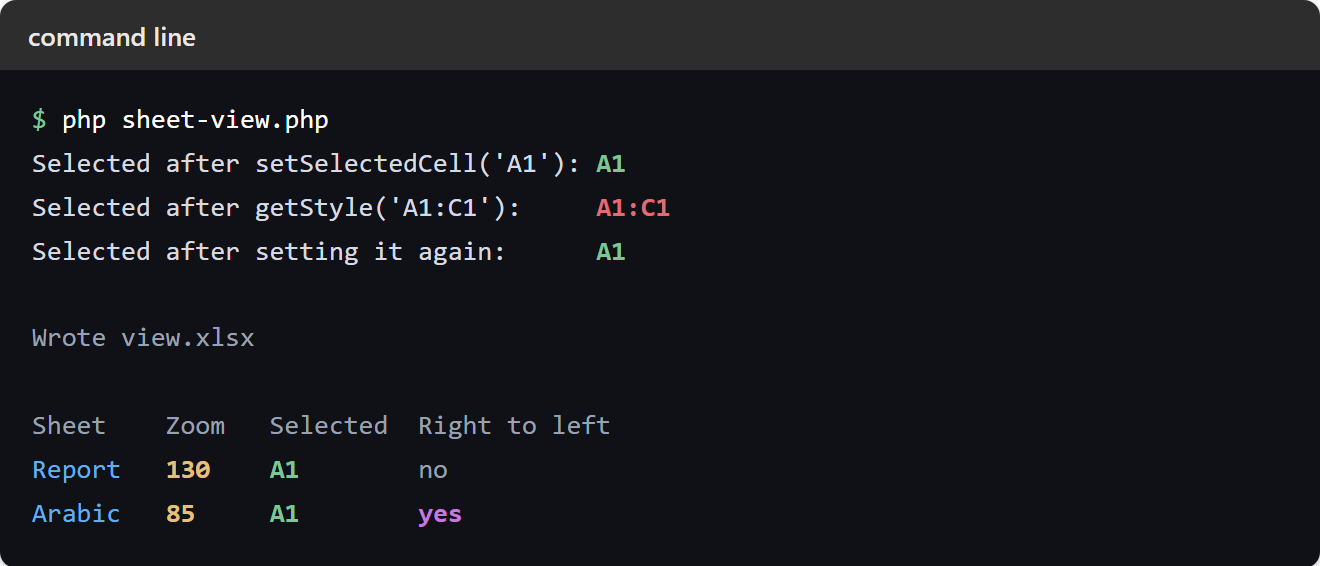
So open view.xlsx and the Report tab greets you slightly enlarged, with the cursor on A1. Meanwhile the Arabic tab runs the other way, with column A hard against the right edge. Finally, keep the ordering rule in mind well beyond this article. Anything that calls getStyle() will move the selection, including the helpers in other posts on this site. Therefore make setSelectedCell() the last thing you do before you save.