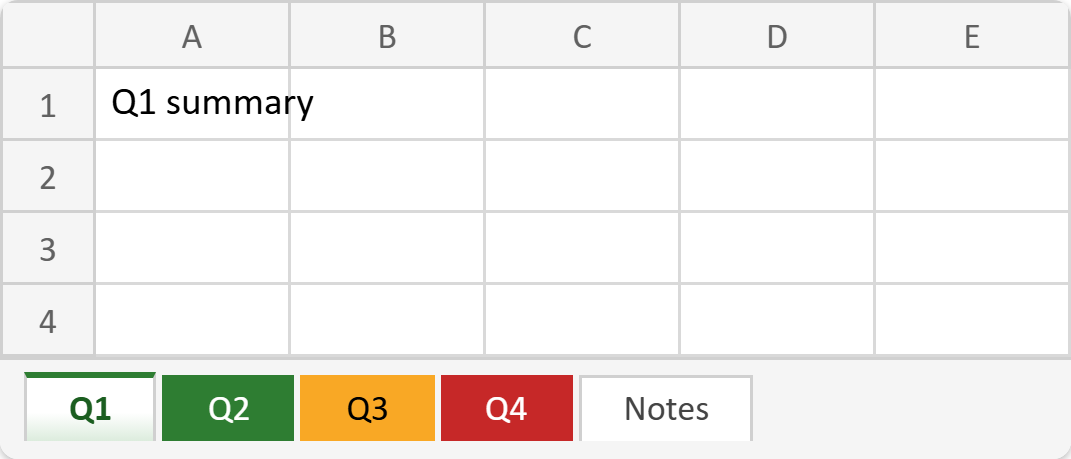
This article shows how to set the worksheet tab color in PHP with the latest version of PhpSpreadsheet. Once a workbook holds more than three or four sheets, the tab strip along the bottom becomes the navigation. Coloring them is the cheapest way to make it readable. For example, green for the quarters that hit target, amber for a near miss, red for a failure. It is one call per sheet: getTabColor()->setRGB().
The call is simple, so this article spends its time on the two things around it that are not. First, the color object takes plain RGB here. However, it reads back as ARGB, with an alpha channel bolted on the front. So a naive string comparison against the value you set will fail. Second, and more surprising, getTabColor() is not a passive getter. Calling it on a sheet that has no tab color gives that sheet one. In fact the method creates the color object on demand. Therefore a loop that only meant to report the colors can quietly color every tab in the workbook.
Below we build a workbook of five sheets and color four of them. Then we prove both behaviours by reading the saved file back.
Requirements to set the tab color in PHP:
- Composer
- PHP 8.2 or newer
Step 1.
First, set up the dependencies. Here we pin the latest major release of PhpSpreadsheet (the 5.x line, tested with 5.9).
{
    "require": {
        "phpoffice/phpspreadsheet": "^5.0"
    }
}
Step 2.
Next, install phpspreadsheet.
$ composer install
Step 3.
Then create a new PHP file and load the autoloader. Tab colors need nothing extra. The color lives on the worksheet itself rather than in the Style namespace.
<?php

require 'vendor/autoload.php';

use PhpOffice\PhpSpreadsheet\IOFactory;
use PhpOffice\PhpSpreadsheet\Spreadsheet;
use PhpOffice\PhpSpreadsheet\Writer\Xlsx;
Step 4.
Next, create the sheets and color them as you go. Note the shape of the loop. A new Spreadsheet already contains one sheet. So the first pass takes that one with getActiveSheet(), and every later pass calls createSheet(). Skip that and you ship a workbook with an empty Worksheet tab in front of your data.
$spreadsheet = new Spreadsheet();

// One sheet per quarter, each with a colour that says how it went.
$quarters = [
    'Q1' => '2E7D32',   // green  - target met
    'Q2' => '2E7D32',   // green  - target met
    'Q3' => 'F9A825',   // amber  - close
    'Q4' => 'C62828',   // red    - missed
];

$first = true;
foreach ($quarters as $name => $rgb) {
    $worksheet = $first ? $spreadsheet->getActiveSheet() : $spreadsheet->createSheet();
    $first = false;

    $worksheet->setTitle($name);
    $worksheet->getTabColor()->setRGB($rgb);
    $worksheet->setCellValue('A1', "$name summary");
}
Step 5.
Then add one sheet with no color at all, so the comparison later is real rather than assumed. Also set the active sheet explicitly. This matters more than it sounds. Excel draws the selected tab as a pale wash of its color, not the solid block you get elsewhere. So if your one colored tab is also the one that opens, it can look as though nothing happened.
// A fifth sheet deliberately left with no colour.
$notes = $spreadsheet->createSheet();
$notes->setTitle('Notes');
$notes->setCellValue('A1', 'No tab colour on this one.');

$spreadsheet->setActiveSheetIndexByName('Q1');
(new Xlsx($spreadsheet))->save('year.xlsx');
echo "Wrote year.xlsx\n\n";
Step 6.
Next, read the colors back from the saved file. Here isTabColorSet() does the real work. It is the only safe way to ask whether a sheet has a color. So we test it before touching getTabColor(). Consequently the Notes sheet still reports honestly. Also notice the two getters. getRGB() returns the six digits you set, while getARGB() returns the same value with an FF alpha prefix.
// Read the colours back out of the saved file.
$reloaded = IOFactory::load('year.xlsx');

printf("%-7s %-9s %s\n", 'Sheet', 'Set?', 'RGB / ARGB');
foreach ($reloaded->getAllSheets() as $sheet) {
    if ($sheet->isTabColorSet()) {
        printf("%-7s %-9s %s / %s\n", $sheet->getTitle(), 'yes',
            $sheet->getTabColor()->getRGB(), $sheet->getTabColor()->getARGB());
    } else {
        printf("%-7s %-9s %s\n", $sheet->getTitle(), 'no', '-');
    }
}
Step 7.
Finally, remove a color and then demonstrate the trap. resetTabColor() clears one properly. However, the very next block asks Notes for a tab color it does not have. That single read is enough to give it one. No assignment, no setter, just the getter. So when you want to know whether a sheet carries a tab color, always ask isTabColorSet() first.
// resetTabColor() removes it again; the getter alone would re-create it.
$reloaded->getSheetByName('Q4')->resetTabColor();
printf("\nAfter resetTabColor() on Q4: %s\n",
    $reloaded->getSheetByName('Q4')->isTabColorSet() ? 'still set' : 'cleared');

// Careful: merely ASKING for the colour counts as setting it.
$reloaded->getSheetByName('Notes')->getTabColor();
printf("After calling getTabColor() on Notes: %s\n",
    $reloaded->getSheetByName('Notes')->isTabColorSet() ? 'now set' : 'still unset');
Complete code to set the tab color in PHP.
<?php

require 'vendor/autoload.php';

use PhpOffice\PhpSpreadsheet\IOFactory;
use PhpOffice\PhpSpreadsheet\Spreadsheet;
use PhpOffice\PhpSpreadsheet\Writer\Xlsx;

$spreadsheet = new Spreadsheet();

// One sheet per quarter, each with a colour that says how it went.
$quarters = [
    'Q1' => '2E7D32',   // green  - target met
    'Q2' => '2E7D32',   // green  - target met
    'Q3' => 'F9A825',   // amber  - close
    'Q4' => 'C62828',   // red    - missed
];

$first = true;
foreach ($quarters as $name => $rgb) {
    $worksheet = $first ? $spreadsheet->getActiveSheet() : $spreadsheet->createSheet();
    $first = false;

    $worksheet->setTitle($name);
    $worksheet->getTabColor()->setRGB($rgb);
    $worksheet->setCellValue('A1', "$name summary");
}

// A fifth sheet deliberately left with no colour.
$notes = $spreadsheet->createSheet();
$notes->setTitle('Notes');
$notes->setCellValue('A1', 'No tab colour on this one.');

$spreadsheet->setActiveSheetIndexByName('Q1');
(new Xlsx($spreadsheet))->save('year.xlsx');
echo "Wrote year.xlsx\n\n";

// Read the colours back out of the saved file.
$reloaded = IOFactory::load('year.xlsx');

printf("%-7s %-9s %s\n", 'Sheet', 'Set?', 'RGB / ARGB');
foreach ($reloaded->getAllSheets() as $sheet) {
    if ($sheet->isTabColorSet()) {
        printf("%-7s %-9s %s / %s\n", $sheet->getTitle(), 'yes',
            $sheet->getTabColor()->getRGB(), $sheet->getTabColor()->getARGB());
    } else {
        printf("%-7s %-9s %s\n", $sheet->getTitle(), 'no', '-');
    }
}

// resetTabColor() removes it again; the getter alone would re-create it.
$reloaded->getSheetByName('Q4')->resetTabColor();
printf("\nAfter resetTabColor() on Q4: %s\n",
    $reloaded->getSheetByName('Q4')->isTabColorSet() ? 'still set' : 'cleared');

// Careful: merely ASKING for the colour counts as setting it.
$reloaded->getSheetByName('Notes')->getTabColor();
printf("After calling getTabColor() on Notes: %s\n",
    $reloaded->getSheetByName('Notes')->isTabColorSet() ? 'now set' : 'still unset');
Test setting the tab color in PHP.
Command line testing.
$ php tab-color.php
Result of setting the tab color in PHP.
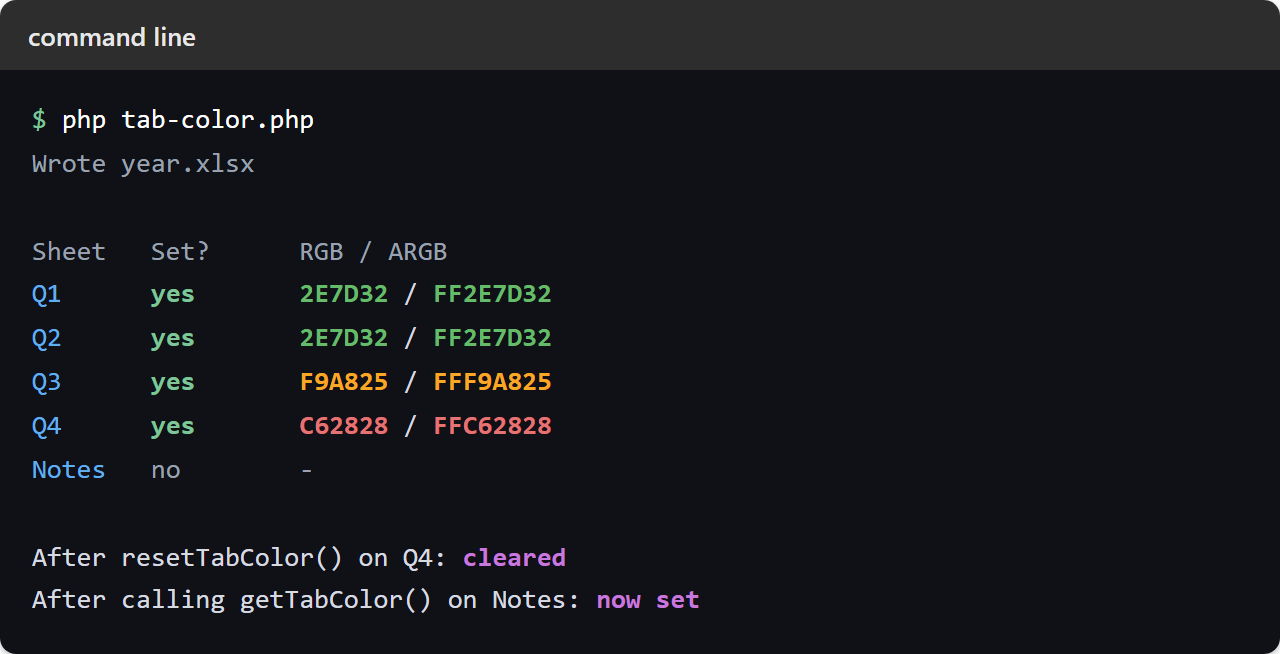
First, all four quarters survive the round trip with the exact hex you gave them. Also, Notes correctly reports no color. Next, see the two getters side by side. 2E7D32 becomes FF2E7D32. That is why you compare with getRGB() and not with the ARGB form. Then resetTabColor() clears Q4 cleanly. Finally the last line is the one to remember. A single read of getTabColor() turned an uncolored sheet into a colored one:
Wrote year.xlsx

Sheet   Set?      RGB / ARGB
Q1      yes       2E7D32 / FF2E7D32
Q2      yes       2E7D32 / FF2E7D32
Q3      yes       F9A825 / FFF9A825
Q4      yes       C62828 / FFC62828
Notes   no        -

After resetTabColor() on Q4: cleared
After calling getTabColor() on Notes: now set
So open year.xlsx and the tab strip reads at a glance. Two green quarters, one amber, one red, and a plain Notes tab at the end. Consequently it is worth the one line per sheet. Set the tab color in PHP whenever a workbook already carries several sheets. It also pairs naturally with working with multiple worksheets.