This article shows how to convert Excel to CSV with the latest version of PhpSpreadsheet using plain PHP. Reading the workbook is the easy half — the interesting half is describing the CSV you want out, because a CSV has no format of its own and every choice you skip becomes a guess someone else’s software has to make.
One class does the writing. Writer\Csv takes the spreadsheet you loaded, and its setDelimiter(), setEnclosure() and setLineEnding() methods fix the shape of the output before it writes a single byte. Two more matter more than they look: setUseBOM() writes the byte-order mark that stops Excel misreading UTF-8, while setSheetIndex() picks the one sheet to write — because a CSV holds exactly one, and a workbook usually holds more.
In fact, this is the exact reverse of converting a CSV file to Excel, and the options line up one for one with the reader’s. So going this direction is what you reach for when a system downstream wants flat text — an importer, a bank upload, a data feed — and will not accept a workbook.
Requirements to convert Excel to CSV:
- Composer
- PHP 8.2 or newer
Step 1.
First, set up the dependencies. Here we pin the latest major release of PhpSpreadsheet (the 5.x line).
{
    "require": {
        "phpoffice/phpspreadsheet": "^5.0"
    }
}
Step 2.
Next, install phpspreadsheet.
$ composer install
Step 3.
Then create a new PHP file. Load Composer’s autoloader and import IOFactory to open the workbook and the Csv writer to save it.
<?php

require 'vendor/autoload.php';

use \PhpOffice\PhpSpreadsheet\IOFactory;
use \PhpOffice\PhpSpreadsheet\Writer\Csv;
Step 4.
Read the workbook. createReaderForFile() picks the right reader from the file itself, and setReadDataOnly(true) tells it to skip every font, colour and border — a CSV cannot carry any of that, so loading it only wastes time.
// Read the workbook. Only the values matter for a CSV.
$reader = IOFactory::createReaderForFile('products.xlsx');
$reader->setReadDataOnly(true);
$spreadsheet = $reader->load('products.xlsx');
Step 5.
Create the writer and describe the file’s layout. setDelimiter() is the character between fields, setEnclosure() is the quote that wraps any field containing one, and setLineEnding() sets how rows end — for example, "\r\n" is what Windows tools and most importers expect.
// Describe the CSV to write.
$writer = new Csv($spreadsheet);
$writer->setDelimiter(',');
$writer->setEnclosure('"');
$writer->setLineEnding("\r\n");
Step 6.
Now the two settings that cause the most trouble when you leave them out. setUseBOM(true) writes three bytes at the front of the file that mark it as UTF-8; without them, Excel opens the file in its own legacy encoding and turns Café into Café. And because a CSV is a single table, setSheetIndex() decides which sheet to write — leave it at 0 for the first, and note that the writer simply drops every other sheet in the workbook.
// Without the BOM, Excel reads UTF-8 as its own legacy encoding.
$writer->setUseBOM(true);

// A CSV holds one sheet. Pick which one by index.
$writer->setSheetIndex(0);
Step 7.
Finally, save it. save() walks the sheet you picked and writes the text file.
$writer->save('products.csv');

$rows = $spreadsheet->getActiveSheet()->getHighestRow();
echo "Done. Converted products.xlsx ($rows rows) to products.csv\n";
Complete code to convert Excel to CSV.
<?php

require 'vendor/autoload.php';

use \PhpOffice\PhpSpreadsheet\IOFactory;
use \PhpOffice\PhpSpreadsheet\Writer\Csv;

// Read the workbook. Only the values matter for a CSV.
$reader = IOFactory::createReaderForFile('products.xlsx');
$reader->setReadDataOnly(true);
$spreadsheet = $reader->load('products.xlsx');

// Describe the CSV to write.
$writer = new Csv($spreadsheet);
$writer->setDelimiter(',');
$writer->setEnclosure('"');
$writer->setLineEnding("\r\n");

// Without the BOM, Excel reads UTF-8 as its own legacy encoding.
$writer->setUseBOM(true);

// A CSV holds one sheet. Pick which one by index.
$writer->setSheetIndex(0);

$writer->save('products.csv');

$rows = $spreadsheet->getActiveSheet()->getHighestRow();
echo "Done. Converted products.xlsx ($rows rows) to products.csv\n";
Test converting Excel to CSV.
Command line testing.
$ php excel-to-csv.php
Result of converting Excel to CSV.
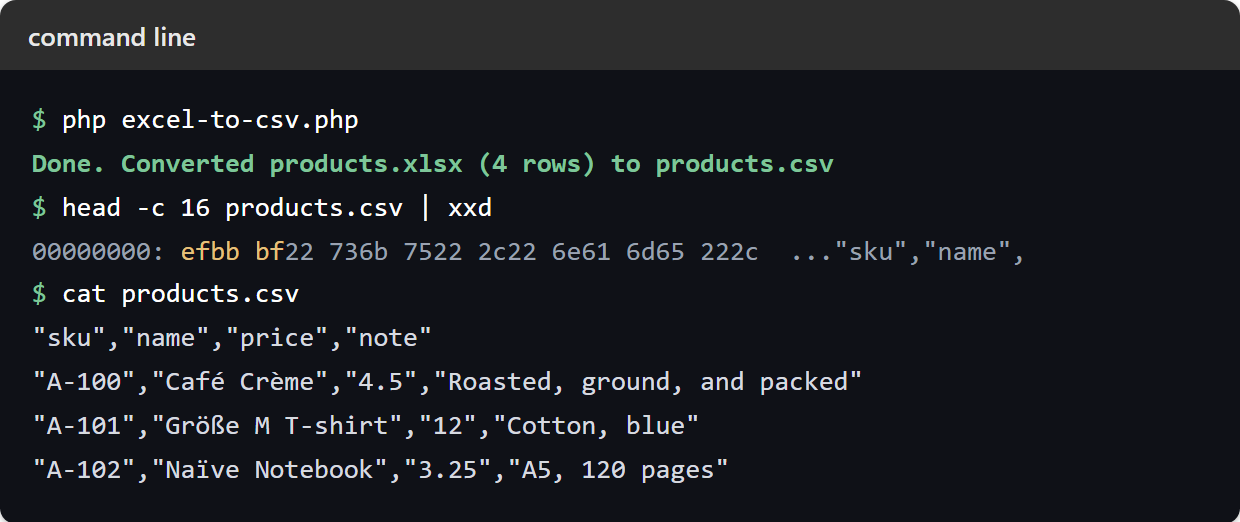
Running the script to convert Excel to CSV is instant. With products.xlsx as the input — a header row and three products, one of which has a comma inside its note — the script writes products.csv:
$ php excel-to-csv.php
Done. Converted products.xlsx (4 rows) to products.csv
"sku","name","price","note"
"A-100","Café Crème","4.5","Roasted, ground, and packed"
"A-101","Größe M T-shirt","12","Cotton, blue"
"A-102","Naïve Notebook","3.25","A5, 120 pages"
Three things in that output are worth naming. First, the accented names survive, because of the BOM — the file really does begin with the bytes EF BB BF before the first quote. Next, quotes wrap the note containing a comma, so the delimiter inside it cannot split the row. Finally, the price the sheet stores as 4.50 comes out as 4.5: a CSV carries the value a cell holds, never the format Excel displays it with. So if the trailing zero matters downstream, write the column as text before converting.