This article shows how a value binder decides what your PHP strings become once they land in an Excel cell. Every time you call setCellValue(), something has to choose whether '2026-08-12' is a date or a piece of text. That something is the value binder, and because PhpSpreadsheet installs one for you, most people write hundreds of cells without ever learning it exists.
Here is the part worth knowing straight away. The default binder leaves '007' alone, which is the behaviour everyone expects, so it is tempting to conclude that strings are safe. However, that same default silently turns '1e5' into the number 100000, because PHP reads it as scientific notation. In other words the rule is not “strings survive”. It is “strings survive unless they look numeric to PHP”, and scientific notation is the case nobody sees coming.
So this article runs the same five inputs through all three bundled binders and shows exactly what each one stores. Then it covers the per-call override, which is almost always what you actually want.
Requirements to set a value binder:
- Composer
- PHP 8.2 or newer
- The
gdandzipextensions, which PhpSpreadsheet 5 requires
Step 1.
First, set up the dependencies. Here we pin the 5.x line, tested with PhpSpreadsheet 5.9 on PHP 8.5. Note that 5.9.0 raised its floor to PHP 8.2, while 5.8.1 and earlier still run on 8.1. So the pin alone does not guarantee the version you think you are getting.
{
    "require": {
        "phpoffice/phpspreadsheet": "^5.0"
    }
}
Step 2.
Next, install phpspreadsheet.
$ composer install
Step 3.
Then pick the sample data. These five strings all look like plain text in PHP, and that is the point. Each one is a value a real export produces. Then the value binder in force decides what each of them becomes.
$samples = [
    '007',          // a product code
    '1e5',          // a code that happens to look like scientific notation
    '2026-08-12',   // a date as text
    '12.5%',        // a percentage as text
    'TRUE',         // the word, not the boolean
];
Step 4.
Now set the default binder explicitly. You never have to do this, because it is already active, but writing it out makes the comparison honest. Cell::setValueBinder() is static, so it applies to every cell you write from that point on, in every workbook.
use PhpOffice\PhpSpreadsheet\Cell\Cell;
use PhpOffice\PhpSpreadsheet\Cell\DefaultValueBinder;

Cell::setValueBinder(new DefaultValueBinder());
Because the binder is global state, changing it halfway through a script changes every cell written afterwards. That is worth remembering if your export builds several sheets in one run.
Step 5.
Then try AdvancedValueBinder, which guesses harder. It converts dates, percentages and booleans instead of leaving them as text. There is a second effect the name does not hint at, though: it also writes a number format. Converting '12.5%' gives you the value 0.125 and a 0.00% format code. So this value binder quietly styles your worksheet as well as typing it.
use PhpOffice\PhpSpreadsheet\Cell\AdvancedValueBinder;

Cell::setValueBinder(new AdvancedValueBinder());
Step 6.
Next comes StringValueBinder, which is the opposite: it converts nothing at all. Every input stays a string, including '1e5'. Therefore this is the binder to reach for when you export reference data, such as codes, SKUs and account numbers. There, any conversion is damage rather than help.
use PhpOffice\PhpSpreadsheet\Cell\StringValueBinder;

Cell::setValueBinder(new StringValueBinder());
Step 7.
Finally, the override you will actually use day to day. A whole-workbook binder is a blunt instrument. After all, a typical sheet has one column of codes that must stay text and another of dates that must stay dates. So setValue() accepts a binder for a single call, which leaves the global one untouched.
$sheet->getCell('A1')->setValue('2026-08-12');
$sheet->getCell('A2')->setValue('2026-08-12', new AdvancedValueBinder());
The signature in PhpSpreadsheet 5.9 is setValue(mixed $value, ?IValueBinder $binder = null), so passing nothing keeps the current global binder. As a result you can leave the default in place for the whole export. Then you opt individual columns into different behaviour, which is far easier to reason about than flipping global state between writes.
Complete code for the value binder comparison.
<?php

require 'vendor/autoload.php';

use PhpOffice\PhpSpreadsheet\Cell\AdvancedValueBinder;
use PhpOffice\PhpSpreadsheet\Cell\Cell;
use PhpOffice\PhpSpreadsheet\Cell\DefaultValueBinder;
use PhpOffice\PhpSpreadsheet\Cell\StringValueBinder;
use PhpOffice\PhpSpreadsheet\Spreadsheet;
use PhpOffice\PhpSpreadsheet\Writer\Xlsx;

// Five strings that all look like text in PHP. What each one becomes in the
// cell is decided by the value binder, not by setCellValue().
$samples = [
    '007',          // a product code
    '1e5',          // a code that happens to look like scientific notation
    '2026-08-12',   // a date as text
    '12.5%',        // a percentage as text
    'TRUE',         // the word, not the boolean
];

// Report what actually landed in the cell: the type, the stored value and the
// number format, which is the part that decides what the user sees.
function report(string $label, array $samples): void
{
    $book  = new Spreadsheet();
    $sheet = $book->getActiveSheet();

    echo "\n$label\n";
    printf("  %-12s  %-4s  %-20s  %s\n", 'INPUT', 'TYPE', 'STORED VALUE', 'NUMBER FORMAT');

    foreach ($samples as $i => $input) {
        $ref = 'A' . ($i + 1);
        $sheet->setCellValue($ref, $input);

        $cell  = $sheet->getCell($ref);
        $value = $cell->getValue();

        printf(
            "  %-12s  %-4s  %-20s  %s\n",
            "'$input'",
            $cell->getDataType(),
            is_bool($value) ? 'bool(' . ($value ? 'true' : 'false') . ')'
                : (is_string($value) ? "string('$value')" : gettype($value) . "($value)"),
            $cell->getStyle()->getNumberFormat()->getFormatCode()
        );
    }

    $book->disconnectWorksheets();
}

// 1. The default. This is what you get when you never mention binders at all.
Cell::setValueBinder(new DefaultValueBinder());
report('DefaultValueBinder - the one you are already using:', $samples);

// 2. Guesses harder. Converts dates, percentages and booleans, and sets the
//    number format as a side effect.
Cell::setValueBinder(new AdvancedValueBinder());
report('AdvancedValueBinder - converts, and styles while it is at it:', $samples);

// 3. Refuses to convert anything. Every cell stays a string.
Cell::setValueBinder(new StringValueBinder());
report('StringValueBinder - everything stays text:', $samples);

// 4. You rarely want one binder for the whole workbook. setValue() takes a
//    binder for a single call, which leaves the global one alone.
Cell::setValueBinder(new DefaultValueBinder());

$book  = new Spreadsheet();
$sheet = $book->getActiveSheet();

$sheet->getCell('A1')->setValue('2026-08-12');
$sheet->getCell('A2')->setValue('2026-08-12', new AdvancedValueBinder());

echo "\nPer-call override, same input, same workbook:\n";
foreach (['A1' => 'global (default)', 'A2' => 'setValue(..., new AdvancedValueBinder())'] as $ref => $how) {
    $cell = $sheet->getCell($ref);
    printf(
        "  %-4s  %-40s  %-4s  %-14s  %s\n",
        $ref,
        $how,
        $cell->getDataType(),
        $cell->getValue(),
        $cell->getStyle()->getNumberFormat()->getFormatCode()
    );
}

(new Xlsx($book))->save('binders.xlsx');
echo "\nSaved binders.xlsx\n";

$book->disconnectWorksheets();
Test the value binder script.
Command line testing.
$ php binders.php
Result of the value binder comparison.
Read down the TYPE column, because that is where the three binders disagree. s is a string, n is a number and b is a boolean:
DefaultValueBinder - the one you are already using:
  INPUT         TYPE  STORED VALUE          NUMBER FORMAT
  '007'         s     string('007')         General
  '1e5'         n     double(100000)        General
  '2026-08-12'  s     string('2026-08-12')  General
  '12.5%'       s     string('12.5%')       General
  'TRUE'        s     string('TRUE')        General

AdvancedValueBinder - converts, and styles while it is at it:
  INPUT         TYPE  STORED VALUE          NUMBER FORMAT
  '007'         s     string('007')         General
  '1e5'         n     double(100000)        General
  '2026-08-12'  n     double(46246)         yyyy-mm-dd
  '12.5%'       n     double(0.125)         0.00%
  'TRUE'        b     bool(true)            General

StringValueBinder - everything stays text:
  INPUT         TYPE  STORED VALUE          NUMBER FORMAT
  '007'         s     string('007')         General
  '1e5'         s     string('1e5')         General
  '2026-08-12'  s     string('2026-08-12')  General
  '12.5%'       s     string('12.5%')       General
  'TRUE'        s     string('TRUE')        General

Per-call override, same input, same workbook:
  A1    global (default)                          s     2026-08-12      General
  A2    setValue(..., new AdvancedValueBinder())  n     46246           yyyy-mm-dd

Saved binders.xlsx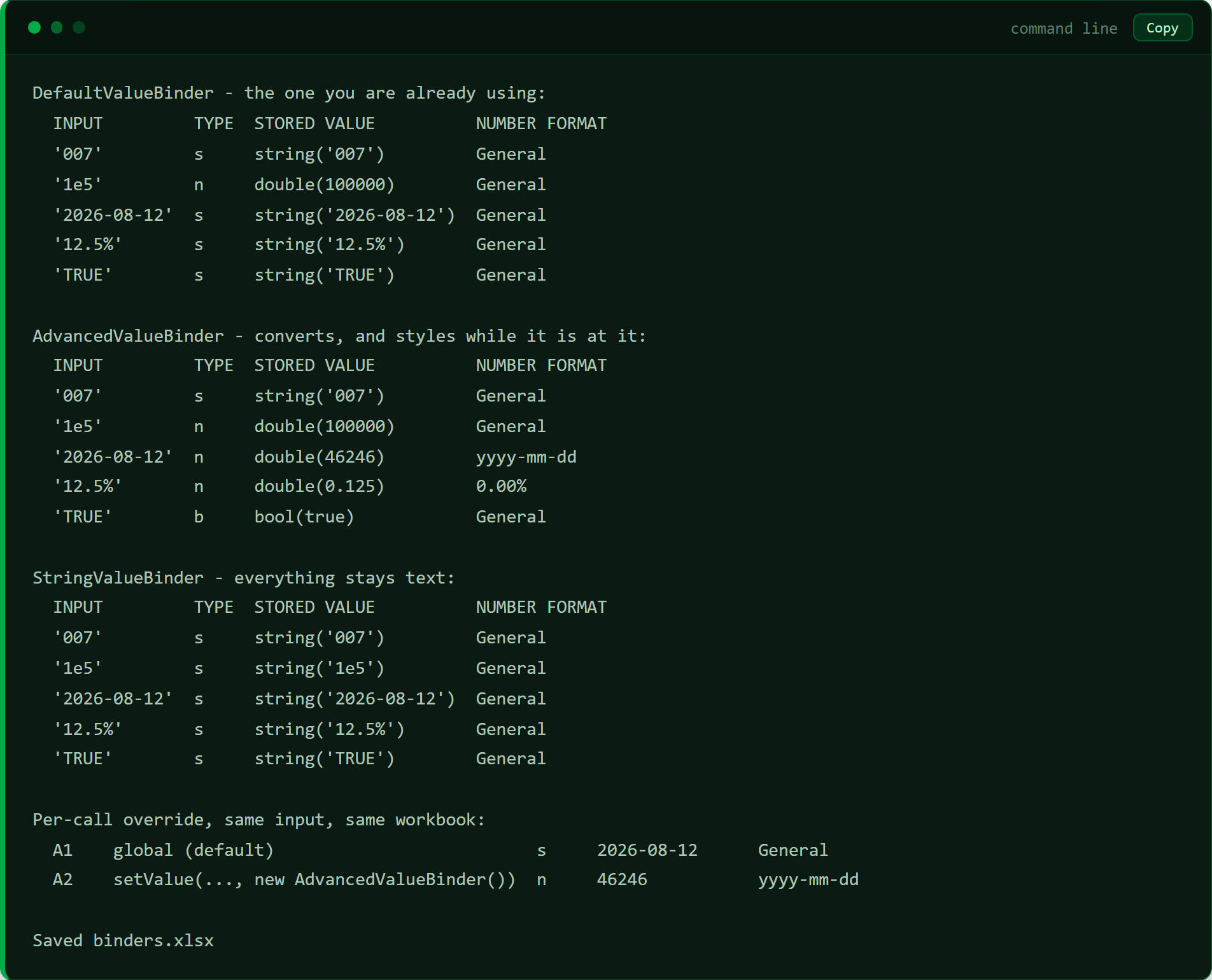
Two rows carry most of the story. The '1e5' row shows the default converting a string nobody asked it to convert, and it is a number under both of the first two binders. Meanwhile the '2026-08-12' row shows AdvancedValueBinder storing 46246, which is the Excel date serial, together with the yyyy-mm-dd format that renders it back into something readable.
Now open the file, though, and the comparison gets uncomfortable:
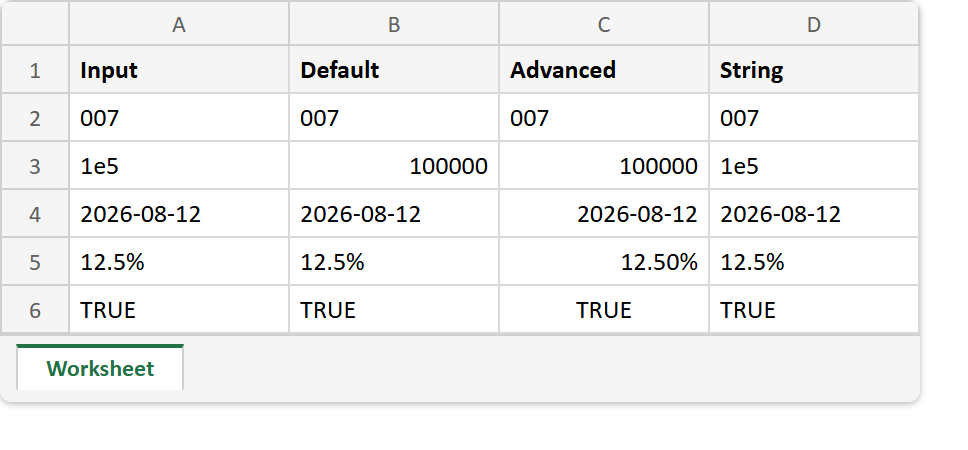
The three columns look nearly the same. The date reads 2026-08-12 whether it was stored as text or as a serial with a format, and TRUE reads TRUE either way. Only two cells differ visibly at all. First, 1e5, which the string binder alone preserves. Then 12.5%, which the advanced binder renders as 12.50% because of the format it attached.
The tell is alignment. Excel pushes numbers to the right and text to the left. So the right-hand drift in the Advanced column is the only clue on screen that those cells hold a different type. This matters because it decides whether a column sorts chronologically or alphabetically, and whether SUM sees anything at all. In short, the picture barely changes while the spreadsheet’s behaviour changes completely.
Which value binder to use.
So the choice comes down to what the column means, not what it looks like. Use StringValueBinder for reference data, where a code is an identifier and converting it is always wrong. Use AdvancedValueBinder when you are exporting figures people will sort, filter and total, and you want real dates and real numbers. Otherwise leave the default alone, which handles ordinary text and ordinary numbers perfectly well.
Above all, prefer the per-call override to the global setter. Mixed columns are the normal case rather than the exception. So setValue($value, $binder) lets one export write codes as text and dates as dates, with no global state to keep track of.
It is worth noting that this is the write-side mirror of a problem this site has covered from the other direction. Reading Excel dates back into PHP explains why a date comes out as 45678; value binders explain which PHP string became that serial on the way in. The same question also has a completely different answer in Google Sheets. There, importing an Excel file really does eat a leading zero, because USER_ENTERED reads '007' as 7. Same question, opposite answers, different library.