This article shows how to append Google Sheets rows from PHP, so that new data lands at the bottom of a table without disturbing what is already there. Adding a row is the most common Google Sheets job a script does. Form captures, logging, nightly cron output: all of them mean the same thing, which is put this at the end.
The rest of this series writes with values->update() against a fixed range like A1:D1. That call always writes exactly where you point it, so using it to add a row means working out the next free row first, then hoping nothing changed in between. Instead values->append() finds the end of the table by itself.
Two things about it surprise people. First, it ignores the range you give it as a destination. Second, one option controls whether it politely inserts a row or writes straight over whatever sits below your table, and the response looks identical either way. We will demonstrate both.
Requirements to append Google Sheets rows:
- Authenticate With A Service Account
- Read Google Sheets Cells
- Install The Google Client Library Specifying Google Sheets
- Composer
- PHP 8.1 or newer
Step 1.
First, set up the dependencies. This is the Sheets-only install used across this series. Tested with google/apiclient 2.19 on PHP 8.5.
{
    "require": {
        "google/apiclient": "^2.12.1"
    },
    "scripts": {
        "pre-autoload-dump": "Google\\Task\\Composer::cleanup"
    },
    "extra": {
        "google/apiclient-services": [
            "Sheets"
        ]
    }
}
Step 2.
Next, install the Google Client Library.
$ composer install
Step 3.
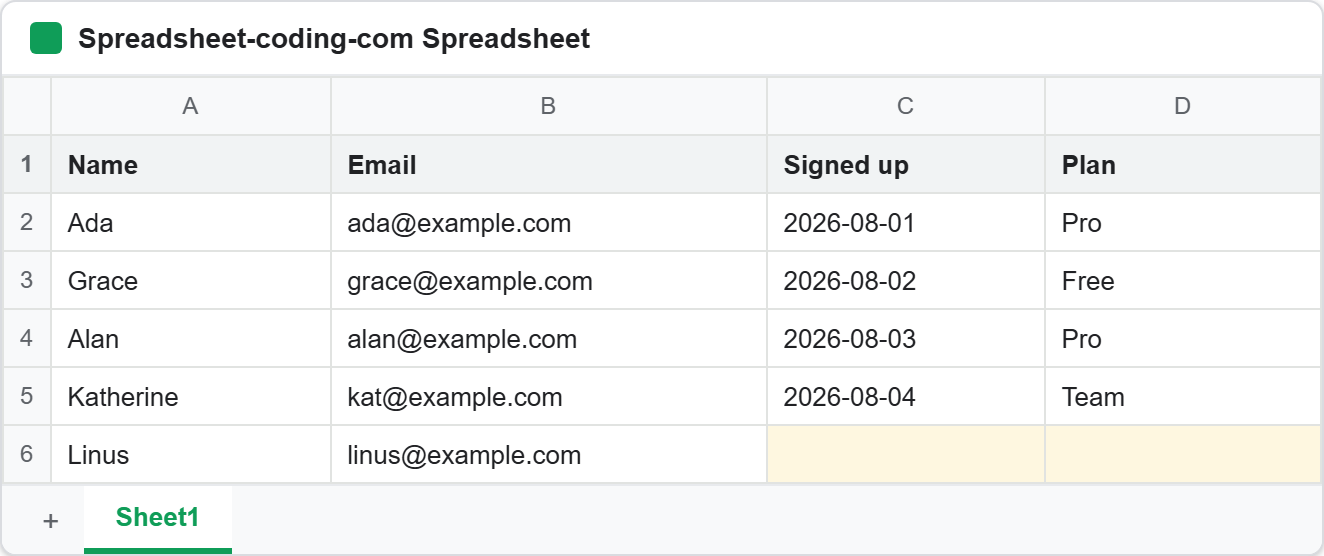
Then set up the parameters and the client. The sheet below already holds five people, so the table runs from row 1 to row 6.
<?php

require 'vendor/autoload.php';

use Google\Client;
use Google\Service\Sheets;
use Google\Service\Sheets\ValueRange;

/**
 * Set up parameters.
 */
$spreadsheetId = 'Your spreadsheetId here.';
$keyFile = 'service-account.json';
$range = 'Sheet1!A1';
$valueInputOption = 'RAW';
$insertDataOption = 'INSERT_ROWS';

$client = new Client();
$client->setApplicationName('Append Google Sheets Rows');
$client->setAuthConfig($keyFile);
$client->addScope(Sheets::SPREADSHEETS);

$service = new Sheets($client);
Note the $range. It says A1, which is the top-left of the table rather than the bottom. That is deliberate, and Step 5 explains why it still works.
Step 4.
Now append the rows. The call takes the same ValueRange as update(), plus the two options that make it an append.
$newRows = [
    ['N1', 'n1@example.com', '2026-08-12', 'Pro'],
    ['N2', 'n2@example.com', '2026-08-13', 'Free'],
    ['N3', 'n3@example.com', '2026-08-14', 'Team'],
];

$response = $service->spreadsheets_values->append(
    $spreadsheetId,
    $range,
    new ValueRange(['values' => $newRows]),
    [
        'valueInputOption' => $valueInputOption,
        'insertDataOption' => $insertDataOption,
    ]
);
The values array is a list of rows, so appending three rows costs one request rather than three. Also note that append() is a POST, unlike update(), which is a PUT. Consequently it is not idempotent: running the script twice adds the rows twice.
Step 5.
Then ask the response where it actually wrote. This is the part worth reading closely, because the range you send is only a hint.
// The API found the table itself. Ask it what it found, and where it wrote.
printf("Range we asked for : %s\n", $range);
printf("Table it detected  : %s\n", $response->getTableRange());
printf("Where it wrote     : %s\n", $response->getUpdates()->getUpdatedRange());
printf("Rows added         : %d\n", $response->getUpdates()->getUpdatedRows());
printf("Cells written      : %d\n\n", $response->getUpdates()->getUpdatedCells());
We passed Sheet1!A1, and nothing was written to A1. The API treats that range as a place to start looking. It grows outwards to find the contiguous block of cells around it, reports that block as tableRange, and writes immediately after its last row. So any cell inside the table works as the hint, and getUpdatedRange() is the only honest answer to where did my row go. Therefore never compute the next row yourself.
Step 6.
Finally, read the sheet back. A response is a claim, while the sheet is the fact.
// Read the sheet back so the result is the sheet, not the response.
$rows = $service->spreadsheets_values->get($spreadsheetId, 'Sheet1!A1:D12')->getValues() ?? [];

echo "Sheet1 after the append:\n";
foreach ($rows as $i => $row) {
    printf("  row %-2d %s\n", $i + 1, implode(' | ', $row));
}
The ?? [] is there because an empty range returns null rather than an empty array, which is covered in reading Google Sheets cells.
Complete code to append Google Sheets rows.
<?php

require 'vendor/autoload.php';

use Google\Client;
use Google\Service\Sheets;
use Google\Service\Sheets\ValueRange;

/**
 * Set up parameters.
 */
$spreadsheetId = 'Your spreadsheetId here.';
$keyFile = 'service-account.json';
$range = 'Sheet1!A1';
$valueInputOption = 'RAW';
$insertDataOption = 'INSERT_ROWS';

$client = new Client();
$client->setApplicationName('Append Google Sheets Rows');
$client->setAuthConfig($keyFile);
$client->addScope(Sheets::SPREADSHEETS);

$service = new Sheets($client);

$newRows = [
    ['N1', 'n1@example.com', '2026-08-12', 'Pro'],
    ['N2', 'n2@example.com', '2026-08-13', 'Free'],
    ['N3', 'n3@example.com', '2026-08-14', 'Team'],
];

$response = $service->spreadsheets_values->append(
    $spreadsheetId,
    $range,
    new ValueRange(['values' => $newRows]),
    [
        'valueInputOption' => $valueInputOption,
        'insertDataOption' => $insertDataOption,
    ]
);

// The API found the table itself. Ask it what it found, and where it wrote.
printf("Range we asked for : %s\n", $range);
printf("Table it detected  : %s\n", $response->getTableRange());
printf("Where it wrote     : %s\n", $response->getUpdates()->getUpdatedRange());
printf("Rows added         : %d\n", $response->getUpdates()->getUpdatedRows());
printf("Cells written      : %d\n\n", $response->getUpdates()->getUpdatedCells());

// Read the sheet back so the result is the sheet, not the response.
$rows = $service->spreadsheets_values->get($spreadsheetId, 'Sheet1!A1:D12')->getValues() ?? [];

echo "Sheet1 after the append:\n";
foreach ($rows as $i => $row) {
    printf("  row %-2d %s\n", $i + 1, implode(' | ', $row));
}
Test appending Google Sheets rows.
Command line testing.
$ php append-google-sheets-rows.php
Result of appending Google Sheets rows.
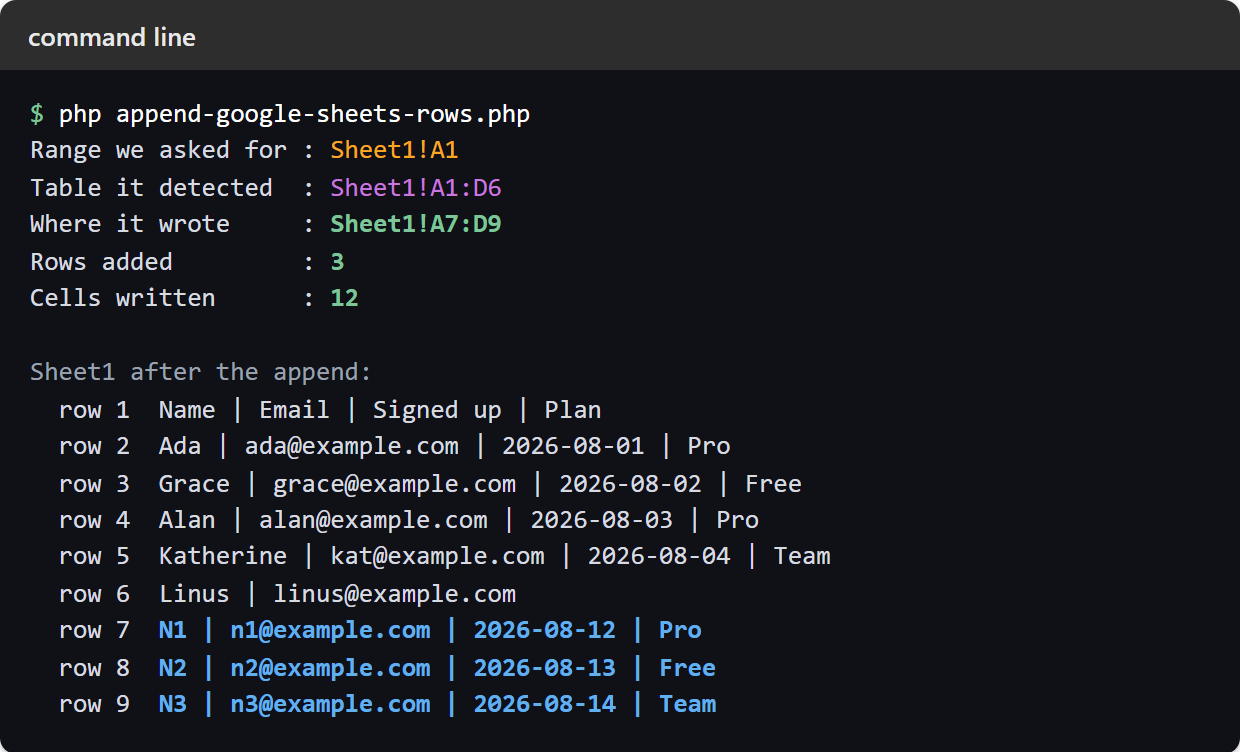
We asked for Sheet1!A1, the API detected the table as Sheet1!A1:D6, and the three rows landed at Sheet1!A7:D9. Nothing above them moved:
Range we asked for : Sheet1!A1
Table it detected  : Sheet1!A1:D6
Where it wrote     : Sheet1!A7:D9
Rows added         : 3
Cells written      : 12

Sheet1 after the append:
  row 1  Name | Email | Signed up | Plan
  row 2  Ada | ada@example.com | 2026-08-01 | Pro
  row 3  Grace | grace@example.com | 2026-08-02 | Free
  row 4  Alan | alan@example.com | 2026-08-03 | Pro
  row 5  Katherine | kat@example.com | 2026-08-04 | Team
  row 6  Linus | linus@example.com
  row 7  N1 | n1@example.com | 2026-08-12 | Pro
  row 8  N2 | n2@example.com | 2026-08-13 | Free
  row 9  N3 | n3@example.com | 2026-08-14 | Team
Append Google Sheets rows without destroying data.
Now the important part. insertDataOption takes two values, and the difference only shows when something else already sits below your table.
Picture the same sheet with a note parked further down. The table still ends at row 6, row 7 is blank, and a row we care about sits at row 8. Append three rows to that sheet and the two options behave completely differently.
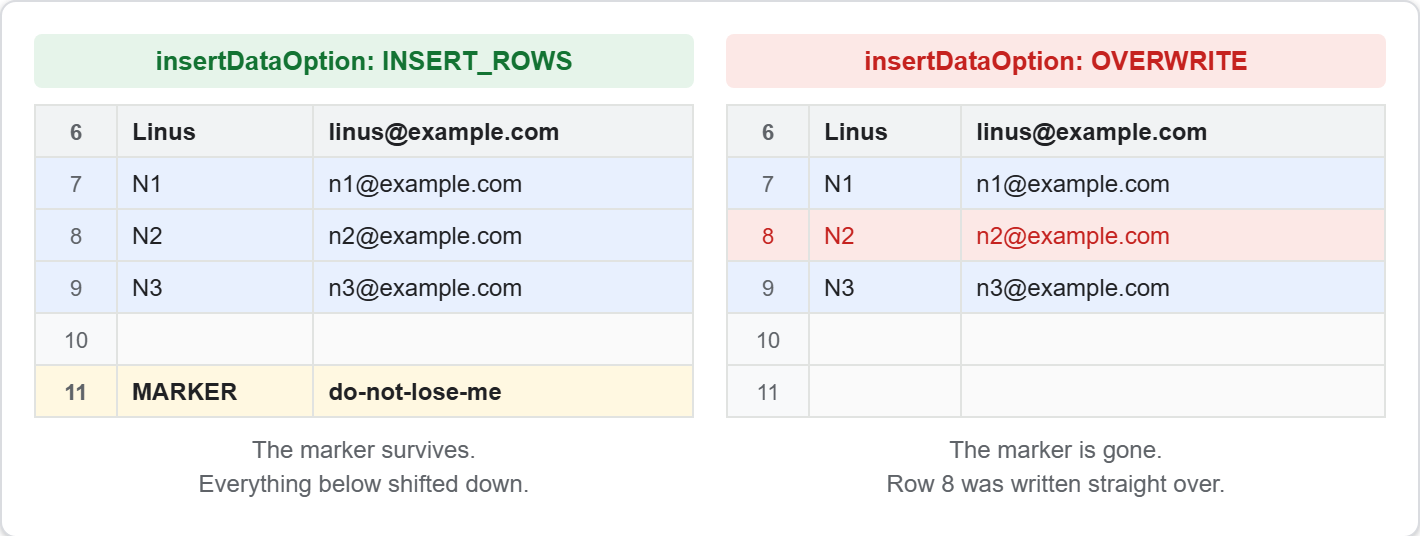
INSERT_ROWS makes room. It inserts genuine new rows, so everything below shifts down and the marker survives at row 11. OVERWRITE does not make room. It writes into the cells that follow the table, so the marker is simply gone, replaced by the second of our three rows.
Here is the part that makes this worth knowing rather than merely worth reading. Both calls returned the same updatedRange of Sheet1!A7:D9, and both reported three rows and twelve cells. So the response cannot tell you that anything was destroyed. Only reading the sheet back would reveal it, and by then the old values are unrecoverable through the API.
Therefore use INSERT_ROWS unless you have a specific reason not to. It is the safe default, and it costs nothing when there is nothing below the table.
RAW or USER_ENTERED.
The other option, valueInputOption, decides whether Google parses your strings. With RAW a value is stored exactly as sent, so =1+1 stays the literal text =1+1 and 2026-08-11 stays a string. With USER_ENTERED the API treats it as though somebody typed it, so =1+1 becomes a formula that evaluates to 2, and that date becomes a real date, stored internally as the serial number 46245.
Neither is correct in general. Use RAW for data you want preserved verbatim, such as anything user-supplied. Use USER_ENTERED when you genuinely want dates and formulas to become dates and formulas, which counting cells with a formula covers in more detail.
There is one thing worth setting up in the sheet before a script starts appending to it. Any calculated column should already cover the rows that do not exist yet, or every append leaves a gap someone has to drag a formula down to fill. Replace Fill Down With The ARRAYFORMULA Function In Google Sheets writes one formula that spans the whole column so appended rows arrive with their totals already filled in, and it shows the guard that stops the empty rows below it filling with zeros.