This article shows how to add a dropdown to a Google Sheet from PHP, using a fixed list of values and then a list read from a range. It also answers the question that actually matters once the dropdown exists: how much can your code trust it?
The Excel half of this site has five data-validation posts, including drop-down list data validation. The Google Sheets half has had none, which is a real gap — a dropdown is the most requested sheet feature after formatting, because it is what stops a colleague typing “Nrth” into a column you later group by.
The request is setDataValidation. It carries a range and a rule, and the rule is a condition plus a few flags that control how the sheet behaves when somebody types.
Requirements to add a dropdown to a Google Sheet:
- Authenticate With A Service Account
- Create A Google Cloud Project
- Enable Google Sheets API Library
- Install The Google Client Library Specifying Google Sheets
- Composer
- PHP 8.1 or newer
Step 1.
First, set up the dependencies. This is the Sheets-only install used across this series. Tested with google/apiclient 2.19 on PHP 8.5.
{
    "require": {
        "google/apiclient": "^2.12.1"
    },
    "scripts": {
        "pre-autoload-dump": "Google\\Task\\Composer::cleanup"
    },
    "extra": {
        "google/apiclient-services": [
            "Sheets"
        ]
    }
}
Step 2.
Next, install the Google Client Library.
$ composer install
Step 3.
Then build the client and take a clean tab to work on.
<?php

require 'vendor/autoload.php';

use Google\Client;
use Google\Service\Sheets;
use Google\Service\Sheets\BatchUpdateSpreadsheetRequest;
use Google\Service\Sheets\Request;
use Google\Service\Sheets\ValueRange;

$spreadsheetId = 'YOUR_SPREADSHEET_ID';
$keyFile = 'service-account.json';
$tabName = 'Orders';

$client = new Client();
$client->setApplicationName('Add A Dropdown');
$client->setAuthConfig($keyFile);
$client->addScope(Sheets::SPREADSHEETS);

$service = new Sheets($client);

$sheetId = freshSheetId($service, $spreadsheetId, $tabName);

$service->spreadsheets_values->update(
    $spreadsheetId,
    $tabName . '!A1',
    new ValueRange(['values' => [
        ['Order', 'Region'],
        ['SO-1001', 'North'],
        ['SO-1002', 'South'],
        ['SO-1003', ''],
    ]]),
    ['valueInputOption' => 'USER_ENTERED']
);
Step 4.
Now the dropdown. A ONE_OF_LIST condition holds the allowed values, and the two flags underneath it decide what the sheet does with them.
$service->spreadsheets->batchUpdate($spreadsheetId, new BatchUpdateSpreadsheetRequest([
    'requests' => [
        new Request(['setDataValidation' => [
            'range' => [
                'sheetId'          => $sheetId,
                'startRowIndex'    => 1,
                'endRowIndex'      => 4,
                'startColumnIndex' => 1,
                'endColumnIndex'   => 2,
            ],
            'rule' => [
                'condition' => [
                    'type'   => 'ONE_OF_LIST',
                    'values' => [
                        ['userEnteredValue' => 'North'],
                        ['userEnteredValue' => 'South'],
                        ['userEnteredValue' => 'East'],
                        ['userEnteredValue' => 'West'],
                    ],
                ],
                'inputMessage' => 'Pick a sales region',
                'strict'       => true,
                'showCustomUi' => true,
            ],
        ]]),
    ],
]));
showCustomUi is the one that draws the arrow. Set it to false and the rule still applies, but the cell looks ordinary — useful when you want the constraint without inviting people to click. strict decides whether a typed value that fails the condition is rejected or merely flagged with a warning triangle.
Step 5.
Add a helper that reads the rule back, since a dropdown is invisible from a terminal.
function validationOf(Sheets $service, string $spreadsheetId, string $tabName, string $cell): string
{
    $meta = $service->spreadsheets->get($spreadsheetId, [
        'ranges'          => [$tabName . '!' . $cell],
        'includeGridData' => true,
        'fields'          => 'sheets(data(rowData(values(dataValidation))))',
    ]);

    $rowData = $meta->getSheets()[0]->getData()[0]->getRowData();

    if (!$rowData || !$rowData[0]->getValues()) {
        return 'none';
    }

    $rule = $rowData[0]->getValues()[0]->getDataValidation();

    if (!$rule) {
        return 'none';
    }

    $values = array_map(
        fn($value) => $value->getUserEnteredValue(),
        $rule->getCondition()->getValues() ?? []
    );

    return sprintf('%s [%s] strict=%s',
        $rule->getCondition()->getType(),
        implode(', ', $values),
        $rule->getStrict() ? 'true' : 'false');
}
Step 6.
A dropdown can also read its options from a range, which is how you keep the list editable without redeploying anything. Note the leading equals sign: this is a formula, not an A1 string.
$service->spreadsheets_values->update(
    $spreadsheetId,
    $tabName . '!E1',
    new ValueRange(['values' => [['Standard'], ['Express'], ['Courier']]]),
    ['valueInputOption' => 'RAW']
);

$service->spreadsheets->batchUpdate($spreadsheetId, new BatchUpdateSpreadsheetRequest([
    'requests' => [
        new Request(['setDataValidation' => [
            'range' => [
                'sheetId'          => $sheetId,
                'startRowIndex'    => 1,
                'endRowIndex'      => 4,
                'startColumnIndex' => 2,
                'endColumnIndex'   => 3,
            ],
            'rule' => [
                'condition' => [
                    'type'   => 'ONE_OF_RANGE',
                    'values' => [['userEnteredValue' => '=' . $tabName . '!E1:E3']],
                ],
                'strict'       => true,
                'showCustomUi' => true,
            ],
        ]]),
    ],
]));
Step 7.
Removing a dropdown is the same request with the rule key left out entirely. There is no separate delete call.
$service->spreadsheets->batchUpdate($spreadsheetId, new BatchUpdateSpreadsheetRequest([
    'requests' => [
        new Request(['setDataValidation' => [
            'range' => [
                'sheetId'          => $sheetId,
                'startRowIndex'    => 1,
                'endRowIndex'      => 2,
                'startColumnIndex' => 1,
                'endColumnIndex'   => 2,
            ],
        ]]),
    ],
]));
Complete code to add a dropdown to a Google Sheet.
<?php

require 'vendor/autoload.php';

use Google\Client;
use Google\Service\Sheets;
use Google\Service\Sheets\BatchUpdateSpreadsheetRequest;
use Google\Service\Sheets\Request;
use Google\Service\Sheets\ValueRange;

$spreadsheetId = 'YOUR_SPREADSHEET_ID';
$keyFile = 'service-account.json';
$tabName = 'Orders';

$client = new Client();
$client->setApplicationName('Add A Dropdown');
$client->setAuthConfig($keyFile);
$client->addScope(Sheets::SPREADSHEETS);

$service = new Sheets($client);

/** Return a brand-new tab with this name, deleting any previous one. */
function freshSheetId(Sheets $service, string $spreadsheetId, string $title): int
{
    $requests = [];

    foreach ($service->spreadsheets->get($spreadsheetId)->getSheets() as $sheet) {
        if ($sheet->getProperties()->getTitle() === $title) {
            $requests[] = new Request([
                'deleteSheet' => ['sheetId' => $sheet->getProperties()->getSheetId()],
            ]);
        }
    }

    $requests[] = new Request(['addSheet' => ['properties' => ['title' => $title]]]);

    $response = $service->spreadsheets->batchUpdate($spreadsheetId, new BatchUpdateSpreadsheetRequest([
        'requests' => $requests,
    ]));

    $replies = $response->getReplies();

    return end($replies)->getAddSheet()->getProperties()->getSheetId();
}

/** Report the validation rule attached to one cell. */
function validationOf(Sheets $service, string $spreadsheetId, string $tabName, string $cell): string
{
    $meta = $service->spreadsheets->get($spreadsheetId, [
        'ranges'          => [$tabName . '!' . $cell],
        'includeGridData' => true,
        'fields'          => 'sheets(data(rowData(values(dataValidation))))',
    ]);

    $rowData = $meta->getSheets()[0]->getData()[0]->getRowData();

    if (!$rowData || !$rowData[0]->getValues()) {
        return 'none';
    }

    $rule = $rowData[0]->getValues()[0]->getDataValidation();

    if (!$rule) {
        return 'none';
    }

    $values = array_map(
        fn($value) => $value->getUserEnteredValue(),
        $rule->getCondition()->getValues() ?? []
    );

    return sprintf('%s [%s] strict=%s',
        $rule->getCondition()->getType(),
        implode(', ', $values),
        $rule->getStrict() ? 'true' : 'false');
}

$sheetId = freshSheetId($service, $spreadsheetId, $tabName);

$service->spreadsheets_values->update(
    $spreadsheetId,
    $tabName . '!A1',
    new ValueRange(['values' => [
        ['Order', 'Region'],
        ['SO-1001', 'North'],
        ['SO-1002', 'South'],
        ['SO-1003', ''],
    ]]),
    ['valueInputOption' => 'USER_ENTERED']
);

// The dropdown itself: a list of allowed values on the Region column.
$service->spreadsheets->batchUpdate($spreadsheetId, new BatchUpdateSpreadsheetRequest([
    'requests' => [
        new Request(['setDataValidation' => [
            'range' => [
                'sheetId'          => $sheetId,
                'startRowIndex'    => 1,
                'endRowIndex'      => 4,
                'startColumnIndex' => 1,
                'endColumnIndex'   => 2,
            ],
            'rule' => [
                'condition' => [
                    'type'   => 'ONE_OF_LIST',
                    'values' => [
                        ['userEnteredValue' => 'North'],
                        ['userEnteredValue' => 'South'],
                        ['userEnteredValue' => 'East'],
                        ['userEnteredValue' => 'West'],
                    ],
                ],
                'inputMessage' => 'Pick a sales region',
                'strict'       => true,
                'showCustomUi' => true,
            ],
        ]]),
    ],
]));

printf("B2 validation: %s\n", validationOf($service, $spreadsheetId, $tabName, 'B2'));

// Now the question that decides how much you can trust it.
echo "\nWriting an invalid value through the API:\n";

$service->spreadsheets_values->update(
    $spreadsheetId,
    $tabName . '!B4',
    new ValueRange(['values' => [['Atlantis']]]),
    ['valueInputOption' => 'USER_ENTERED']
);

$back = $service->spreadsheets_values->get($spreadsheetId, $tabName . '!B4')->getValues();
printf("  B4 now holds: %s\n", $back[0][0] ?? '(empty)');

// A dropdown fed from a range instead of a literal list.
$service->spreadsheets_values->update(
    $spreadsheetId,
    $tabName . '!E1',
    new ValueRange(['values' => [['Standard'], ['Express'], ['Courier']]]),
    ['valueInputOption' => 'RAW']
);

$service->spreadsheets->batchUpdate($spreadsheetId, new BatchUpdateSpreadsheetRequest([
    'requests' => [
        new Request(['setDataValidation' => [
            'range' => [
                'sheetId'          => $sheetId,
                'startRowIndex'    => 1,
                'endRowIndex'      => 4,
                'startColumnIndex' => 2,
                'endColumnIndex'   => 3,
            ],
            'rule' => [
                'condition' => [
                    'type'   => 'ONE_OF_RANGE',
                    'values' => [['userEnteredValue' => '=' . $tabName . '!E1:E3']],
                ],
                'strict'       => true,
                'showCustomUi' => true,
            ],
        ]]),
    ],
]));

printf("\nC2 validation: %s\n", validationOf($service, $spreadsheetId, $tabName, 'C2'));

// Removing a rule: the same request, with no rule at all.
$service->spreadsheets->batchUpdate($spreadsheetId, new BatchUpdateSpreadsheetRequest([
    'requests' => [
        new Request(['setDataValidation' => [
            'range' => [
                'sheetId'          => $sheetId,
                'startRowIndex'    => 1,
                'endRowIndex'      => 2,
                'startColumnIndex' => 1,
                'endColumnIndex'   => 2,
            ],
        ]]),
    ],
]));

printf("B2 validation after clearing: %s\n", validationOf($service, $spreadsheetId, $tabName, 'B2'));
Test how to add a dropdown to a Google Sheet.
$ php dropdown.php
Result of the code to add a dropdown to a Google Sheet.
B2 validation: ONE_OF_LIST [North, South, East, West] strict=true

Writing an invalid value through the API:
  B4 now holds: Atlantis

C2 validation: ONE_OF_RANGE [=Orders!$E$1:$E$3] strict=true
B2 validation after clearing: none
Two small things in that output are worth a second look. The range condition came back as =Orders!$E$1:$E$3, not the =Orders!E1:E3 that was sent — the API normalises it to absolute references, so it will not drift if rows are inserted above it. And clearing reports none, confirming that a setDataValidation with no rule really is the delete.
Strict does not mean validated.
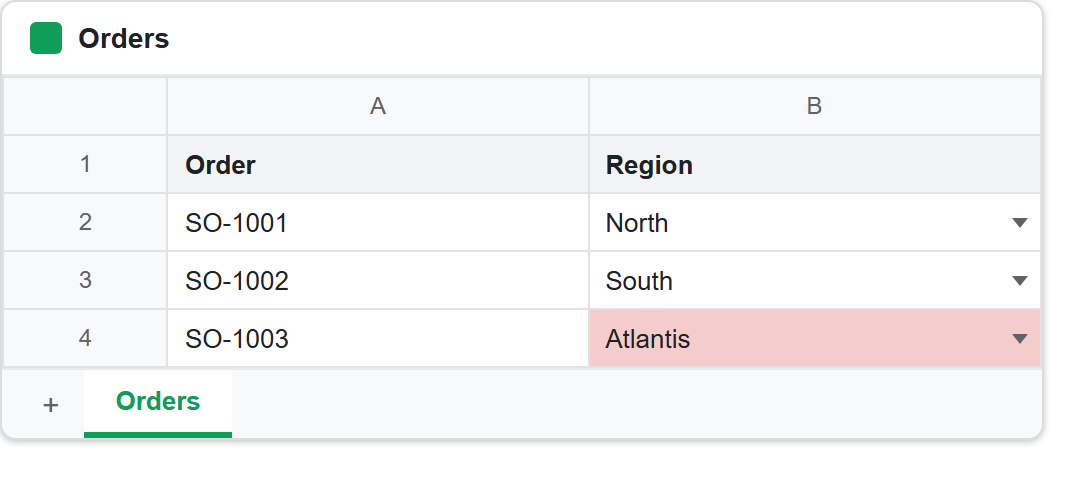
The middle block is the important one, and it is the reason to read this section before shipping anything. The rule on that column is strict=true and lists four regions. The script then wrote Atlantis into one of those cells through spreadsheets_values->update(), and the API accepted it without complaint. The cell now holds Atlantis.
So strict governs typing in the browser. It is not a server-side constraint, and it is not validation in any sense your PHP can lean on. A person clicking into that cell and typing a bad region gets stopped; your own code writing the same bad value does not, and neither does any other script with access to the sheet.
That is not a bug, but it is easy to misread, because “strict” sounds like a guarantee. Treat a dropdown as an input aid for humans and nothing more. If a value has to be one of four things, check it in PHP before you write it:
$allowed = ['North', 'South', 'East', 'West'];

if (!in_array($region, $allowed, true)) {
    throw new InvalidArgumentException("Unknown region: $region");
}
The dropdown and the guard are complementary. One keeps the sheet tidy for the people editing it; the other keeps it correct for everything downstream that reads it.
Add a dropdown to a Google Sheet from a range.
The ONE_OF_RANGE version is usually the better choice for anything that changes. The options live in cells, so somebody can add a region without touching your code, and every cell using the rule picks it up at once.
Two practical notes. The range is written as a formula, so the leading = is required and leaving it off is the most common mistake here. And the options range is an ordinary part of the sheet, so it is visible unless you put it on a tab of its own — which is what most people end up doing, often alongside some formatting to mark it as configuration rather than data.
Beyond lists, the same request handles the other condition types: NUMBER_BETWEEN, DATE_AFTER, TEXT_IS_EMAIL and the rest. Only ONE_OF_LIST and ONE_OF_RANGE draw a dropdown; the others simply constrain what may be typed, and they take their arguments in the same userEnteredValue string form.