A single IF tests one thing. The AND function lets one formula test two or more things at once, so a bonus can depend on both a sales target and a renewal, and a row only passes when every test is true.
In fact, AND returns plain TRUE or FALSE, and its natural home is inside IF. OR is its twin: it returns TRUE when any one of the tests passes, and NOT flips whichever answer you give it.
However, the function is not the English word, and people type it as if it were. That one habit produces a formula Excel refuses to accept, so it is the first thing this card clears up.
The AND function.
So give it each test as a separate argument, with a comma between them.
=AND(B2>100,C2="Yes")
Ana sold 120 and renewed, so both tests pass and it returns TRUE. Ben renewed but sold only 80, so it returns FALSE, because one failed test is enough to fail the whole AND. Microsoft’s reference allows up to 255 of these tests in one call.
Next, put it inside IF to turn TRUE and FALSE into something readable.
=IF(AND(B2>100,C2="Yes"),"Bonus","")
That writes Bonus beside Ana and Eve and leaves the other rows empty. Likewise =OR(B2>100,C2="Yes") returns TRUE for everyone except Dee, who neither sold over 100 nor renewed.
AND is a function, not a word.
Then look at the version most people type first.
=IF(B2>100 AND C2="Yes","Bonus","")
Excel refuses that formula and shows its error dialog, because AND is not an operator you can place between two tests. The tests go inside the brackets as separate arguments, and the whole AND(…) becomes the first argument of IF.
Also, feed it a range and you get one answer, not one per row. =AND(B2:B6>100) returns FALSE for the whole column as soon as any one row fails, so it cannot replace a row-by-row IF. As a result, a text value on its own is no test at all: =AND("Yes") returns #VALUE!, which Microsoft’s reference confirms for a range with no logical values in it.
Result of the AND function.
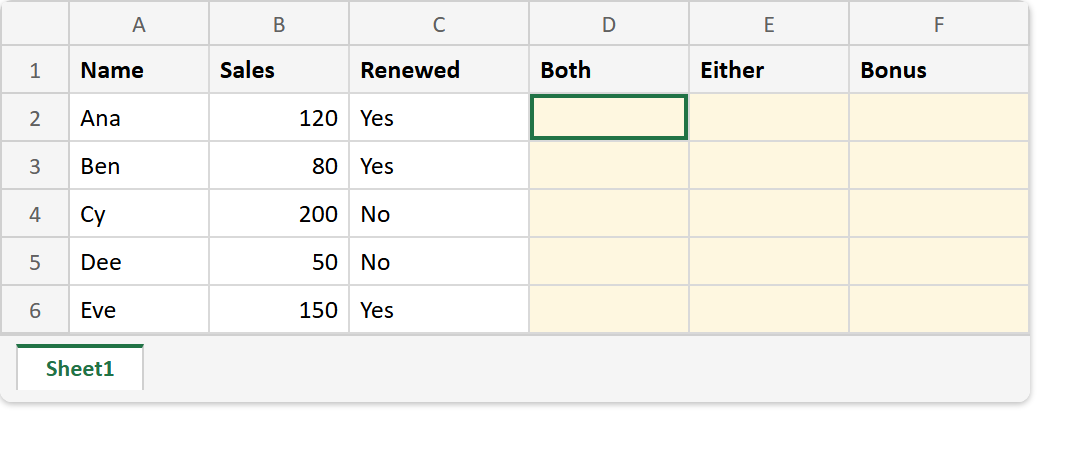
Before. Five sales figures and a renewal flag, with the three test columns empty.
After. AND passes two rows, OR passes four, and IF turns the two passes into the word Bonus.
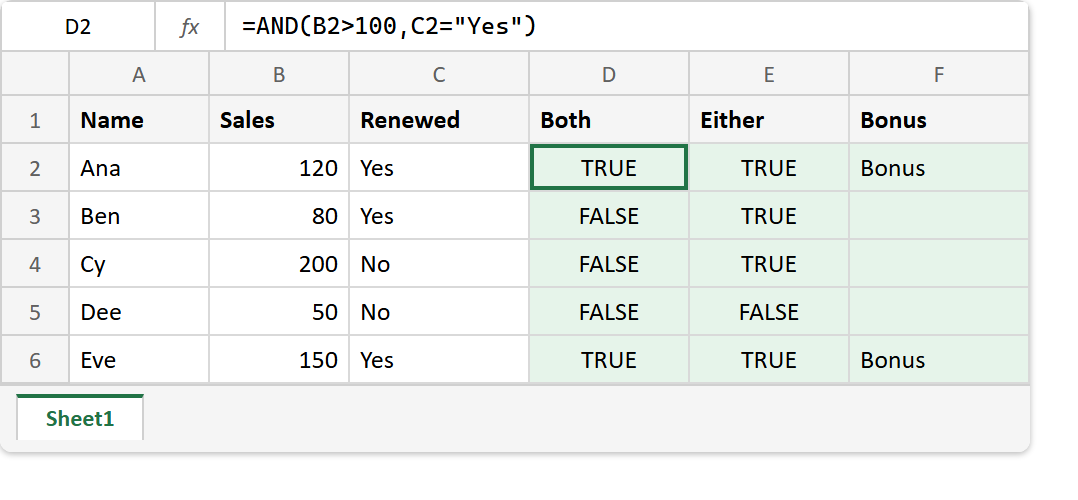
A2:C6 -> Ana 120 Yes | Ben 80 Yes | Cy 200 No | Dee 50 No | Eve 150 Yes

=AND(B2>100,C2="Yes")                   ->  TRUE   (Ana; Eve is the other TRUE)
=AND(B3>100,C3="Yes")                   ->  FALSE  (Ben: 80 fails the first test)
=OR(B3>100,C3="Yes")                    ->  TRUE   (Ben renewed)
=OR(B5>100,C5="Yes")                    ->  FALSE  (Dee fails both)
=IF(AND(B2>100,C2="Yes"),"Bonus","")    ->  Bonus
=AND(B2:B6>40)                          ->  TRUE   (one answer for five rows)
=AND(B2:B6>100)                         ->  FALSE
=AND("Yes")                             ->  #VALUE!
So reach for AND when a row must pass every test, and for OR when one is enough. For the IF it usually sits inside, see returning a value by condition with IF, and when the tests are a ladder of alternatives rather than a set that must all hold, IFS checks them in order instead.