An imported name list arrives in three different cases at once. The PROPER function fixes most of it in a single pass, then quietly damages a few rows you have to know about.
Three functions share this job. UPPER shouts, LOWER whispers, and PROPER title-cases every word it finds. Only the last one has to make a decision, which is why only the last one gets it wrong.
Contact lists, address exports and anything typed by more than one person all end up here. One formula tidies the column, so long as you check the rows it touched.
The PROPER function.
Point it at a cell and read the tidied version back.
=PROPER(A2)
One argument. The PROPER function lowercases everything first, then raises the first letter of each word, so ada lovelace and ADA LOVELACE both arrive as Ada Lovelace.
The siblings are simpler and safer. =UPPER(A2) and =LOWER(A2) change every letter the same way, therefore they have no judgement to get wrong.
What counts as a new word.
Here is the flaw. It starts a new word after every character that is not a letter, and it makes no exceptions at all.
=SUBSTITUTE(PROPER(A4),"Mcd","McD")
So ronald mcdonald comes back as Ronald Mcdonald, and 3rd street becomes 3Rd Street because the digit ended a word. Names carrying an apostrophe survive by luck rather than by design.
There is no switch that turns this off, so the repair is the formula above. Run it first, then patch the cases you already know about with SUBSTITUTE. Still, that only scales to a list short enough to read.
Result of the PROPER function.
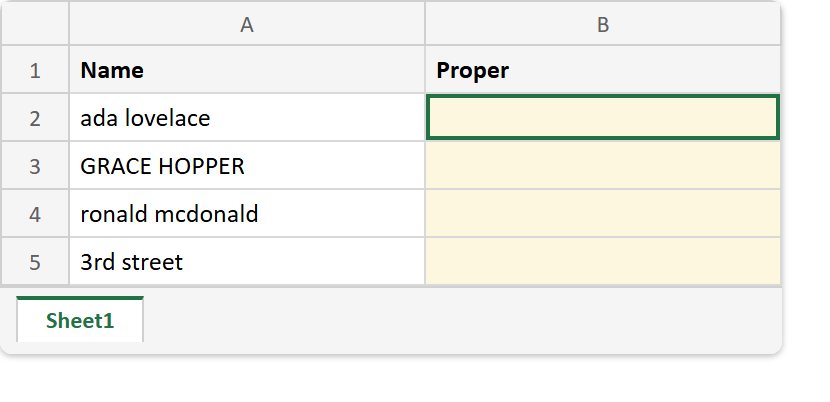
Before. Four names in the state a real export hands you.
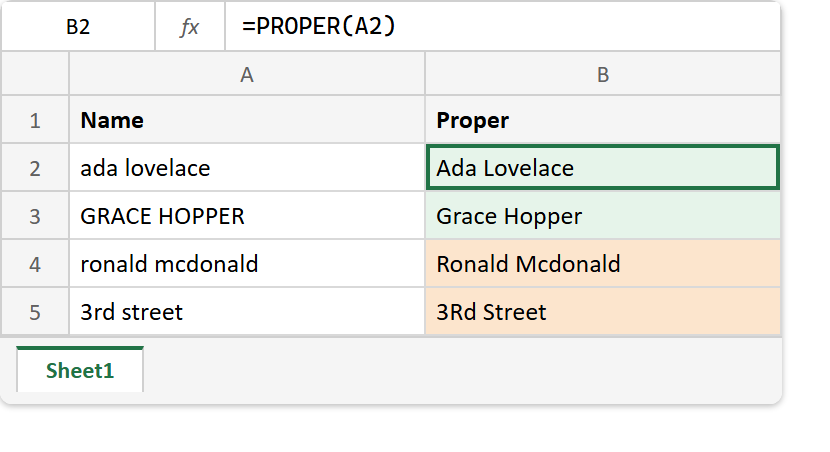
After. Two rows fixed, two rows quietly made worse, and one formula down the whole column.
A2  ->  ada lovelace
A3  ->  GRACE HOPPER
A4  ->  ronald mcdonald
A5  ->  3rd street

=PROPER(A2)  ->  Ada Lovelace
=PROPER(A3)  ->  Grace Hopper
=PROPER(A4)  ->  Ronald Mcdonald
=PROPER(A5)  ->  3Rd Street
The last two lines are the reason this one needs checking afterwards. Of course the first two are exactly what you asked for, which is precisely what makes the other two easy to miss.
The repair is SUBSTITUTE, and a column that arrived this messy usually wants TRIM run over it first as well.