A plain average takes every row. The AVERAGEIF function averages only the rows that match a condition, such as one region, one product or every order above a threshold.
In fact, it follows the same pattern as SUMIF. You test one range and average another, and Excel pairs the two row by row, with the same condition strings for both.
However, the two functions part ways when nothing matches. SUMIF quietly returns 0, while AVERAGEIF stops with an error, and that difference decides how you should handle an empty group.
The AVERAGEIF function.
So give it the column to test, the condition, and the column to average.
=AVERAGEIF(A2:A6,"North",B2:B6)
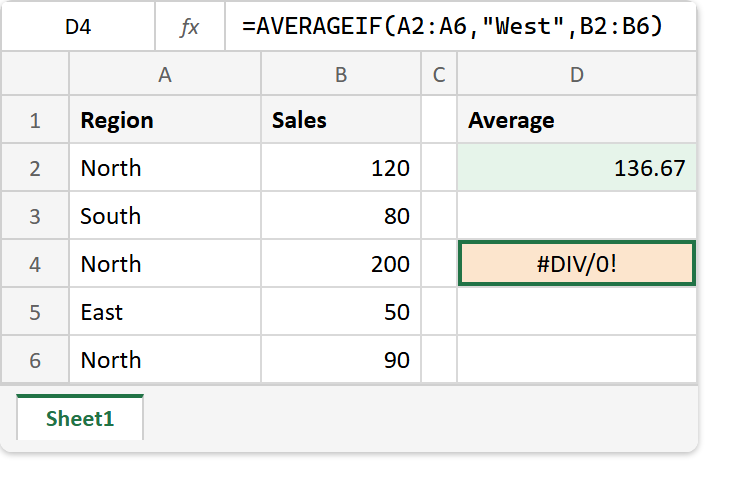
Three rows say North, with sales of 120, 200 and 90. As a result, the function returns 136.67 once you format the cell to two decimals.
Also, the third argument is optional. Leave it out and the AVERAGEIF function averages the tested cells themselves, so =AVERAGEIF(B2:B6,">100") returns 160, the average of every sale above 100. For more than one condition, AVERAGEIFS puts the average range first, the same way SUMIFS does.
No match is a division by zero.
Next, ask for a region that is not in the list.
=AVERAGEIF(A2:A6,"West",B2:B6)
That returns #DIV/0!. An average is a total divided by a count, and with no West rows the count is zero. Microsoft’s reference says the same: if no cells meet the criteria, AVERAGEIF returns the #DIV/0! error value.
Meanwhile =SUMIF(A2:A6,"West",B2:B6) returns 0 for the same data. So a summary sheet that mixes both can show a total of 0 next to an error for one empty group. Wrap the average in IFERROR only when an empty cell is the honest answer.
Result of the AVERAGEIF function.
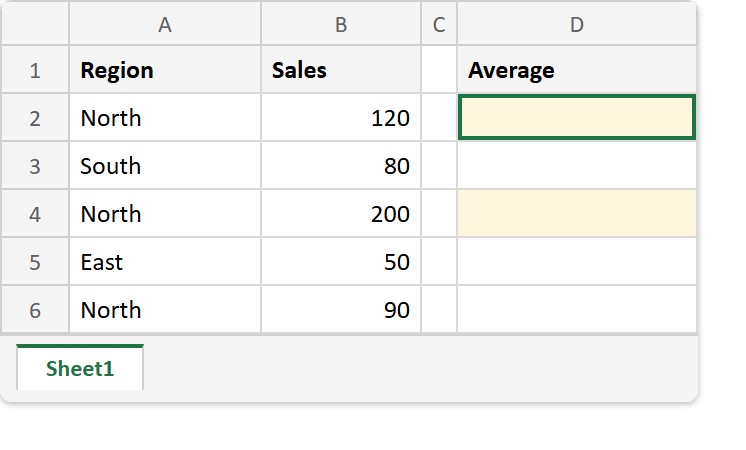
Before. Five sales across three regions, with the average column empty.
After. North averages 136.67, while West, which has no rows, returns #DIV/0!.
=AVERAGEIF(A2:A6,"North",B2:B6)                   ->  136.67
=AVERAGEIF(A2:A6,"West",B2:B6)                    ->  #DIV/0!
=SUMIF(A2:A6,"West",B2:B6)                        ->  0
=AVERAGEIF(B2:B6,">100")                          ->  160
=AVERAGEIFS(B2:B6,A2:A6,"North",B2:B6,">100")     ->  160
=IFERROR(AVERAGEIF(A2:A6,"West",B2:B6),"")        ->  (empty)
One more detail carries over from the plain average. The function skips a blank cell in the average range rather than counting it as zero, so clearing the 90 changes the North result to 160 rather than 106.67. For the full story of what an average skips, see the AVERAGE function, and for the total of the same rows, SUMIF.