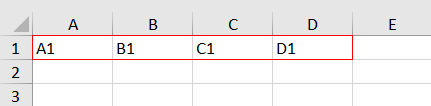
Use PhpSpreadsheet in PHP to create and write data to excel files horizontally, starting from left to right, and in this particular tutorial example, we will try to write data to the cells of an excel file in the following cell order, A1, B1, C1, and D1.
Requirements:
- Composer
- PHP 7.2 or newer
Step 1.
Setup dependencies.
{
    "require": {
        "phpoffice/phpspreadsheet": "^1.3"
    }
}
Step 2.
Install phpspreadsheet.
$ composer install
Step 3.
Create a new PHP file, and start coding.
<?php

// Autoload dependencies
require 'vendor/autoload.php';

// Import the core class of PhpSpreadsheet
use PhpOffice\PhpSpreadsheet\Spreadsheet;

// Import the Xlsx writer class
use PhpOffice\PhpSpreadsheet\Writer\Xlsx;

// Create a new Spreadsheet object
$spreadsheet = new Spreadsheet();

// Retrieve the current active worksheet
$sheet = $spreadsheet->getActiveSheet();

// Set cell values for A1-D1
foreach (range('A', 'D') as $letter) {
    $sheet->setCellValue($letter . '1', $letter . '1');
}

// Write a new .xlsx file
$writer = new Xlsx($spreadsheet);

// Save the new .xlsx file
$writer->save('write-excel-files-data-horizontally.xlsx');
Test.
Run the following codes.
$ php write-excel-files-data-horizontally.php
Result.
Open the generated file write-excel-files-data-horizontally.xlsx.