This article shows how to insert rows and columns in a Google Sheet from PHP, what the new cells inherit from their neighbours, and how to size a column to fit once it has something in it.
This closes the last quarter of grid editing for the Google Sheets half of the site. The series can append rows to the bottom and delete rows and clear ranges, but nothing until now put a row in the middle. On the Excel side that job is inserting rows in xlsx files and inserting columns.
One request does both directions. insertDimension takes a dimension of ROWS or COLUMNS, a half-open range of indexes, and a flag called inheritFromBefore that decides whether the new cells arrive formatted or blank.
Requirements to insert rows and columns:
- Authenticate With A Service Account
- Create A Google Cloud Project
- Enable Google Sheets API Library
- Install The Google Client Library Specifying Google Sheets
- Composer
- PHP 8.1 or newer
Step 1.
First, set up the dependencies. This is the Sheets-only install used across this series. Tested with google/apiclient 2.19 on PHP 8.5.
{
    "require": {
        "google/apiclient": "^2.12.1"
    },
    "scripts": {
        "pre-autoload-dump": "Google\\Task\\Composer::cleanup"
    },
    "extra": {
        "google/apiclient-services": [
            "Sheets"
        ]
    }
}
Step 2.
Next, install the Google Client Library.
$ composer install
Step 3.
Then build the client, and get a tab to work on. This helper deletes the tab first if it is already there, which matters more here than in most of these scripts: inserting changes the shape of the sheet, so a script that reuses a tab is working against whatever the last run left behind.
<?php

require 'vendor/autoload.php';

use Google\Client;
use Google\Service\Sheets;
use Google\Service\Sheets\BatchUpdateSpreadsheetRequest;
use Google\Service\Sheets\Request;
use Google\Service\Sheets\ValueRange;

$spreadsheetId = 'YOUR_SPREADSHEET_ID';
$keyFile = 'service-account.json';
$tabName = 'Roster';

$client = new Client();
$client->setApplicationName('Insert Rows And Columns');
$client->setAuthConfig($keyFile);
$client->addScope(Sheets::SPREADSHEETS);

$service = new Sheets($client);

function freshSheetId(Sheets $service, string $spreadsheetId, string $title): int
{
    $requests = [];

    foreach ($service->spreadsheets->get($spreadsheetId)->getSheets() as $sheet) {
        if ($sheet->getProperties()->getTitle() === $title) {
            $requests[] = new Request([
                'deleteSheet' => ['sheetId' => $sheet->getProperties()->getSheetId()],
            ]);
        }
    }

    $requests[] = new Request(['addSheet' => ['properties' => ['title' => $title]]]);

    $response = $service->spreadsheets->batchUpdate($spreadsheetId, new BatchUpdateSpreadsheetRequest([
        'requests' => $requests,
    ]));

    $replies = $response->getReplies();

    return end($replies)->getAddSheet()->getProperties()->getSheetId();
}

$sheetId = freshSheetId($service, $spreadsheetId, $tabName);
Step 4.
Write a small roster, then shade row 2. The shading is a marker: it makes it obvious later which cells inherited their formatting and which arrived plain.
$service->spreadsheets_values->update(
    $spreadsheetId,
    $tabName . '!A1',
    new ValueRange(['values' => [
        ['Name', 'Team', 'Start date'],
        ['Ada', 'Platform', '2026-01-06'],
        ['Grace', 'Platform', '2026-02-17'],
        ['Alan', 'Data', '2026-03-02'],
    ]]),
    ['valueInputOption' => 'USER_ENTERED']
);

$service->spreadsheets->batchUpdate($spreadsheetId, new BatchUpdateSpreadsheetRequest([
    'requests' => [
        new Request(['repeatCell' => [
            'range' => [
                'sheetId'          => $sheetId,
                'startRowIndex'    => 1,
                'endRowIndex'      => 2,
                'startColumnIndex' => 0,
                'endColumnIndex'   => 3,
            ],
            'cell' => ['userEnteredFormat' => [
                'backgroundColor' => ['red' => 1.0, 'green' => 0.95, 'blue' => 0.70],
            ]],
            'fields' => 'userEnteredFormat.backgroundColor',
        ]]),
    ],
]));
Step 5.
Now insert a row. Indexes are zero-based and the range is half-open, so startIndex 2 with endIndex 3 means one row, arriving at what a person calls row 3. Everything from the old row 3 downwards moves down by one.
$service->spreadsheets->batchUpdate($spreadsheetId, new BatchUpdateSpreadsheetRequest([
    'requests' => [
        new Request(['insertDimension' => [
            'range' => [
                'sheetId'    => $sheetId,
                'dimension'  => 'ROWS',
                'startIndex' => 2,
                'endIndex'   => 3,
            ],
            'inheritFromBefore' => true,
        ]]),
    ],
]));
Widen the range to insert several rows at once. startIndex 2 with endIndex 5 puts three rows in, in a single request, which is much cheaper than three requests.
Step 6.
Add a helper that reports a cell’s fill, so the inheritance is measurable rather than a matter of opinion.
function fillOf(Sheets $service, string $spreadsheetId, string $tabName, string $cell): string
{
    $meta = $service->spreadsheets->get($spreadsheetId, [
        'ranges'          => [$tabName . '!' . $cell],
        'includeGridData' => true,
        'fields'          => 'sheets(data(rowData(values(userEnteredFormat(backgroundColor)))))',
    ]);

    $rowData = $meta->getSheets()[0]->getData()[0]->getRowData();

    if (!$rowData || !$rowData[0]->getValues()) {
        return 'no formatting';
    }

    $format = $rowData[0]->getValues()[0]->getUserEnteredFormat();

    if (!$format || !$format->getBackgroundColor()) {
        return 'no formatting';
    }

    $colour = $format->getBackgroundColor();

    return sprintf('%.2f / %.2f / %.2f',
        $colour->getRed() ?? 0, $colour->getGreen() ?? 0, $colour->getBlue() ?? 0);
}
Step 7.
Columns work identically — swap ROWS for COLUMNS and the indexes count across instead of down. A new column has nothing in it, so it is also the moment to let the API size things to fit.
$service->spreadsheets->batchUpdate($spreadsheetId, new BatchUpdateSpreadsheetRequest([
    'requests' => [
        new Request(['insertDimension' => [
            'range' => [
                'sheetId'    => $sheetId,
                'dimension'  => 'COLUMNS',
                'startIndex' => 1,
                'endIndex'   => 2,
            ],
            'inheritFromBefore' => true,
        ]]),
        new Request(['autoResizeDimensions' => [
            'dimensions' => [
                'sheetId'    => $sheetId,
                'dimension'  => 'COLUMNS',
                'startIndex' => 0,
                'endIndex'   => 4,
            ],
        ]]),
    ],
]));
Complete code to insert rows and columns.
<?php

require 'vendor/autoload.php';

use Google\Client;
use Google\Service\Sheets;
use Google\Service\Sheets\BatchUpdateSpreadsheetRequest;
use Google\Service\Sheets\Request;
use Google\Service\Sheets\ValueRange;

$spreadsheetId = 'YOUR_SPREADSHEET_ID';
$keyFile = 'service-account.json';
$tabName = 'Roster';

$client = new Client();
$client->setApplicationName('Insert Rows And Columns');
$client->setAuthConfig($keyFile);
$client->addScope(Sheets::SPREADSHEETS);

$service = new Sheets($client);

/**
 * Return a brand-new tab with this name, deleting any previous one.
 */
function freshSheetId(Sheets $service, string $spreadsheetId, string $title): int
{
    $requests = [];

    foreach ($service->spreadsheets->get($spreadsheetId)->getSheets() as $sheet) {
        if ($sheet->getProperties()->getTitle() === $title) {
            $requests[] = new Request([
                'deleteSheet' => ['sheetId' => $sheet->getProperties()->getSheetId()],
            ]);
        }
    }

    $requests[] = new Request(['addSheet' => ['properties' => ['title' => $title]]]);

    $response = $service->spreadsheets->batchUpdate($spreadsheetId, new BatchUpdateSpreadsheetRequest([
        'requests' => $requests,
    ]));

    $replies = $response->getReplies();

    return end($replies)->getAddSheet()->getProperties()->getSheetId();
}

/** Print the grid as it currently stands. */
function dump(Sheets $service, string $spreadsheetId, string $tabName, string $label): void
{
    $rows = $service->spreadsheets_values->get($spreadsheetId, $tabName . '!A1:E8')->getValues() ?? [];

    printf("%s\n", $label);
    foreach ($rows as $index => $row) {
        printf("  row %-2d %s\n", $index + 1, implode(' | ', $row));
    }
}

/** Report whether a cell carries a background colour. */
function fillOf(Sheets $service, string $spreadsheetId, string $tabName, string $cell): string
{
    $meta = $service->spreadsheets->get($spreadsheetId, [
        'ranges'          => [$tabName . '!' . $cell],
        'includeGridData' => true,
        'fields'          => 'sheets(data(rowData(values(userEnteredFormat(backgroundColor)))))',
    ]);

    $rowData = $meta->getSheets()[0]->getData()[0]->getRowData();

    if (!$rowData || !$rowData[0]->getValues()) {
        return 'no formatting';
    }

    $format = $rowData[0]->getValues()[0]->getUserEnteredFormat();

    if (!$format || !$format->getBackgroundColor()) {
        return 'no formatting';
    }

    $colour = $format->getBackgroundColor();

    return sprintf('%.2f / %.2f / %.2f',
        $colour->getRed() ?? 0, $colour->getGreen() ?? 0, $colour->getBlue() ?? 0);
}

$sheetId = freshSheetId($service, $spreadsheetId, $tabName);

$service->spreadsheets_values->update(
    $spreadsheetId,
    $tabName . '!A1',
    new ValueRange(['values' => [
        ['Name', 'Team', 'Start date'],
        ['Ada', 'Platform', '2026-01-06'],
        ['Grace', 'Platform', '2026-02-17'],
        ['Alan', 'Data', '2026-03-02'],
    ]]),
    ['valueInputOption' => 'USER_ENTERED']
);

// Shade row 2 so the inherited formatting is visible later.
$service->spreadsheets->batchUpdate($spreadsheetId, new BatchUpdateSpreadsheetRequest([
    'requests' => [
        new Request(['repeatCell' => [
            'range' => [
                'sheetId'          => $sheetId,
                'startRowIndex'    => 1,
                'endRowIndex'      => 2,
                'startColumnIndex' => 0,
                'endColumnIndex'   => 3,
            ],
            'cell' => ['userEnteredFormat' => [
                'backgroundColor' => ['red' => 1.0, 'green' => 0.95, 'blue' => 0.70],
            ]],
            'fields' => 'userEnteredFormat.backgroundColor',
        ]]),
    ],
]));

dump($service, $spreadsheetId, $tabName, "Before:");

// Insert one row at position 3, inheriting row 2's formatting.
$service->spreadsheets->batchUpdate($spreadsheetId, new BatchUpdateSpreadsheetRequest([
    'requests' => [
        new Request(['insertDimension' => [
            'range' => [
                'sheetId'    => $sheetId,
                'dimension'  => 'ROWS',
                'startIndex' => 2,
                'endIndex'   => 3,
            ],
            'inheritFromBefore' => true,
        ]]),
    ],
]));

echo "\n";
dump($service, $spreadsheetId, $tabName, "After inserting a row at position 3:");

printf("\n  A3 (inherited from row 2) : %s\n", fillOf($service, $spreadsheetId, $tabName, 'A3'));

// The same insert without inheritance, so the new row starts plain.
$service->spreadsheets->batchUpdate($spreadsheetId, new BatchUpdateSpreadsheetRequest([
    'requests' => [
        new Request(['insertDimension' => [
            'range' => [
                'sheetId'    => $sheetId,
                'dimension'  => 'ROWS',
                'startIndex' => 4,
                'endIndex'   => 5,
            ],
            'inheritFromBefore' => false,
        ]]),
    ],
]));

printf("  A5 (inheritFromBefore off): %s\n", fillOf($service, $spreadsheetId, $tabName, 'A5'));

// Inserting at the very top is the one case that must not inherit.
echo "\nInserting at the top with inheritFromBefore => true:\n";

try {
    $service->spreadsheets->batchUpdate($spreadsheetId, new BatchUpdateSpreadsheetRequest([
        'requests' => [
            new Request(['insertDimension' => [
                'range' => [
                    'sheetId'    => $sheetId,
                    'dimension'  => 'ROWS',
                    'startIndex' => 0,
                    'endIndex'   => 1,
                ],
                'inheritFromBefore' => true,
            ]]),
        ],
    ]));

    echo "  accepted\n";
} catch (Google\Service\Exception $e) {
    $error = json_decode($e->getMessage(), true)['error'] ?? [];
    printf("  HTTP %d: %s\n", $e->getCode(), $error['message'] ?? $e->getMessage());
}

// Columns work the same way, and can be sized to fit afterwards.
$service->spreadsheets->batchUpdate($spreadsheetId, new BatchUpdateSpreadsheetRequest([
    'requests' => [
        new Request(['insertDimension' => [
            'range' => [
                'sheetId'    => $sheetId,
                'dimension'  => 'COLUMNS',
                'startIndex' => 1,
                'endIndex'   => 2,
            ],
            'inheritFromBefore' => true,
        ]]),
        new Request(['autoResizeDimensions' => [
            'dimensions' => [
                'sheetId'    => $sheetId,
                'dimension'  => 'COLUMNS',
                'startIndex' => 0,
                'endIndex'   => 4,
            ],
        ]]),
    ],
]));

$meta = $service->spreadsheets->get($spreadsheetId, [
    'fields' => 'sheets(properties(sheetId),data(columnMetadata(pixelSize)))',
]);

foreach ($meta->getSheets() as $sheet) {
    if ($sheet->getProperties()->getSheetId() !== $sheetId) {
        continue;
    }

    $widths = array_slice($sheet->getData()[0]->getColumnMetadata(), 0, 4);

    echo "\nColumn widths after inserting a column and auto-resizing:\n";
    foreach ($widths as $index => $column) {
        printf("  column %s : %d px\n", chr(65 + $index), $column->getPixelSize());
    }
}
Test how to insert rows and columns.
$ php insert.php
Result of the code to insert rows and columns.
Before:
  row 1  Name | Team | Start date
  row 2  Ada | Platform | 2026-01-06
  row 3  Grace | Platform | 2026-02-17
  row 4  Alan | Data | 2026-03-02

After inserting a row at position 3:
  row 1  Name | Team | Start date
  row 2  Ada | Platform | 2026-01-06
  row 3
  row 4  Grace | Platform | 2026-02-17
  row 5  Alan | Data | 2026-03-02

  A3 (inherited from row 2) : 1.00 / 0.95 / 0.70
  A5 (inheritFromBefore off): no formatting

Inserting at the top with inheritFromBefore => true:
  HTTP 400: Invalid requests[0].insertDimension: range.startIndex must not be 0 if inheritFromBefore is true.

Column widths after inserting a column and auto-resizing:
  column A : 41 px
  column B : 100 px
  column C : 57 px
  column D : 72 px
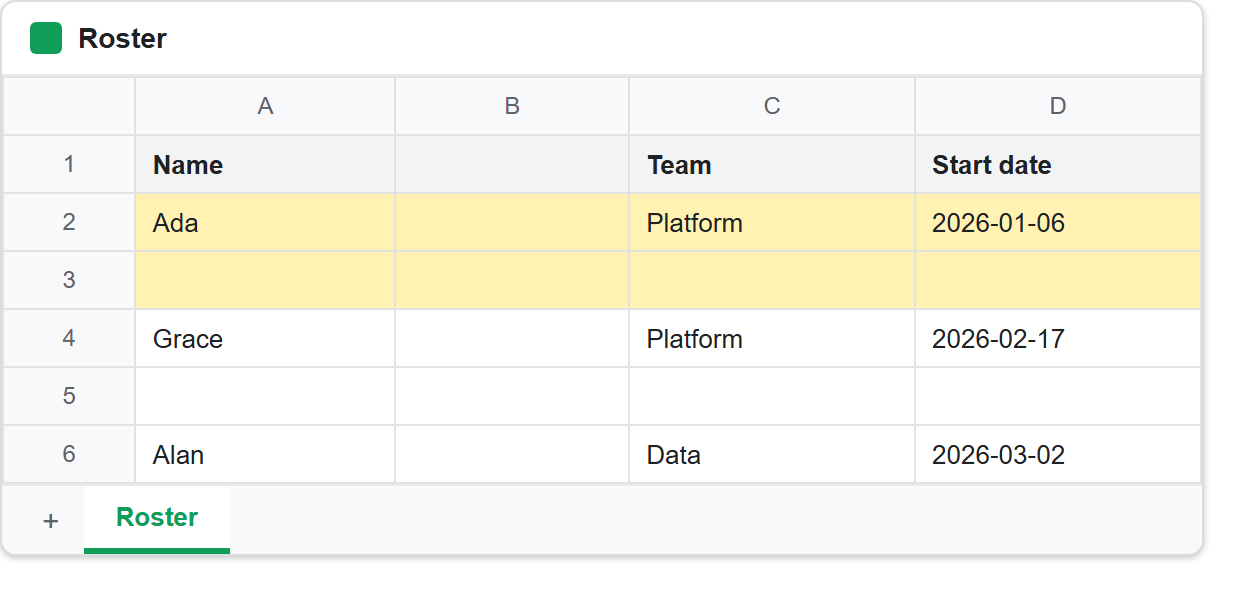
What the new row inherits.
The two readings after the grid are the point of the exercise. Row 2 was shaded cream. The row inserted directly beneath it came back as 1.00 / 0.95 / 0.70 — the same cream — because inheritFromBefore was true. The one inserted with the flag off reported no formatting.
So the flag is a straight choice between two reasonable behaviours. Inheriting keeps a striped or bordered table looking consistent when you splice a record into the middle. Not inheriting is what you want under a formatted header row, where copying the header’s bold white-on-green into a data row would look absurd.
There is one case where the choice is made for you:
Invalid requests[0].insertDimension: range.startIndex must not be 0
if inheritFromBefore is true.
Inserting at the very top has nothing before it to inherit from, so the API rejects the combination rather than guessing. Any loop that might insert at position zero needs to pass false for that one case.
Insert rows and columns in the right order.
When several inserts share one batchUpdate, the requests apply in order and each one shifts every index after it. Sending indexes 1 and 3 in ascending order does not put blanks before the second and fourth rows. Measured on a five-row fixture:
ascending  (1 then 3) -> r1  __  r2  __  r3  r4  r5
descending (3 then 1) -> r1  __  r2  r3  __  r4  r5
Only the descending run lands where it was asked to. The second ascending insert drifts up by one, because the first insert had already pushed everything down before it was evaluated. Sort your indexes downwards before batching and the problem disappears.
This is the same trap as deleting, in reverse, and the row deletion article covers the deletion half. One rule serves both: never send a batch of positional edits in ascending order.
Finally, note the column widths. autoResizeDimensions sized A, C and D to their contents — 41, 57 and 72 pixels — but the freshly inserted column B stayed at the default 100. Auto-resize fits a column to what is in it, and an empty column has nothing to fit, so it is left alone rather than collapsed to nothing.