This article shows why getCalculatedValue() can hand you an out-of-date number, and how the calculation cache causes it. PhpSpreadsheet memoises every formula result it works out. Read a formula once, change a cell that feeds it, then read the formula again, and you get the first answer back. Nothing throws. Nothing warns you.
That is what makes this worth an article of its own. A crash tells you where to look. A silently stale number does not, and it survives all the way into the file your users download. So the calculation cache is a correctness problem first and a performance feature second, which is the opposite of how it usually gets described.
Below we build a tiny revenue model, drive four scenarios through it, and watch the same wrong number come back four times. Then we fix it two different ways and measure which one you actually want.
Requirements to clear the calculation cache:
- Composer
- PHP 8.2 or newer
- The
gdandzipextensions, which PhpSpreadsheet 5 requires
Step 1.
First, set up the dependencies. Here we pin the 5.x line, tested with PhpSpreadsheet 5.9 on PHP 8.5. Note that 5.9.0 raised its floor to PHP 8.2, while 5.8.1 and earlier still run on 8.1. So the pin alone does not guarantee the version you think you are getting.
{
    "require": {
        "phpoffice/phpspreadsheet": "^5.0"
    }
}
Step 2.
Next, install phpspreadsheet.
$ composer install
Step 3.
Then build the model. It is one row: units in A1, unit price in B1, and revenue in C1 as a formula. This is the shape of every what-if script ever written against a spreadsheet, which is exactly why the bug bites here.
$book  = new Spreadsheet();
$sheet = $book->getActiveSheet();

$sheet->setCellValue('A1', 100);      // units
$sheet->setCellValue('B1', 9.99);     // unit price
$sheet->setCellValue('C1', '=A1*B1'); // revenue
Step 4.
Now drive four scenarios through it. Write a new number into A1, read C1 back, repeat. Reading the whole thing looks completely reasonable, and that is the trap.
foreach ([100, 250, 500, 1000] as $units) {
    $sheet->setCellValue('A1', $units);

    printf("    %5d units  ->  %8s\n", $units, $sheet->getCell('C1')->getCalculatedValue());
}
Every row prints 999. The first read evaluated =A1*B1 when A1 still held 100, PhpSpreadsheet stored the answer against the key Worksheet!C1, and the three later reads never touched the formula again. Writing to A1 does not invalidate anything, because the engine keeps no record of which cells feed which formula.
Worth separating this from a different cache with a similar name. getOldCalculatedValue() returns the number Excel saved inside the file, and it can be stale for its own unrelated reasons. The calculation cache described here lives in memory, belongs to PhpSpreadsheet, and applies even to a workbook you built from scratch and never saved.
Step 5.
So clear the calculation cache yourself. Calculation::getInstance() takes the workbook and returns its calculation engine, and clearCalculationCache() empties the stored results. Call it after each write and the next read is evaluated fresh.
use PhpOffice\PhpSpreadsheet\Calculation\Calculation;

$calc = Calculation::getInstance($book);

foreach ([100, 250, 500, 1000] as $units) {
    $sheet->setCellValue('A1', $units);
    $calc->clearCalculationCache();

    printf("    %5d units  ->  %8s\n", $units, $sheet->getCell('C1')->getCalculatedValue());
}
This empties the results for the entire workbook, not just the formula you touched. That is fine in a loop like this one, though it does mean every other formula gets recomputed on its next read as well.
Step 6.
Alternatively, switch the calculation cache off once and stop thinking about it. setCalculationCacheEnabled(false) makes every getCalculatedValue() call evaluate the formula, so the numbers track your writes without any bookkeeping on your part.
Calculation::getInstance($book)->setCalculationCacheEnabled(false);
Correctness is no longer your problem here, but speed is. As a rough measurement, a sheet of 1000 rows of =An*2+SUM(A1:An) read twice over took 6.55 seconds with the calculation cache on and 13.04 seconds with it off. Roughly double, in other words, and your own figure will depend on how heavy your formulas are. For a what-if loop over four scenarios that cost is invisible; for a report that reads thousands of formulas it is not.
Step 7.
One more thing to get right, because it is easy to miss. The calculation engine belongs to a single workbook. Calling Calculation::getInstance() with no argument returns a different object entirely, so any setting you apply to it is quietly discarded as far as your spreadsheet is concerned.
// Wrong: configures an instance your workbook never consults.
Calculation::getInstance()->setCalculationCacheEnabled(false);

// Right: pass the workbook.
Calculation::getInstance($book)->setCalculationCacheEnabled(false);
The first line runs without complaint and changes nothing. Since it is also the form most examples show when no workbook is handy, it is a realistic way to end up convinced the cache is off while your results stay stale.
Complete code for the calculation cache demo.
Here is the whole script. It runs the same four scenarios three times: once with the calculation cache at its default, once clearing it after every write, and once with it disabled up front.
<?php

require 'vendor/autoload.php';

use PhpOffice\PhpSpreadsheet\Calculation\Calculation;
use PhpOffice\PhpSpreadsheet\Spreadsheet;

// A one-row model: units in A1, unit price in B1, revenue in C1. Every run
// below writes the same four scenarios into A1 and reads C1 straight back.
function whatIf(string $label, ?bool $cacheEnabled = null, bool $clearEachTime = false): void
{
    $book  = new Spreadsheet();
    $sheet = $book->getActiveSheet();
    $calc  = Calculation::getInstance($book);

    if ($cacheEnabled !== null) {
        $calc->setCalculationCacheEnabled($cacheEnabled);
    }

    $sheet->setCellValue('A1', 100);      // units
    $sheet->setCellValue('B1', 9.99);     // unit price
    $sheet->setCellValue('C1', '=A1*B1'); // revenue

    echo "$label\n";

    foreach ([100, 250, 500, 1000] as $units) {
        $sheet->setCellValue('A1', $units);

        if ($clearEachTime) {
            $calc->clearCalculationCache();
        }

        printf("    %5d units  ->  %8s\n", $units, $sheet->getCell('C1')->getCalculatedValue());
    }

    echo "\n";
    $book->disconnectWorksheets();
}

whatIf('1. Calculation cache left ON (this is the default):');
whatIf('2. clearCalculationCache() after every write:', null, true);
whatIf('3. setCalculationCacheEnabled(false) once, up front:', false);

// The calculation cache belongs to ONE workbook. getInstance() with no
// argument hands back a different object, so settings applied to it are lost.
$first  = new Spreadsheet();
$second = new Spreadsheet();

echo "Which instance am I configuring?\n";
printf("    getInstance(\$first) === getInstance(\$second) : %s\n",
    Calculation::getInstance($first) === Calculation::getInstance($second) ? 'same' : 'DIFFERENT');
printf("    getInstance(\$first) === getInstance()        : %s\n",
    Calculation::getInstance($first) === Calculation::getInstance() ? 'same' : 'DIFFERENT');

$first->disconnectWorksheets();
$second->disconnectWorksheets();
Test the calculation cache script.
Run it from the command line.
$ php cache.php
Result of the calculation cache comparison.
The first block is the bug. Four different scenarios, one answer, no error. The second and third blocks are the same four scenarios computed properly.
1. Calculation cache left ON (this is the default):
      100 units  ->       999
      250 units  ->       999
      500 units  ->       999
     1000 units  ->       999

2. clearCalculationCache() after every write:
      100 units  ->       999
      250 units  ->    2497.5
      500 units  ->      4995
     1000 units  ->      9990

3. setCalculationCacheEnabled(false) once, up front:
      100 units  ->       999
      250 units  ->    2497.5
      500 units  ->      4995
     1000 units  ->      9990

Which instance am I configuring?
    getInstance($first) === getInstance($second) : DIFFERENT
    getInstance($first) === getInstance()        : DIFFERENT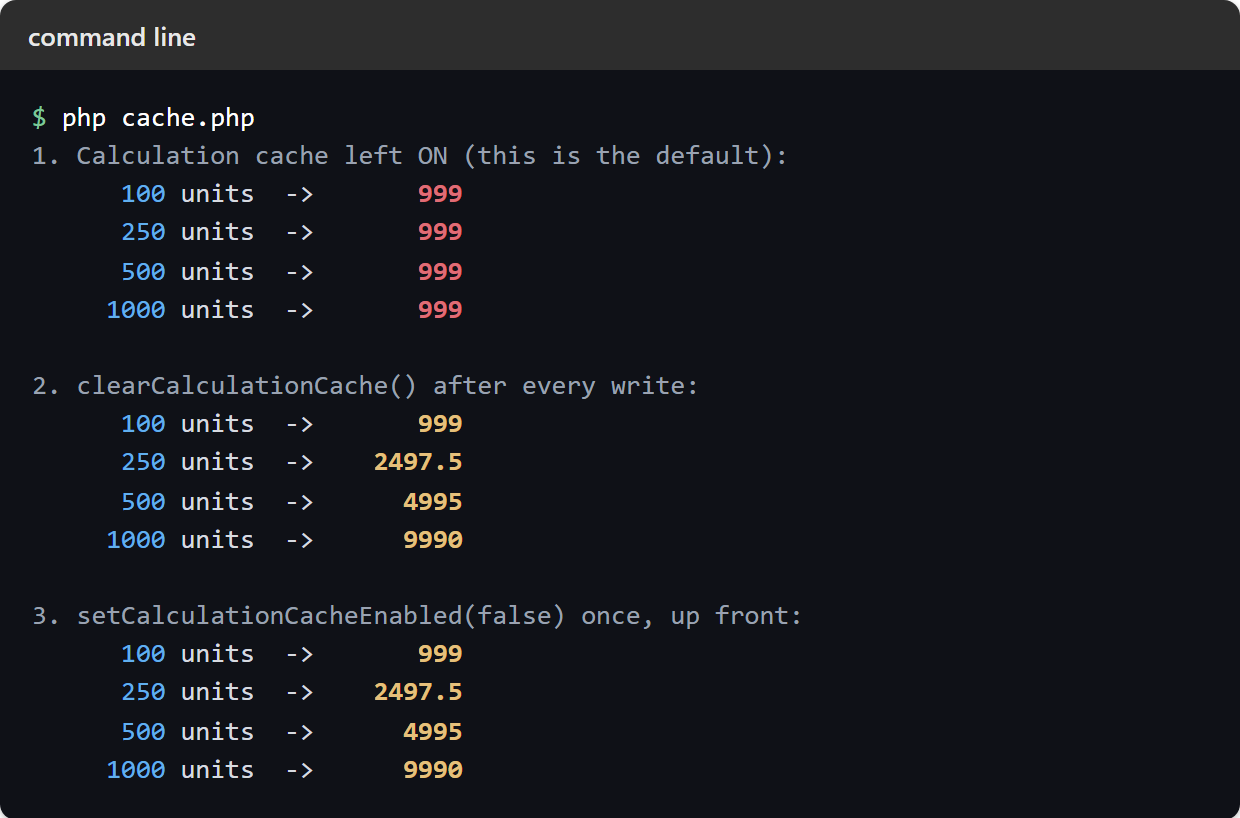
Notice that 999 is a real number rather than a null or a zero. It is the right answer to a question you asked earlier, which is why nothing downstream can spot it.
The method that quietly does nothing.
PhpSpreadsheet also ships clearCalculationCacheForWorksheet(), which reads like the surgical option: clear one sheet, leave the rest of the workbook alone. On version 5.9.0 it does not work, and it fails silently.
$sheet->setCellValue('A1', 250);
Calculation::getInstance($book)->clearCalculationCacheForWorksheet($sheet->getTitle());

echo $sheet->getCell('C1')->getCalculatedValue();  // 999, still the old value
The reason is a mismatch in the keys. Results are stored flat, under 'Worksheet!C1', while the method unsets the bare key 'Worksheet', which never exists. So the call is a no-op that returns void and reports nothing at all. Until that is fixed upstream, use clearCalculationCache() and accept that it clears the whole workbook.
Which calculation cache setting to use.
For a script that writes a workbook and saves it, leave the calculation cache alone. Each formula is read once, the memoised value is never wrong, and you get the speed for free.
For a what-if loop, a goal-seek, or anything that rewrites a precedent cell and reads the result again, disable the calculation cache with setCalculationCacheEnabled(false) at the top of the run. It is one line, it cannot be forgotten halfway through a loop, and the cost is bounded.
Reach for clearCalculationCache() when the reads vastly outnumber the writes. A report that evaluates thousands of formulas between a handful of edits keeps the cache working for the bulk of the run and pays only at the edits. That is the case where the extra bookkeeping earns its keep.