This article shows how to reject a corrupt or unreadable Excel file in PHP with the latest version of PhpSpreadsheet, instead of letting one take down the page. Every other example on this site loads a file that exists and is valid. As soon as a file arrives from somebody else, that assumption dies.
There is a specific trap here, and it is not the one people guard against. Handling an uploaded Excel file already checks that the bytes really are a spreadsheet, using IOFactory::identify(). However, identify() only reports which reader would try. A workbook can pass that check cleanly and still explode halfway through load(), because the damage is inside the archive rather than at its front.
Two facts make this survivable. First, Reader\Exception is a subclass of the library’s general exception, so catching only the reader’s own class misses the failures that happen deeper in. Second, a corrupt or unreadable Excel file can load without throwing anything at all and still be worthless. Below we manufacture four broken files, watch the usual approach die on one of them, and then build a loader that turns every case into a sentence a user can act on.
Requirements to reject a corrupt or unreadable Excel file:
- Composer
- PHP 8.2 or newer
Tested with PhpSpreadsheet 5.9 on PHP 8.5.
Step 1.
First, set up the dependencies. Here we pin the latest major release of PhpSpreadsheet (the 5.x line).
{
    "require": {
        "phpoffice/phpspreadsheet": "^5.0"
    }
}
Step 2.
Next, install phpspreadsheet.
$ composer install
Step 3.
Then manufacture the broken files, because you cannot test error handling without errors. Each one models a real accident rather than a contrived byte pattern.
<?php

require 'vendor/autoload.php';

use PhpOffice\PhpSpreadsheet\Spreadsheet;
use PhpOffice\PhpSpreadsheet\Writer\Xlsx;

@mkdir('broken');

// A real, valid workbook to use as the control and as raw material.
$spreadsheet = new Spreadsheet();
$sheet = $spreadsheet->getActiveSheet();
$sheet->setTitle('Report');
$sheet->fromArray([['id', 'name'], [1, 'Alice'], [2, 'Bob']], null, 'A1');
(new Xlsx($spreadsheet))->save('broken/good.xlsx');

// 1. Zero bytes. A failed upload or a full disk produces exactly this.
file_put_contents('broken/empty.xlsx', '');

// 2. A genuine .xlsx cut off half way - an interrupted transfer. The ZIP
//    central directory lives at the END of the file, so truncation destroys it.
$whole = file_get_contents('broken/good.xlsx');
file_put_contents('broken/truncated.xlsx', substr($whole, 0, (int) (strlen($whole) / 2)));

// 3. A perfectly valid ZIP that simply is not a spreadsheet.
$zip = new ZipArchive();
$zip->open('broken/notxlsx.xlsx', ZipArchive::CREATE | ZipArchive::OVERWRITE);
$zip->addFromString('readme.txt', "I am a zip, but I am not a workbook.\n");
$zip->close();

// 4. A valid ZIP shaped like an xlsx but with its core part missing.
copy('broken/good.xlsx', 'broken/gutted.xlsx');
$zip = new ZipArchive();
$zip->open('broken/gutted.xlsx');
$zip->deleteName('xl/workbook.xml');
$zip->close();
Step 4.
Now watch the ordinary approach fail. This is the shape most code takes — guard identify(), then trust load() — and it is enough for three of the four files.
<?php

require 'vendor/autoload.php';

use PhpOffice\PhpSpreadsheet\IOFactory;
use PhpOffice\PhpSpreadsheet\Reader\Exception as ReaderException;

// The usual approach: guard identify(), then trust load().
try {
    $type = IOFactory::identify('broken/gutted.xlsx');
} catch (ReaderException $e) {
    exit("Rejected: not a spreadsheet.\n");
}

echo "identify() says: {$type}\n";

$spreadsheet = IOFactory::load('broken/gutted.xlsx');

echo "never reached\n";
The gutted file is still a valid ZIP whose front looks exactly like a workbook, so identify() is satisfied and the catch never fires. The failure happens later, and it is fatal:
$ php naive.php
identify() says: Xlsx

Fatal error: Uncaught PhpOffice\PhpSpreadsheet\Exception: You tried to set a sheet
active by the out of bounds index: 0. The actual number of sheets is 0.
in vendor/phpoffice/phpspreadsheet/src/PhpSpreadsheet/Spreadsheet.php:821
Note the class in that message. It is PhpOffice\PhpSpreadsheet\Exception, not Reader\Exception, which is why the existing catch lets it straight through.
Step 5.
So get the class hierarchy right, because everything else follows from it. Reader\Exception extends the library’s general Exception, which in turn extends PHP’s RuntimeException.
RuntimeException
  └── PhpOffice\PhpSpreadsheet\Exception          <- thrown by a damaged workbook
        └── PhpOffice\PhpSpreadsheet\Reader\Exception   <- thrown by identify()
Consequently, catching the parent around load() catches both, while catching the child catches only one. That single choice is the difference between a message and a stack trace.
Step 6.
Now write the loader. It returns either a spreadsheet or a reason, so the caller never has to guess which happened.
<?php

require 'vendor/autoload.php';

use PhpOffice\PhpSpreadsheet\Exception as SpreadsheetException;
use PhpOffice\PhpSpreadsheet\IOFactory;
use PhpOffice\PhpSpreadsheet\Reader\Exception as ReaderException;
use PhpOffice\PhpSpreadsheet\Spreadsheet;

const ALLOWED = ['Xlsx', 'Xls', 'Ods'];

/**
 * Load a spreadsheet, or explain in one sentence why it cannot be loaded.
 *
 * @return array{0: ?Spreadsheet, 1: string}
 */
function loadSafely(string $path): array
{
    // 1. An empty file is not a spreadsheet, and nothing below will say so.
    if (!is_file($path) || filesize($path) === 0) {
        return [null, 'the file is empty'];
    }

    // 2. Which reader do the BYTES call for? Reader\Exception means none.
    try {
        $type = IOFactory::identify($path);
    } catch (ReaderException $e) {
        return [null, 'it is not a spreadsheet in any format we can read'];
    }

    if (!in_array($type, ALLOWED, true)) {
        return [null, "{$type} files are not accepted"];
    }

    // 3. Now actually read it. Catch the PARENT class: a damaged workbook
    //    fails deep inside the reader and throws the generic exception, not
    //    Reader\Exception. Catching only the reader's own class misses it.
    try {
        $spreadsheet = IOFactory::load($path);
    } catch (SpreadsheetException $e) {
        return [null, 'it is a ' . $type . ' file but it is damaged'];
    }

    // 4. It loaded. That still does not mean it has anything in it.
    $worksheet = $spreadsheet->getActiveSheet();

    if ($worksheet->getHighestRow() === 1 && $worksheet->getHighestColumn() === 'A'
        && $worksheet->getCell('A1')->getValue() === null) {
        return [null, 'it opened but contains no data'];
    }

    return [$spreadsheet, ''];
}
Step 7.
Finally, run every file through it and report the verdict.
foreach (glob('broken/*.xlsx') as $path) {
    [$spreadsheet, $why] = loadSafely($path);

    if ($spreadsheet === null) {
        printf("%-16s REJECTED  - %s\n", basename($path), $why);
        continue;
    }

    $worksheet = $spreadsheet->getActiveSheet();
    printf(
        "%-16s ACCEPTED  - sheet \"%s\", %d rows, %d columns\n",
        basename($path),
        $worksheet->getTitle(),
        $worksheet->getHighestRow(),
        \PhpOffice\PhpSpreadsheet\Cell\Coordinate::columnIndexFromString($worksheet->getHighestColumn())
    );
}
Test rejecting a corrupt or unreadable Excel file.
Command line testing.
$ php make-broken.php
$ php safe-load.php
Result of rejecting a corrupt or unreadable Excel file.
Every corrupt or unreadable Excel file is turned away with its own reason, and only the valid workbook gets through. Nothing throws, and nothing reaches the user as a stack trace:
empty.xlsx       REJECTED  - the file is empty
good.xlsx        ACCEPTED  - sheet "Report", 3 rows, 2 columns
gutted.xlsx      REJECTED  - it is a Xlsx file but it is damaged
notxlsx.xlsx     REJECTED  - it is not a spreadsheet in any format we can read
truncated.xlsx   REJECTED  - it is not a spreadsheet in any format we can read
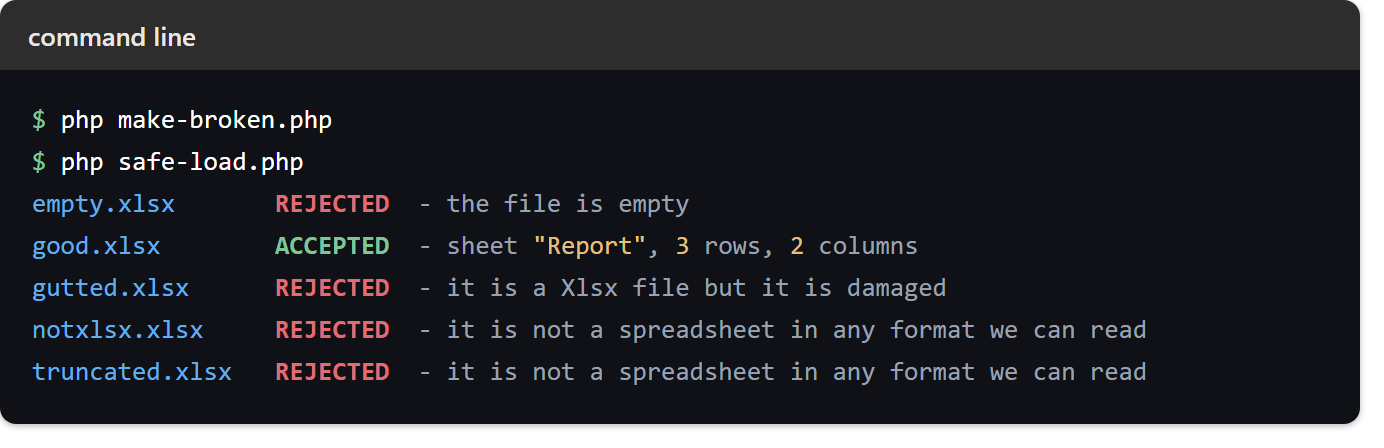
The two rejections that share a message earn it honestly. A truncated .xlsx loses the ZIP central directory, which sits at the end of the file, so what remains is no longer a readable archive at all — the same reason a stray byte in front of a download corrupts it.
One corrupt or unreadable Excel file that loads without error.
One result deserves a closer look, because the guard that catches it looks redundant until you remove it. Run the empty file through the raw library and nothing goes wrong:
empty.xlsx identify=Csv load OK, sheet "Worksheet", 1 rows
A CSV has no signature of its own, so a file with no bytes is a perfectly plausible CSV — an empty one. As a result identify() answers Csv, load() succeeds, and you are handed a real Spreadsheet object containing one empty row. No exception is thrown anywhere.
Therefore the size check on line one is not defensive clutter; it is the only thing standing between an empty upload and a silently empty import. This is the same reasoning that keeps Csv off the allow-list in the upload article, seen from the other side.