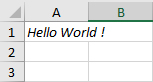
Stylize the fonts on an xlsx file and make it italic with this PhpSpreadsheet tutorial.
Requirements:
- Composer
- PHP 7.2 or newer
Step 1.
Setup dependencies.
{
    "require": {
        "phpoffice/phpspreadsheet": "^1.3"
    }
}
Step 2.
Install phpspreadsheet.
$ composer install
Step 3.
Create a new PHP file, and start coding.
<?php

// Autoload dependencies
require 'vendor/autoload.php';

// Import the core class of PhpSpreadsheet
use PhpOffice\PhpSpreadsheet\Spreadsheet;

// Import the Xlsx writer class
use PhpOffice\PhpSpreadsheet\Writer\Xlsx;

// Create a new Spreadsheet object
$spreadsheet = new Spreadsheet();

// Retrieve the current active worksheet
$sheet = $spreadsheet->getActiveSheet();

// Set cell A1 with the "Hello World !" string value
$sheet->setCellValue('A1', 'Hello World !');

// Set cell A1 font style to italic
$sheet->getStyle('A1')->getFont()->setItalic(true);

// Write a new .xlsx file
$writer = new Xlsx($spreadsheet);

// Save the new .xlsx file
$writer->save('create-xlsx-files-with-italic-texts.xlsx');
Test.
Run the following codes.
$ php create-xlsx-files-with-italic-texts.php
Result.
Open the generated file create-xlsx-files-with-italic-texts.xlsx.