This article shows how to add strikethrough, superscript and subscript text in Excel files in PHP with the latest version of PhpSpreadsheet. All three live on the same object, the cell’s Font, so they are one lesson rather than three. A struck-through price marks an old value, while superscript and subscript carry the notation that plain text cannot — footnote markers, units, and chemical formulae.
The calls are short. First getStyle() selects the cell, then getFont() reaches its font, and finally setStrikethrough(), setSuperscript() or setSubscript() switches the effect on. Because these are font settings, each one applies to the entire cell.
That whole-cell scope is the thing to understand before you start. If you want part of a cell raised or struck — the 2 in x² but not the x — that is a different tool, and rich text inside a single cell is where it belongs. Below we style three cells, read the file back to confirm the settings stuck, and then look at a trap that catches people out: superscript and subscript cannot both be on.
Requirements to add strikethrough, superscript and subscript text:
- Composer
- PHP 8.2 or newer
Tested with PhpSpreadsheet 5.9 on PHP 8.5.
Step 1.
First, set up the dependencies. Here we pin the latest major release of PhpSpreadsheet (the 5.x line).
{
    "require": {
        "phpoffice/phpspreadsheet": "^5.0"
    }
}
Step 2.
Next, install phpspreadsheet.
$ composer install
Step 3.
Then create a new PHP file. Load Composer’s autoloader and import Spreadsheet, the Xlsx writer, and IOFactory for reading the file back at the end.
<?php

require 'vendor/autoload.php';

use PhpOffice\PhpSpreadsheet\IOFactory;
use PhpOffice\PhpSpreadsheet\Spreadsheet;
use PhpOffice\PhpSpreadsheet\Writer\Xlsx;
Step 4.
Create the spreadsheet and lay down one row per effect. Column A names the style and column B carries the text that will show it.
$spreadsheet = new Spreadsheet();
$worksheet = $spreadsheet->getActiveSheet();
$worksheet->setTitle('Font');

$worksheet->fromArray([
    ['Style', 'Example'],
    ['Strikethrough', 'Was 49.99'],
    ['Superscript', 'x2'],
    ['Subscript', 'H2O'],
], null, 'A1');
Step 5.
Now apply the three effects. Each call reaches the same place — the cell’s font — and each one styles the whole cell, so x2 becomes a fully raised x2 rather than an x with a raised 2.
// Each of these styles the WHOLE cell.
$worksheet->getStyle('B2')->getFont()->setStrikethrough(true);
$worksheet->getStyle('B3')->getFont()->setSuperscript(true);
$worksheet->getStyle('B4')->getFont()->setSubscript(true);
You can style a range the same way. For example, getStyle('B2:B10') strikes ten cells with one call, which is how you would grey out a block of cancelled orders.
Step 6.
Widen the columns so nothing clips, then save.
$worksheet->getColumnDimension('A')->setAutoSize(true);
$worksheet->getColumnDimension('B')->setAutoSize(true);

(new Xlsx($spreadsheet))->save('font-styles.xlsx');
echo "Wrote font-styles.xlsx\n\n";
Step 7.
Finally, read the file back. Writing a style and having it survive the round trip are two different claims, so this loop checks all three effects on each cell and proves which one is actually set.
$reloaded = IOFactory::load('font-styles.xlsx');
$sheet = $reloaded->getActiveSheet();

foreach (['B2' => 'Strikethrough', 'B3' => 'Superscript', 'B4' => 'Subscript'] as $cell => $label) {
    $font = $sheet->getStyle($cell)->getFont();
    printf(
        "%-4s %-14s strike=%-5s super=%-5s sub=%s\n",
        $cell,
        $label,
        var_export($font->getStrikethrough(), true),
        var_export($font->getSuperscript(), true),
        var_export($font->getSubscript(), true)
    );
}
Complete code to add strikethrough, superscript and subscript text.
<?php

require 'vendor/autoload.php';

use PhpOffice\PhpSpreadsheet\IOFactory;
use PhpOffice\PhpSpreadsheet\Spreadsheet;
use PhpOffice\PhpSpreadsheet\Writer\Xlsx;

$spreadsheet = new Spreadsheet();
$worksheet = $spreadsheet->getActiveSheet();
$worksheet->setTitle('Font');

$worksheet->fromArray([
    ['Style', 'Example'],
    ['Strikethrough', 'Was 49.99'],
    ['Superscript', 'x2'],
    ['Subscript', 'H2O'],
], null, 'A1');

// Each of these styles the WHOLE cell.
$worksheet->getStyle('B2')->getFont()->setStrikethrough(true);
$worksheet->getStyle('B3')->getFont()->setSuperscript(true);
$worksheet->getStyle('B4')->getFont()->setSubscript(true);

$worksheet->getColumnDimension('A')->setAutoSize(true);
$worksheet->getColumnDimension('B')->setAutoSize(true);

(new Xlsx($spreadsheet))->save('font-styles.xlsx');
echo "Wrote font-styles.xlsx\n\n";

// Read the file back to prove the styles survived the round trip.
$reloaded = IOFactory::load('font-styles.xlsx');
$sheet = $reloaded->getActiveSheet();

foreach (['B2' => 'Strikethrough', 'B3' => 'Superscript', 'B4' => 'Subscript'] as $cell => $label) {
    $font = $sheet->getStyle($cell)->getFont();
    printf(
        "%-4s %-14s strike=%-5s super=%-5s sub=%s\n",
        $cell,
        $label,
        var_export($font->getStrikethrough(), true),
        var_export($font->getSuperscript(), true),
        var_export($font->getSubscript(), true)
    );
}
Test adding strikethrough, superscript and subscript text.
Command line testing.
$ php font-styles.php
Result of adding strikethrough, superscript and subscript text.
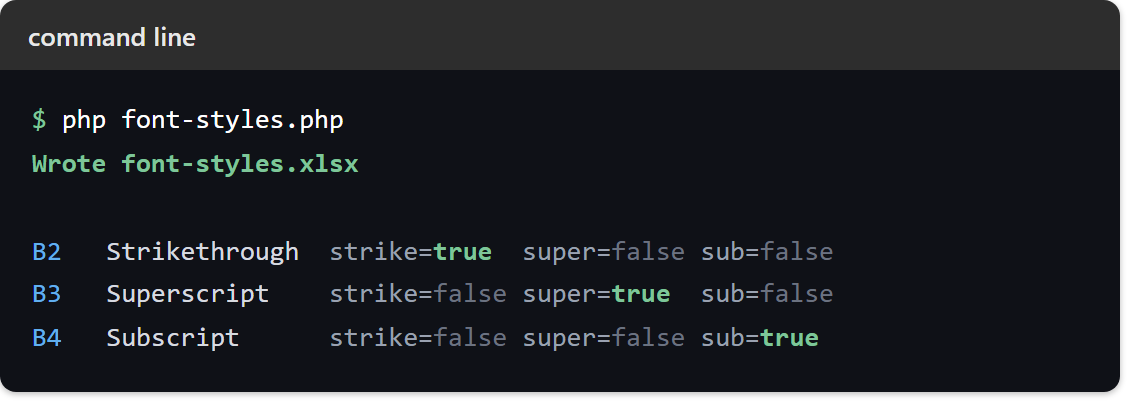
PhpSpreadsheet writes the file, and every effect reads back exactly where it was set. Notice that each row has precisely one true, which is what confirms the settings are independent of each other:
Wrote font-styles.xlsx

B2   Strikethrough  strike=true  super=false sub=false
B3   Superscript    strike=false super=true  sub=false
B4   Subscript      strike=false super=false sub=true
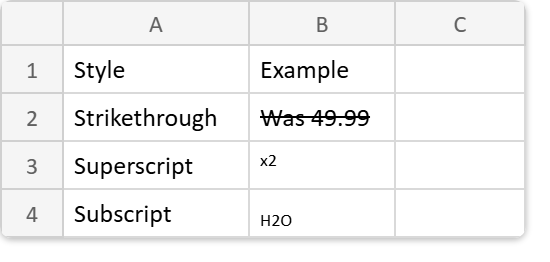
Open font-styles.xlsx in Excel and you can see the effects rather than merely read them back. Excel draws a line through the old price, and the other two cells sit raised and lowered against the baseline:
Superscript and subscript cannot both be on.
Here is the trap. Excel stores the two as one setting with three states — raised, lowered, or neither — so they are mutually exclusive. Turning one on therefore turns the other off, silently and with no warning.
<?php

require 'vendor/autoload.php';

use PhpOffice\PhpSpreadsheet\Spreadsheet;

$spreadsheet = new Spreadsheet();
$font = $spreadsheet->getActiveSheet()->getStyle('A1')->getFont();

$font->setSuperscript(true);
echo "after setSuperscript(true):\n";
echo '  superscript = ' . var_export($font->getSuperscript(), true) . "\n";
echo '  subscript   = ' . var_export($font->getSubscript(), true) . "\n";

$font->setSubscript(true);
echo "then setSubscript(true):\n";
echo '  superscript = ' . var_export($font->getSuperscript(), true) . "\n";
echo '  subscript   = ' . var_export($font->getSubscript(), true) . "\n";
Running it shows the second setting revoking the first:
$ php exclusive.php
after setSuperscript(true):
  superscript = true
  subscript   = false
then setSubscript(true):
  superscript = false
  subscript   = true
So the last call wins. Strikethrough is different, because it is a separate flag — one cell can carry a strike and a superscript at once. Watch for this when a loop applies styles, or when a config array merges them, since two rules that each look correct can quietly cancel one another.