This article shows how to filter rows in a Google Sheet from PHP with a basic filter, and how to add named filter views that do not disturb anyone else. It also covers the one thing about filters that catches every script that reads data back.
Filtering is the counterpart to sorting a range, and the pair is worth understanding together. A sort rewrites the sheet. A filter, by contrast, never touches a single cell — it only changes what a person looking at the sheet can see. On the Excel side the nearest thing is auto-filter settings in xlsx files.
There are two requests here, and they are not alternatives. First, setBasicFilter sets the one filter a sheet may carry, and everyone sees it. Next, addFilterView adds a named view with its own criteria and its own sort, and a sheet can hold as many of those as you like.
Requirements to filter rows:
- Authenticate With A Service Account
- Create A Google Cloud Project
- Enable Google Sheets API Library
- Install The Google Client Library Specifying Google Sheets
- Composer
- PHP 8.1 or newer
Step 1.
First, set up the dependencies. This is the Sheets-only install used across this series. Tested with google/apiclient 2.19 on PHP 8.5.
{
    "require": {
        "google/apiclient": "^2.12.1"
    },
    "scripts": {
        "pre-autoload-dump": "Google\\Task\\Composer::cleanup"
    },
    "extra": {
        "google/apiclient-services": [
            "Sheets"
        ]
    }
}
Step 2.
Next, install the Google Client Library.
$ composer install
Step 3.
Then build the client and get a tab to work on, with a small order book to filter.
<?php

require 'vendor/autoload.php';

use Google\Client;
use Google\Service\Sheets;
use Google\Service\Sheets\BatchUpdateSpreadsheetRequest;
use Google\Service\Sheets\Request;
use Google\Service\Sheets\ValueRange;

$spreadsheetId = 'YOUR_SPREADSHEET_ID';
$keyFile = 'service-account.json';
$tabName = 'Orders';

$client = new Client();
$client->setApplicationName('Filter Rows');
$client->setAuthConfig($keyFile);
$client->addScope(Sheets::SPREADSHEETS);

$service = new Sheets($client);

$sheetId = freshSheetId($service, $spreadsheetId, $tabName);

$service->spreadsheets_values->update(
    $spreadsheetId,
    $tabName . '!A1',
    new ValueRange(['values' => [
        ['Client', 'Region', 'Status', 'Total'],
        ['Acme', 'North', 'paid', 1200],
        ['Bravo', 'South', 'pending', 340],
        ['Cortex', 'North', 'paid', 980],
        ['Delta', 'East', 'pending', 2150],
        ['Echo', 'South', 'paid', 275],
        ['Foxtrot', 'North', 'cancelled', 640],
    ]]),
    ['valueInputOption' => 'USER_ENTERED']
);
Step 4.
Set the basic filter. The criteria map takes a column index for its key, and like the sort key in sortRange, that index counts from the sheet rather than from the range. Column 3 is Total.
A condition holds a type and its arguments. Here, NUMBER_GREATER with one value is the whole rule.
$gridRange = [
    'sheetId'          => $sheetId,
    'startRowIndex'    => 0,
    'endRowIndex'      => 7,
    'startColumnIndex' => 0,
    'endColumnIndex'   => 4,
];

$service->spreadsheets->batchUpdate($spreadsheetId, new BatchUpdateSpreadsheetRequest([
    'requests' => [
        new Request(['setBasicFilter' => ['filter' => [
            'range'    => $gridRange,
            'criteria' => [
                3 => ['condition' => [
                    'type'   => 'NUMBER_GREATER',
                    'values' => [['userEnteredValue' => '500']],
                ]],
            ],
        ]]]),
    ],
]));
Include the header row in the range. The filter treats the first row as labels and gives it the dropdown arrows, so leaving it out filters the header away along with everything else.
Step 5.
Now read the data back, and then separately ask the API which rows the filter hides. These are two different questions and they have different answers — which is the point of the whole article.
function hiddenRows(Sheets $service, string $spreadsheetId, string $range): array
{
    $meta = $service->spreadsheets->get($spreadsheetId, [
        'ranges'          => [$range],
        'includeGridData' => true,
        'fields'          => 'sheets(data(rowMetadata(hiddenByFilter)))',
    ]);

    $hidden = [];

    foreach ($meta->getSheets()[0]->getData()[0]->getRowMetadata() as $index => $row) {
        if ($row->getHiddenByFilter()) {
            $hidden[] = $index + 1;
        }
    }

    return $hidden;
}
Step 6.
Criteria come in a second flavour. Instead of a condition, list the values you want gone. This is what the checkbox list in the browser produces, and it is often the easier fit — there is no condition type for “anything except these two words”.
$service->spreadsheets->batchUpdate($spreadsheetId, new BatchUpdateSpreadsheetRequest([
    'requests' => [
        new Request(['setBasicFilter' => ['filter' => [
            'range'    => $gridRange,
            'criteria' => [
                2 => ['hiddenValues' => ['cancelled', 'pending']],
            ],
        ]]]),
    ],
]));
Note that this replaced the previous filter rather than adding to it. A sheet has one basic filter; setting it again overwrites whatever was there.
Step 7.
A filter view is the version that does not step on anyone. It carries a title, its own criteria, and — unlike the basic filter — its own sortSpecs. The reply hands back an id you need in order to link to it.
$response = $service->spreadsheets->batchUpdate($spreadsheetId, new BatchUpdateSpreadsheetRequest([
    'requests' => [
        new Request(['addFilterView' => ['filter' => [
            'title'     => 'Big northern orders',
            'range'     => $gridRange,
            'sortSpecs' => [
                ['dimensionIndex' => 3, 'sortOrder' => 'DESCENDING'],
            ],
            'criteria'  => [
                1 => ['condition' => [
                    'type'   => 'TEXT_EQ',
                    'values' => [['userEnteredValue' => 'North']],
                ]],
            ],
        ]]]),
    ],
]));

$view = $response->getReplies()[0]->getAddFilterView()->getFilter();

printf("  filterViewId : %d\n", $view->getFilterViewId());
printf("  open it at   : .../edit#gid=%d&fvid=%d\n", $sheetId, $view->getFilterViewId());
Step 8.
Finally, take the basic filter off again. clearBasicFilter needs nothing but the sheet id, because there was only ever one of them to clear. It leaves filter views alone, of course — you delete those one at a time with deleteFilterView.
$service->spreadsheets->batchUpdate($spreadsheetId, new BatchUpdateSpreadsheetRequest([
    'requests' => [
        new Request(['clearBasicFilter' => ['sheetId' => $sheetId]]),
    ],
]));
Complete code to filter rows.
<?php

require 'vendor/autoload.php';

use Google\Client;
use Google\Service\Sheets;
use Google\Service\Sheets\BatchUpdateSpreadsheetRequest;
use Google\Service\Sheets\Request;
use Google\Service\Sheets\ValueRange;

$spreadsheetId = 'YOUR_SPREADSHEET_ID';
$keyFile = 'service-account.json';
$tabName = 'Orders';

$client = new Client();
$client->setApplicationName('Filter Rows');
$client->setAuthConfig($keyFile);
$client->addScope(Sheets::SPREADSHEETS);

$service = new Sheets($client);

/**
 * Return a brand-new tab with this name, deleting any previous one.
 */
function freshSheetId(Sheets $service, string $spreadsheetId, string $title): int
{
    $requests = [];

    foreach ($service->spreadsheets->get($spreadsheetId)->getSheets() as $sheet) {
        if ($sheet->getProperties()->getTitle() === $title) {
            $requests[] = new Request([
                'deleteSheet' => ['sheetId' => $sheet->getProperties()->getSheetId()],
            ]);
        }
    }

    $requests[] = new Request(['addSheet' => ['properties' => ['title' => $title]]]);

    $response = $service->spreadsheets->batchUpdate($spreadsheetId, new BatchUpdateSpreadsheetRequest([
        'requests' => $requests,
    ]));

    $replies = $response->getReplies();

    return end($replies)->getAddSheet()->getProperties()->getSheetId();
}

/** Ask the API which rows the filter is currently hiding. */
function hiddenRows(Sheets $service, string $spreadsheetId, string $range): array
{
    $meta = $service->spreadsheets->get($spreadsheetId, [
        'ranges'          => [$range],
        'includeGridData' => true,
        'fields'          => 'sheets(data(rowMetadata(hiddenByFilter)))',
    ]);

    $hidden = [];

    foreach ($meta->getSheets()[0]->getData()[0]->getRowMetadata() as $index => $row) {
        if ($row->getHiddenByFilter()) {
            $hidden[] = $index + 1;
        }
    }

    return $hidden;
}

$sheetId = freshSheetId($service, $spreadsheetId, $tabName);

$service->spreadsheets_values->update(
    $spreadsheetId,
    $tabName . '!A1',
    new ValueRange(['values' => [
        ['Client', 'Region', 'Status', 'Total'],
        ['Acme', 'North', 'paid', 1200],
        ['Bravo', 'South', 'pending', 340],
        ['Cortex', 'North', 'paid', 980],
        ['Delta', 'East', 'pending', 2150],
        ['Echo', 'South', 'paid', 275],
        ['Foxtrot', 'North', 'cancelled', 640],
    ]]),
    ['valueInputOption' => 'USER_ENTERED']
);

$dataRange = $tabName . '!A1:D7';
$gridRange = [
    'sheetId'          => $sheetId,
    'startRowIndex'    => 0,
    'endRowIndex'      => 7,
    'startColumnIndex' => 0,
    'endColumnIndex'   => 4,
];

// ----------------------------------------------------------- basic filter
// Column index 3 is Total. Criteria are keyed by column index, and the key is
// absolute - the fourth column of the sheet, not the fourth column of the range.
$service->spreadsheets->batchUpdate($spreadsheetId, new BatchUpdateSpreadsheetRequest([
    'requests' => [
        new Request(['setBasicFilter' => ['filter' => [
            'range'    => $gridRange,
            'criteria' => [
                3 => ['condition' => [
                    'type'   => 'NUMBER_GREATER',
                    'values' => [['userEnteredValue' => '500']],
                ]],
            ],
        ]]]),
    ],
]));

echo "Basic filter set: Total > 500\n\n";

$rows = $service->spreadsheets_values->get($spreadsheetId, $dataRange)->getValues() ?? [];

printf("values.get still returns %d rows:\n", count($rows));
foreach ($rows as $index => $row) {
    printf("  row %-2d %-9s %-7s %-10s %s\n", $index + 1, $row[0], $row[1], $row[2], $row[3]);
}

$hidden = hiddenRows($service, $spreadsheetId, $dataRange);

printf("\nRows the filter is hiding in the browser: %s\n", implode(', ', $hidden) ?: 'none');

// -------------------------------------------------- hiddenValues criteria
// The other way to write criteria: name the values to hide, not a condition.
$service->spreadsheets->batchUpdate($spreadsheetId, new BatchUpdateSpreadsheetRequest([
    'requests' => [
        new Request(['setBasicFilter' => ['filter' => [
            'range'    => $gridRange,
            'criteria' => [
                2 => ['hiddenValues' => ['cancelled', 'pending']],
            ],
        ]]]),
    ],
]));

$hidden = hiddenRows($service, $spreadsheetId, $dataRange);

printf("\nAfter replacing it with hiddenValues on Status: rows %s hidden\n", implode(', ', $hidden) ?: 'none');

// ------------------------------------------------------------ filter view
$response = $service->spreadsheets->batchUpdate($spreadsheetId, new BatchUpdateSpreadsheetRequest([
    'requests' => [
        new Request(['addFilterView' => ['filter' => [
            'title'     => 'Big northern orders',
            'range'     => $gridRange,
            'sortSpecs' => [
                ['dimensionIndex' => 3, 'sortOrder' => 'DESCENDING'],
            ],
            'criteria'  => [
                1 => ['condition' => [
                    'type'   => 'TEXT_EQ',
                    'values' => [['userEnteredValue' => 'North']],
                ]],
            ],
        ]]]),
    ],
]));

$view = $response->getReplies()[0]->getAddFilterView()->getFilter();

printf("\nFilter view created: '%s'\n", $view->getTitle());
printf("  filterViewId : %d\n", $view->getFilterViewId());
printf("  open it at   : .../edit#gid=%d&fvid=%d\n", $sheetId, $view->getFilterViewId());

// The view sorts. The stored rows do not move.
$rows = $service->spreadsheets_values->get($spreadsheetId, $dataRange)->getValues() ?? [];

printf("\nStored order after the filter view sorted by Total descending:\n");
foreach ($rows as $index => $row) {
    printf("  row %-2d %-9s %-7s %-10s %s\n", $index + 1, $row[0], $row[1], $row[2], $row[3]);
}

// ------------------------------------------------- one basic filter, one sheet
$meta = $service->spreadsheets->get($spreadsheetId, [
    'fields' => 'sheets(properties(sheetId),basicFilter,filterViews(filterViewId,title))',
]);

foreach ($meta->getSheets() as $sheet) {
    if ($sheet->getProperties()->getSheetId() !== $sheetId) {
        continue;
    }

    printf("\nbasicFilter on this sheet : %s\n", $sheet->getBasicFilter() ? 'one' : 'none');
    printf("filterViews on this sheet : %d\n", count($sheet->getFilterViews() ?? []));

    foreach ($sheet->getFilterViews() ?? [] as $filterView) {
        printf("  %d  %s\n", $filterView->getFilterViewId(), $filterView->getTitle());
    }
}

// ------------------------------------------------------------ clear it again
$service->spreadsheets->batchUpdate($spreadsheetId, new BatchUpdateSpreadsheetRequest([
    'requests' => [
        new Request(['clearBasicFilter' => ['sheetId' => $sheetId]]),
    ],
]));

$hidden = hiddenRows($service, $spreadsheetId, $dataRange);

printf("\nAfter clearBasicFilter: rows hidden = %s\n", implode(', ', $hidden) ?: 'none');
Test how to filter rows.
$ php filter.php
Result of the code to filter rows.
Basic filter set: Total > 500

values.get still returns 7 rows:
  row 1  Client    Region  Status     Total
  row 2  Acme      North   paid       1200
  row 3  Bravo     South   pending    340
  row 4  Cortex    North   paid       980
  row 5  Delta     East    pending    2150
  row 6  Echo      South   paid       275
  row 7  Foxtrot   North   cancelled  640

Rows the filter is hiding in the browser: 3, 6

After replacing it with hiddenValues on Status: rows 3, 5, 7 hidden

Filter view created: 'Big northern orders'
  filterViewId : 1406384242
  open it at   : .../edit#gid=1625753041&fvid=1406384242

Stored order after the filter view sorted by Total descending:
  row 1  Client    Region  Status     Total
  row 2  Acme      North   paid       1200
  row 3  Bravo     South   pending    340
  row 4  Cortex    North   paid       980
  row 5  Delta     East    pending    2150
  row 6  Echo      South   paid       275
  row 7  Foxtrot   North   cancelled  640

basicFilter on this sheet : one
filterViews on this sheet : 1
  1406384242  Big northern orders

After clearBasicFilter: rows hidden = none
Filter rows and you hide them from people, not from your code.
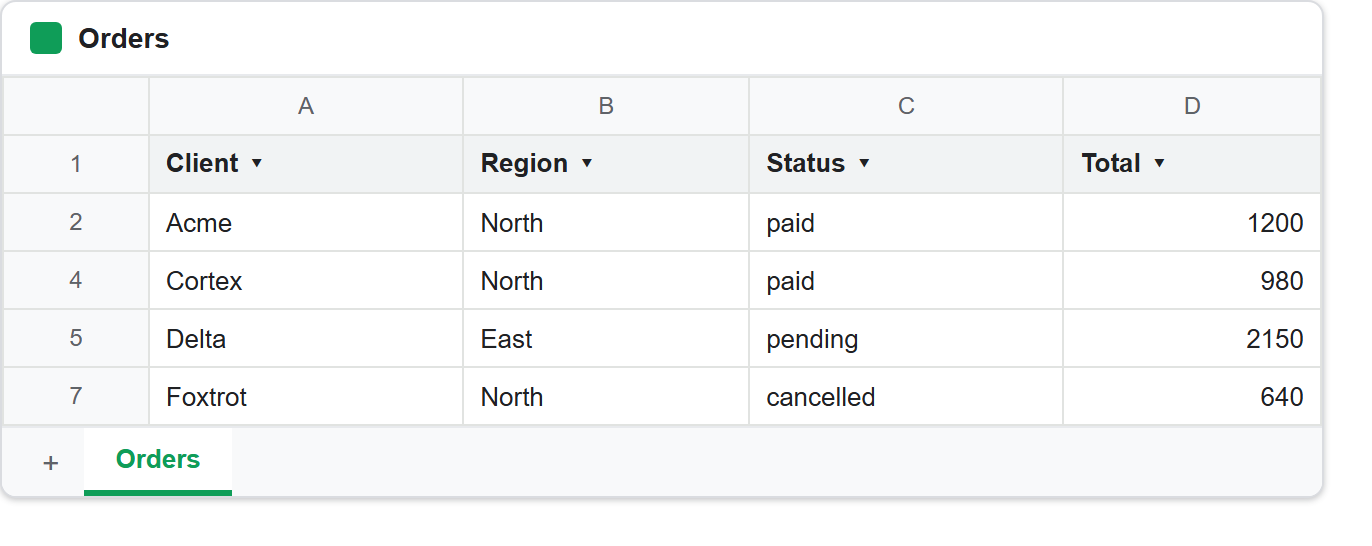
The first two readings are the ones to take away. Step 4 set the filter to Total > 500, and it worked — rows 3 and 6 are the two orders under 500, and the browser hides them.
But values.get returned all seven rows, including both hidden ones, with no hint that a filter was on at all.
That is not a bug, and it is not a caching delay either. A filter is a property of the view. It never moves, deletes or marks a cell, so a request for the cells has nothing to report. As a result, any script that sets a filter and then reads the range expecting a shortlist gets the full list, and silently processes rows the user believes it excluded.
So if you want the filtered set in PHP, you have two honest options. First, filter rows in PHP, on the values you already hold — the data is right there and costs no extra request. Otherwise, ask a second question, the one hiddenRows() asks:
'includeGridData' => true,
'fields'          => 'sheets(data(rowMetadata(hiddenByFilter)))',
hiddenByFilter lives on the row metadata, not on the values, and it only comes back when you ask for grid data. Note that it appears only on rows a filter is hiding. A row someone hid by hand reports hiddenByUser instead, so a script that cares about both has to read both.
Filter rows in a view, and the stored order never moves.
Step 7 created the filter view with sortSpecs asking for Total descending. Yet the stored order afterwards is Acme, Bravo, Cortex, Delta, Echo, Foxtrot — exactly what Step 3 wrote, in the original order, with Delta and its 2150 still sitting in row 5.
This is the clean contrast with sortRange. Both put rows in order. However, sortRange rewrites the cells, permanently, for everybody. A filter view produces the same ordering for one viewer and leaves the sheet exactly as it found it.
So the choice between them is not about sorting at all — it is about who you are changing the sheet for:
sortRange     -> stored order changes, everyone sees it, cannot be undone
filter view   -> stored order untouched, one viewer, delete it and it is gone
So for a nightly report that should stay tidy for whoever opens it, sort. For “let me look at the north region by size for a minute”, filter rows into a view instead, hand over the link, and leave the data alone.
One basic filter, many filter views.
The tally near the end of the output states the structural difference plainly: basicFilter on this sheet : one, next to a list of filter views that grows every time you add one.
Step 6 makes it concrete. The second setBasicFilter did not add a rule about Status to the existing rule about Total. Instead it replaced the filter outright, which is why the hidden rows change from 3, 6 to 3, 5, 7. So if you want two conditions on one basic filter, both keys go in the same criteria map in a single request.
Filter views do not have that constraint, and they are addressable. The reply gives an id, and that id is a URL:
.../edit#gid=1625753041&fvid=1406384242
Which makes a filter view the useful thing to generate from a script. For example, a job that filters rows one way per region, per client or per week hands every recipient a link that opens the sheet already narrowed to their slice — and no viewer’s filter ever fights another’s.