One unusual value can pull an average a long way. The MEDIAN function returns the middle value of a set instead, so a single huge order or a single tiny salary barely moves it.
In fact, that is why reports on house prices and incomes usually quote medians. The typical value is what people want, and the median describes it better than the average when the data is lopsided.
However, the middle is only a real cell when the count is odd. With an even count, the MEDIAN function returns a number that may appear nowhere in your data.
The MEDIAN function.
So give it the range of numbers.
=MEDIAN(A2:A6)
Five order values of 40, 45, 55, 70 and 900 put 55 in the middle, so it returns 55. Also, like AVERAGE, it ignores text and empty cells in the range, so a stray label does not break it.
Next, compare the plain average over the same five cells.
=AVERAGE(A2:A6)
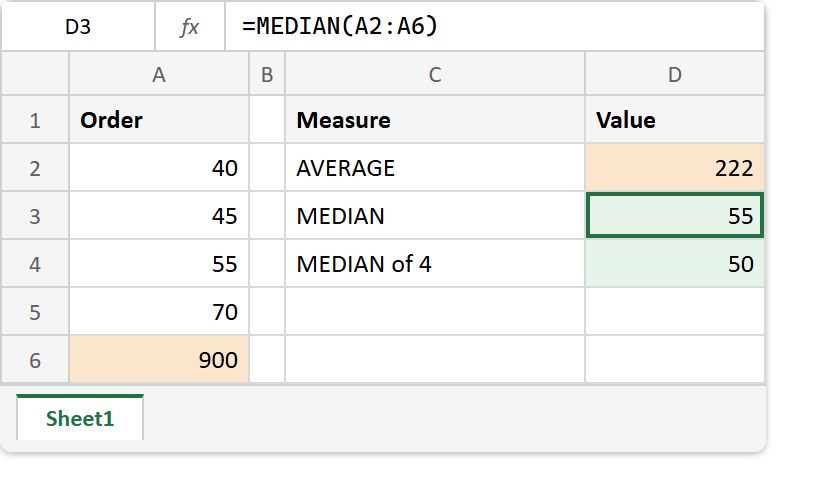
That returns 222. Four of the five orders are under 75, yet the average says a typical order is worth 222, because the 900 drags it upwards. Meanwhile the median ignores how far away the 900 is and only notes that it sits at the top.
An even count has no middle cell.
Then drop the large order and take the median of the first four.
=MEDIAN(A2:A5)
That returns 50, and no cell holds 50. With an even count there are two middle values, 45 and 55 here, and Microsoft’s reference confirms that MEDIAN averages them. As a result, the median of whole numbers can be a decimal, and a median price can be a price nobody paid.
Result of the MEDIAN function.
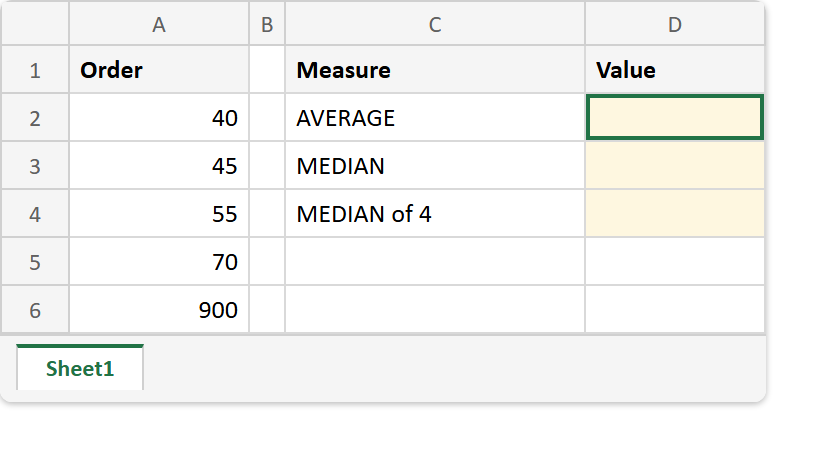
Before. Five order values, one of them far larger than the rest.
After. The outlier lifts the average to 222, while the median stays at 55.
A2:A6 -> 40, 45, 55, 70, 900

=AVERAGE(A2:A6)   ->  222
=MEDIAN(A2:A6)    ->  55
=MEDIAN(A2:A5)    ->  50    (even count: the average of 45 and 55)
=AVERAGE(A2:A5)   ->  52.5
So report the median when one extreme value would mislead, and the average when every value should count in proportion. For what AVERAGE includes and skips, see the AVERAGE function.