Counting everything is easy; counting only the rows that qualify is where the syntax turns strange. The COUNTIF function does it in one argument, written as text.
In fact, that last part catches nearly everyone. The condition is not written the way a condition looks anywhere else in the formula bar.
For instance, orders above a threshold, tasks marked done and rows matching a name are all the same question. One formula answers each of them, provided the condition is quoted properly.
The COUNTIF function.
So give it a range and something to match against.
=COUNTIF(A2:A6,">10")
Notice the quotation marks around the comparison. In short, the COUNTIF function reads its second argument as text, so the greater-than sign lives inside the quotes rather than outside them.
Also, a plain match needs no operator at all. =COUNTIF(A2:A6,"apple") counts exact entries, and the match ignores case, so Apple and APPLE both register.
The criteria is always text.
Next, put the threshold in a cell, which is what anybody sensible does. This is the moment the quoting rule stops being cosmetic.
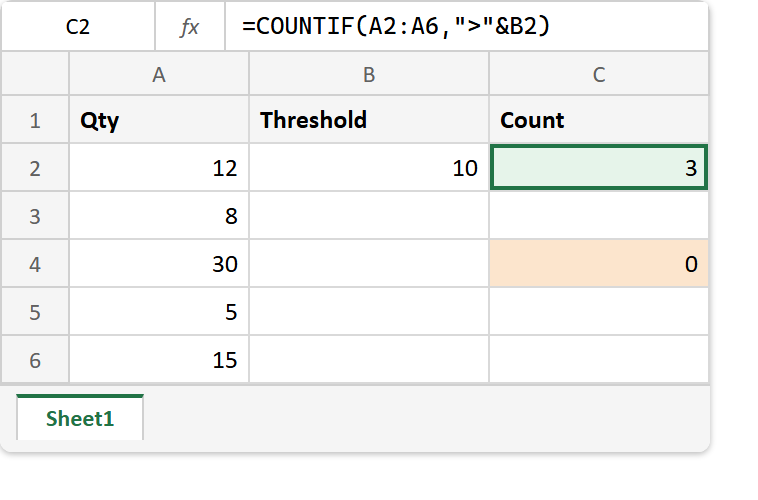
=COUNTIF(A2:A6,">"&B2)
The operator stays quoted and the reference gets joined on afterwards. Write ">B2" instead and Excel compares every value against the literal two characters B2, which nothing matches.
Worse, there is no error. You get zero, which reads exactly like a fact about the data rather than a fault in the formula, and it survives every review that only looks for red cells.
Result of the COUNTIF function.
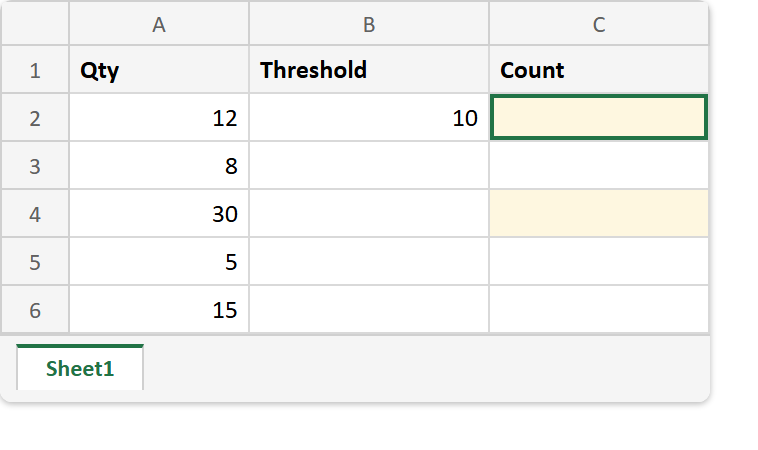
Before. Five quantities and the threshold sitting in its own cell.
After. The joined criteria counts three, while the quoted one counts nothing.
A2:A6  ->  12, 8, 30, 5, 15
B2     ->  10

=COUNTIF(A2:A6,">10")     ->  3
=COUNTIF(A2:A6,">"&B2)    ->  3
=COUNTIF(A2:A6,">B2")     ->  0      (B2 read as literal text)
=SUMIF(A2:A6,">10")       ->  57
The first two lines are the same question written twice, and the third only differs by an ampersand. Consequently the failure looks like a typo and behaves like data.
SUMIF takes the identical criteria and totals instead of counting. Meanwhile COUNTA is the version with no condition at all, which is worth comparing against when a conditional count comes back lower than you expected.