This article shows how to put rich text — several different font styles inside one cell — into an Excel file with the latest version of PhpSpreadsheet and plain PHP. A normal string cell carries a single font, so setCellValue('A1', 'text') cannot make one word bold and red while the rest stays plain. A RichText object can, because you build it from separate “text runs” that each carry their own font.
A small set of classes does the work. The rich text value lives in a RichText object; createText() adds a plain run, while createTextRun() adds a run and hands it back so you can style it — getFont()->setBold() and getFont()->setColor() then apply to that run alone. Finally, you drop the finished object into a cell with setCellValue(), exactly as you would a string.
This is what you reach for when a status cell needs one word to stand out, when a label mixes a caption with a value, or when a note contains an emphasised warning. The rest of the cell — alignment, borders, fill — is styled the usual way; rich text only governs the characters themselves.
Requirements to add rich text to a cell:
- Composer
- PHP 8.2 or newer
Step 1.
First, set up the dependencies. Here we pin the latest major release of PhpSpreadsheet (the 5.x line).
{
    "require": {
        "phpoffice/phpspreadsheet": "^5.0"
    }
}
Step 2.
Next, install phpspreadsheet.
$ composer install
Step 3.
Then create a new PHP file. Load Composer’s autoloader and import the classes we need: Spreadsheet, the RichText holder, the Color helper for run colours, and the Xlsx writer.
<?php

require 'vendor/autoload.php';

use PhpOffice\PhpSpreadsheet\Spreadsheet;
use PhpOffice\PhpSpreadsheet\RichText\RichText;
use PhpOffice\PhpSpreadsheet\Style\Color;
use PhpOffice\PhpSpreadsheet\Writer\Xlsx;
Step 4.
Create a new spreadsheet and grab the active worksheet, the same way every write starts.
$spreadsheet = new Spreadsheet();
$worksheet = $spreadsheet->getActiveSheet();
Step 5.
Build a RichText object and add the first, unstyled run with createText(). Everything you add builds up left to right into one cell value.
// A RichText value is a sequence of "runs", each with its own font.
$rich = new RichText();

// A plain run: ordinary text, default font.
$rich->createText('Order #1024 ');
Step 6.
Add a styled run with createTextRun(). Unlike createText(), it returns the run, so you can reach into its font and make it bold and red. Styling this run does not touch the others.
// createTextRun() returns the run so we can style it on its own.
$overdue = $rich->createTextRun('OVERDUE');
$overdue->getFont()->setBold(true);
$overdue->getFont()->setColor(new Color(Color::COLOR_RED));

// Back to a plain run for the rest of the sentence.
$rich->createText(' — pay within 14 days');
Step 7.
Drop the whole RichText object into a cell with setCellValue() — it accepts a rich-text value just as it accepts a string — then save the workbook.
$worksheet->setCellValue('A1', $rich);

$writer = new Xlsx($spreadsheet);
$writer->save('rich-text.xlsx');

echo "Wrote rich-text.xlsx\n";
Complete code to add rich text to a cell.
<?php

require 'vendor/autoload.php';

use PhpOffice\PhpSpreadsheet\Spreadsheet;
use PhpOffice\PhpSpreadsheet\RichText\RichText;
use PhpOffice\PhpSpreadsheet\Style\Color;
use PhpOffice\PhpSpreadsheet\Writer\Xlsx;

$spreadsheet = new Spreadsheet();
$worksheet = $spreadsheet->getActiveSheet();

// Build the rich-text value out of separate runs.
$rich = new RichText();
$rich->createText('Order #1024 ');

$overdue = $rich->createTextRun('OVERDUE');
$overdue->getFont()->setBold(true);
$overdue->getFont()->setColor(new Color(Color::COLOR_RED));

$rich->createText(' — pay within 14 days');

// Drop the whole RichText object into one cell.
$worksheet->setCellValue('A1', $rich);

$writer = new Xlsx($spreadsheet);
$writer->save('rich-text.xlsx');

echo "Wrote rich-text.xlsx\n";
Test adding rich text to a cell.
Command line testing.
$ php rich-text.php
Result of adding rich text to a cell.
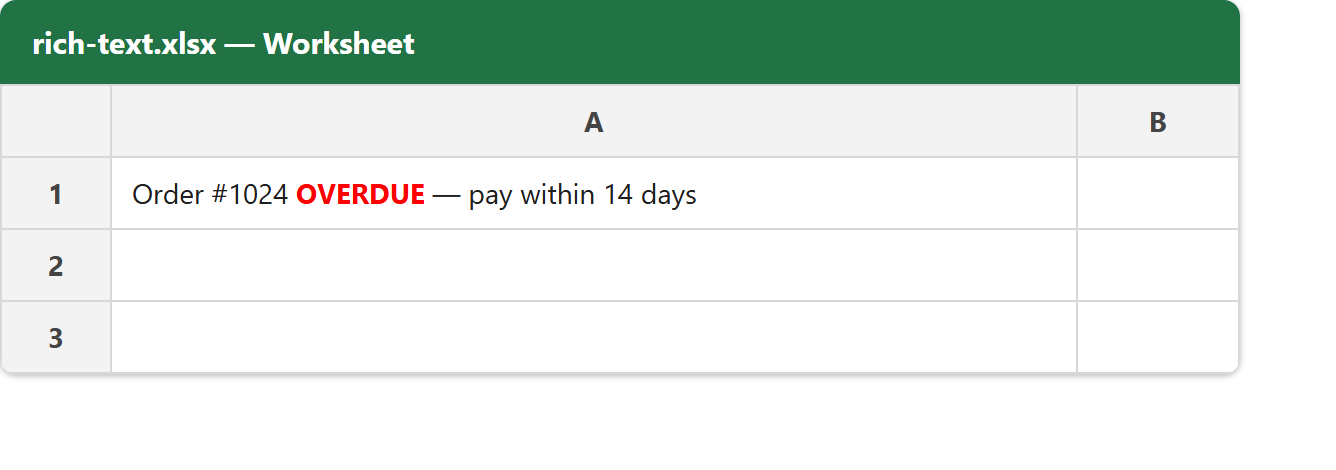
Running the script writes rich-text.xlsx instantly. As a result, cell A1 holds one rich text value made of three runs, but only the middle run — OVERDUE — turns bold and red while the rest stays plain. Opening the file shows the mixed styling inside the single cell:
If you read the cell back, its value is a RichText object rather than a string. Calling getPlainText() on it flattens the runs into Order #1024 OVERDUE — pay within 14 days, which is handy when you only need the text and not the styling.