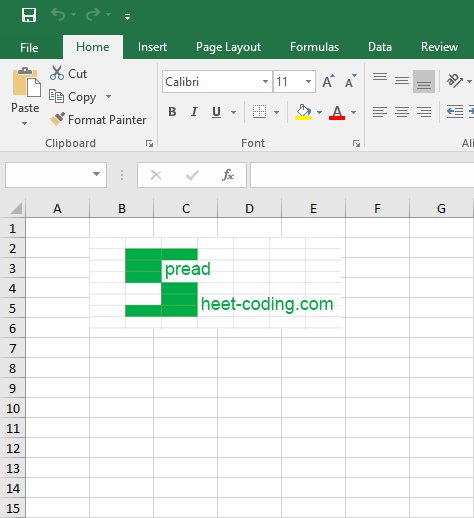
Learn how to insert pictures in excel files in PHP using PHPSpreadSheet.
You can insert pictures in excel files by creating a new Drawing object and then set it’s properties such as the path, height, and name of the picture.
You can also set the specific cell address where you would exactly like the picture to be inserted. And when all is set, the drawing object should be added to your working worksheet.
This article will discuss the basic process of inserting pictures in excel files in PHP using PHPSpreadSheet.
Requirements:
- Composer
- PHP 7.2 or newer
Step 1.
Setup dependencies.
{
    "require": {
        "phpoffice/phpspreadsheet": "^1.3"
    }
}
Step 2.
Install phpspreadsheet.
$ composer installcommand line
Step 3.
Create a new PHP file (insert-pictures-in-excel-files.php), and start coding.
Step 4.
Prepare the sheet.
// Autoload dependencies
require 'vendor/autoload.php';

// Import the core class of PhpSpreadsheet
use PhpOffice\PhpSpreadsheet\Spreadsheet;

// Import the Xlsx writer class
use PhpOffice\PhpSpreadsheet\Writer\Xlsx;

// Create a new Spreadsheet object
$spreadsheet = new Spreadsheet();

// Retrieve the current active worksheet
$sheet = $spreadsheet->getActiveSheet();
Step 5.
Prepare the picture through a new Drawing object.
// Prepare the drawing object
$drawing = new \PhpOffice\PhpSpreadsheet\Worksheet\Drawing();

// Set the picture name
$drawing->setName('PhpSpreadsheet logo');

// Set the picture path
$drawing->setPath('./spreadsheet-coding-com-logo.png');

// Set the cell address where the picture will be inserted
$drawing->setCoordinates('B2');
Step 6.
Add the Drawing object to the worksheet.
// Add the drawing to the worksheet
$drawing->setWorksheet($spreadsheet->getActiveSheet());
Step 7.
Last step.
Create and save the excel file.
// Write a new .xlsx file
$writer = new Xlsx($spreadsheet);

// Save the new .xlsx file
$writer->save('insert-pictures-in-excel-files.xlsx');
Complete code.
<?php

// Autoload dependencies
require 'vendor/autoload.php';

// Import the core class of PhpSpreadsheet
use PhpOffice\PhpSpreadsheet\Spreadsheet;

// Import the Xlsx writer class
use PhpOffice\PhpSpreadsheet\Writer\Xlsx;

// Create a new Spreadsheet object
$spreadsheet = new Spreadsheet();

// Retrieve the current active worksheet
$sheet = $spreadsheet->getActiveSheet();

// Prepare the drawing object
$drawing = new \PhpOffice\PhpSpreadsheet\Worksheet\Drawing();

// Set the picture name
$drawing->setName('PhpSpreadsheet logo');

// Set the picture path
$drawing->setPath('./spreadsheet-coding-com-logo.png');

// Set the cell address where the picture will be inserted
$drawing->setCoordinates('B2');

// Add the drawing to the worksheet
$drawing->setWorksheet($spreadsheet->getActiveSheet());

// Write a new .xlsx file
$writer = new Xlsx($spreadsheet);

// Save the new .xlsx file
$writer->save('insert-pictures-in-excel-files.xlsx');
Test.
Run the following codes.
$ php insert-pictures-in-excel-files.php
Result.
Open the generated file insert-pictures-in-excel-files.xlsx.
Before.

After.