Typing a date into a cell records a fact; asking for one records a promise to keep changing it. The TODAY function belongs to the second kind, and the difference matters more than it looks.
It takes no arguments at all. You type the name, you type the empty brackets, and Excel fills in the date every time the workbook opens.
For instance, an age column or a days-outstanding column genuinely wants that behaviour. Meanwhile an invoice date very much does not, and both are written the same way.
The TODAY function.
So type the whole formula, brackets included.
=TODAY()
The empty brackets are not optional, since Excel needs them to tell a function from a name. In short, the TODAY function takes nothing and returns the current date, which makes it the simplest formula in the whole cluster.
NOW is the sibling with the clock attached. It returns the date and the time together, so it changes far more often than once a day, and it recalculates on almost any edit.
It changes every time the file opens.
This is the card. The function is volatile, so it does not remember the day you typed it; it reports the day you are reading it.
=TODAY()+30
Consequently a column meant as a record silently rewrites itself overnight. Every invoice in the file reads as issued today, every timestamp agrees with every other one, and nothing about the sheet looks wrong.
Two fixes exist and both are worth knowing. Pressing Ctrl and the semicolon types a static date that never moves, while paste-special-values freezes a formula you already typed.
Result of the TODAY function.
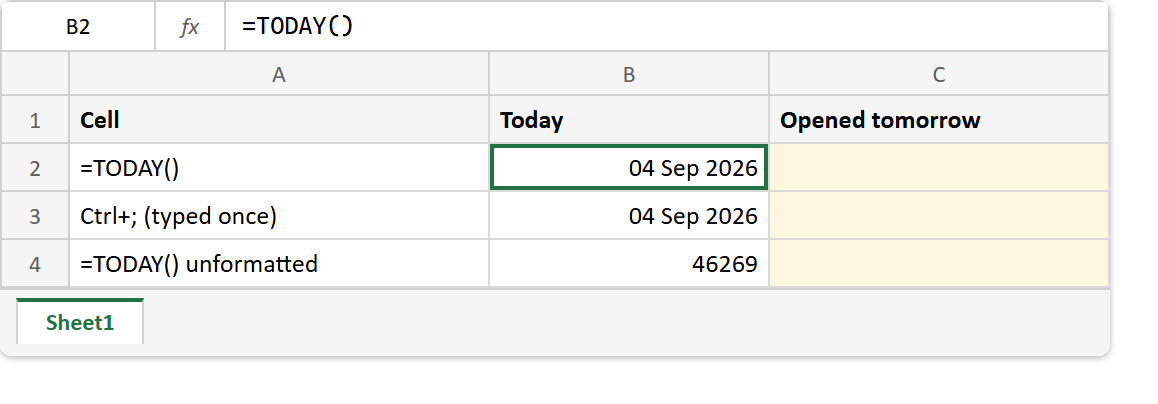
Before. The workbook on the day you built it, where everything reads correctly.
After. The same workbook opened a day later, with two rows moved and one holding still.
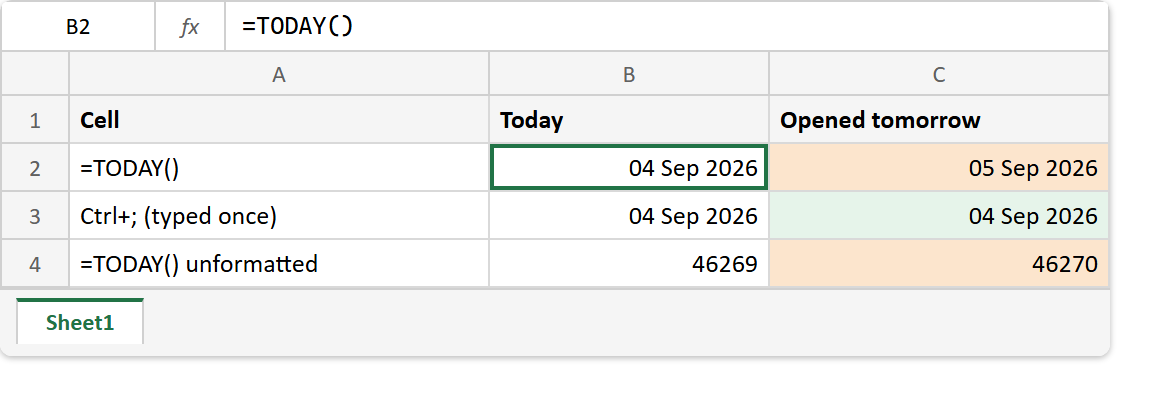
B2  ->  =TODAY()              ->  04 Sep 2026   (05 Sep 2026 tomorrow)
B3  ->  Ctrl+; typed once     ->  04 Sep 2026   (04 Sep 2026 tomorrow)
B4  ->  =TODAY() unformatted  ->  46269         (46270 tomorrow)

=TODAY()     ->  46269, shown as a date once formatted
=NOW()       ->  46269.65, where the fraction is the time
=TODAY()+30  ->  04 Oct 2026
The bottom row shows what the cell really holds. A date is a count of days, so arithmetic on it works exactly as arithmetic should, and adding thirty gives a date thirty days out.
An unformatted cell therefore shows five digits rather than a date, which is not a broken formula. TEXT covers that serial and how to render it as something readable.