This article shows how to run a find and replace across a Google Sheet from PHP, how to stop it matching more than you meant, and what happens when it reaches a formula.
One request does it. In short, findReplace takes the text to look for, the text to put in its place, and a scope saying how much of the spreadsheet to walk. Everything else is a flag, and the defaults on those flags are the reason this article carries a warning.
It is the closest thing the Sheets API has to a bulk edit. Updating cells means knowing which cells; this one finds them for you, which is convenient right up to the moment it finds one you did not have in mind.
Requirements to find and replace:
- Authenticate With A Service Account
- Create A Google Cloud Project
- Enable Google Sheets API Library
- Install The Google Client Library Specifying Google Sheets
- Composer
- PHP 8.1 or newer
Step 1.
First, set up the dependencies. This is the Sheets-only install used across this series. Tested with google/apiclient 2.19 on PHP 8.5.
{
    "require": {
        "google/apiclient": "^2.12.1"
    },
    "scripts": {
        "pre-autoload-dump": "Google\\Task\\Composer::cleanup"
    },
    "extra": {
        "google/apiclient-services": [
            "Sheets"
        ]
    }
}
Step 2.
Next, install the Google Client Library.
$ composer install
Step 3.
Then build the client and seed an invoice list. Three details in this fixture exist purely to trip the search up: a status in capitals, a client whose name contains the search word, and a total that holds a formula rather than a number.
function seed(Sheets $service, string $spreadsheetId, string $tabName): void
{
    $service->spreadsheets_values->update(
        $spreadsheetId,
        $tabName . '!A1',
        new ValueRange(['values' => [
            ['Client', 'Status', 'Owner', 'Fee'],
            ['Acme Ltd', 'pending', 'ada', 1200],
            ['Acme Holdings', 'PENDING', 'grace', 800],
            ['Bravo Ltd', 'paid', 'ada', 450],
            ['Pending Motors', 'pending', 'alan', 990],
            ['Total', '', '', '=SUM(D2:D5)'],
        ]]),
        ['valueInputOption' => 'USER_ENTERED']
    );
}
Step 4.
Wrap the request so the demonstrations differ only in their flags. The reply carries five separate counters and they do not all mean the same thing, so print them as they arrive rather than tidying them into one number.
function findReplace(Sheets $service, string $spreadsheetId, array $spec, string $label): void
{
    try {
        $response = $service->spreadsheets->batchUpdate($spreadsheetId, new BatchUpdateSpreadsheetRequest([
            'requests' => [new Request(['findReplace' => $spec])],
        ]));

        $result = $response->getReplies()[0]->getFindReplace();

        printf("%s\n", $label);
        printf("    occurrences=%-5s rows=%-5s values=%-5s formulas=%s\n",
            var_export($result->getOccurrencesChanged(), true),
            var_export($result->getRowsChanged(), true),
            var_export($result->getValuesChanged(), true),
            var_export($result->getFormulasChanged(), true)
        );
    } catch (Google\Service\Exception $e) {
        $error = json_decode($e->getMessage(), true)['error'] ?? [];

        printf("%s\n", $label);
        printf("    HTTP %d: %s\n", $e->getCode(), $error['message'] ?? $e->getMessage());
    }
}
Step 5.
Start with the scope, because it is not optional and it is not a range. You must set exactly one of three fields: sheetId for one tab, range for one block, or allSheets for the whole spreadsheet.
Send none of them, or more than one, and the API rejects the request before any searching happens.
findReplace($service, $spreadsheetId, [
    'find'        => 'pending',
    'replacement' => 'awaiting',
], 'no scope at all');

findReplace($service, $spreadsheetId, [
    'find'        => 'pending',
    'replacement' => 'awaiting',
    'allSheets'   => true,
    'sheetId'     => $sheetId,
], 'allSheets and sheetId together');
Step 6.
Now the same replacement scoped to one sheet, with every flag left at its default.
findReplace($service, $spreadsheetId, [
    'find'        => 'pending',
    'replacement' => 'awaiting',
    'sheetId'     => $sheetId,
], 'defaults');
Four changes, from four rows of data. Look at what the grid says afterwards before deciding that is the right number.
Step 7.
Two flags fix it. First, matchCase stops the search treating PENDING as the same word. Next, matchEntireCell requires the cell to hold the search text and nothing else, which is what protects the client called Pending Motors.
findReplace($service, $spreadsheetId, [
    'find'            => 'pending',
    'replacement'     => 'awaiting',
    'sheetId'         => $sheetId,
    'matchCase'       => true,
    'matchEntireCell' => true,
], 'matchCase + matchEntireCell');
There is a fourth flag, searchByRegex, which reads find as a regular expression matched against each cell. It is genuinely useful for things like normalising phone numbers, and it makes every warning in this article louder.
Step 8.
Finally, aim it at something only a formula contains. D2:D5 appears nowhere in the visible data — it exists only inside the total in D6.
findReplace($service, $spreadsheetId, [
    'find'            => 'D2:D5',
    'replacement'     => 'D2:D4',
    'sheetId'         => $sheetId,
    'includeFormulas' => false,
], 'D2:D5 -> D2:D4, formulas off');

findReplace($service, $spreadsheetId, [
    'find'            => 'D2:D5',
    'replacement'     => 'D2:D4',
    'sheetId'         => $sheetId,
    'includeFormulas' => true,
], 'D2:D5 -> D2:D4, formulas on');
Complete code to find and replace.
<?php

require 'vendor/autoload.php';

use Google\Client;
use Google\Service\Sheets;
use Google\Service\Sheets\BatchUpdateSpreadsheetRequest;
use Google\Service\Sheets\Request;
use Google\Service\Sheets\ValueRange;

$spreadsheetId = 'YOUR_SPREADSHEET_ID';
$keyFile = 'service-account.json';
$tabName = 'Invoices';

$client = new Client();
$client->setApplicationName('Find And Replace');
$client->setAuthConfig($keyFile);
$client->addScope(Sheets::SPREADSHEETS);

$service = new Sheets($client);

/**
 * Return a brand-new tab with this name, deleting any previous one.
 */
function freshSheetId(Sheets $service, string $spreadsheetId, string $title): int
{
    $requests = [];

    foreach ($service->spreadsheets->get($spreadsheetId)->getSheets() as $sheet) {
        if ($sheet->getProperties()->getTitle() === $title) {
            $requests[] = new Request([
                'deleteSheet' => ['sheetId' => $sheet->getProperties()->getSheetId()],
            ]);
        }
    }

    $requests[] = new Request(['addSheet' => ['properties' => ['title' => $title]]]);

    $response = $service->spreadsheets->batchUpdate($spreadsheetId, new BatchUpdateSpreadsheetRequest([
        'requests' => $requests,
    ]));

    $replies = $response->getReplies();

    return end($replies)->getAddSheet()->getProperties()->getSheetId();
}

/** Write the fixture back, so every demo starts from the same grid. */
function seed(Sheets $service, string $spreadsheetId, string $tabName): void
{
    $service->spreadsheets_values->update(
        $spreadsheetId,
        $tabName . '!A1',
        new ValueRange(['values' => [
            ['Client', 'Status', 'Owner', 'Fee'],
            ['Acme Ltd', 'pending', 'ada', 1200],
            ['Acme Holdings', 'PENDING', 'grace', 800],
            ['Bravo Ltd', 'paid', 'ada', 450],
            ['Pending Motors', 'pending', 'alan', 990],
            ['Total', '', '', '=SUM(D2:D5)'],
        ]]),
        ['valueInputOption' => 'USER_ENTERED']
    );
}

/** Print the grid, and the Total row's formula alongside its value. */
function dump(Sheets $service, string $spreadsheetId, string $tabName, string $label): void
{
    $rows = $service->spreadsheets_values->get($spreadsheetId, $tabName . '!A1:D6')->getValues() ?? [];
    $formula = $service->spreadsheets_values
        ->get($spreadsheetId, $tabName . '!D6', ['valueRenderOption' => 'FORMULA'])
        ->getValues()[0][0] ?? '';

    printf("%s\n", $label);
    foreach ($rows as $index => $row) {
        printf("  %-15s %-9s %-6s %s\n", $row[0] ?? '', $row[1] ?? '', $row[2] ?? '', $row[3] ?? '');
    }
    printf("  (D6 holds %s)\n", $formula);
}

/**
 * Run one findReplace and report what it claims to have changed.
 *
 * Every counter in the reply is separate, and a null means "none" rather
 * than zero, so they are printed exactly as they arrive.
 */
function findReplace(Sheets $service, string $spreadsheetId, array $spec, string $label): void
{
    try {
        $response = $service->spreadsheets->batchUpdate($spreadsheetId, new BatchUpdateSpreadsheetRequest([
            'requests' => [new Request(['findReplace' => $spec])],
        ]));

        $result = $response->getReplies()[0]->getFindReplace();

        printf("%s\n", $label);
        printf("    occurrences=%-5s rows=%-5s values=%-5s formulas=%s\n",
            var_export($result->getOccurrencesChanged(), true),
            var_export($result->getRowsChanged(), true),
            var_export($result->getValuesChanged(), true),
            var_export($result->getFormulasChanged(), true)
        );
    } catch (Google\Service\Exception $e) {
        $error = json_decode($e->getMessage(), true)['error'] ?? [];

        printf("%s\n", $label);
        printf("    HTTP %d: %s\n", $e->getCode(), $error['message'] ?? $e->getMessage());
    }
}

$sheetId = freshSheetId($service, $spreadsheetId, $tabName);
seed($service, $spreadsheetId, $tabName);

dump($service, $spreadsheetId, $tabName, "Before:");

// ------------------------------------------------------------ scope is required
echo "\n";
findReplace($service, $spreadsheetId, [
    'find'        => 'pending',
    'replacement' => 'awaiting',
], 'no scope at all');

findReplace($service, $spreadsheetId, [
    'find'        => 'pending',
    'replacement' => 'awaiting',
    'allSheets'   => true,
    'sheetId'     => $sheetId,
], 'allSheets and sheetId together');

// ------------------------------------------------------- the default is greedy
findReplace($service, $spreadsheetId, [
    'find'        => 'pending',
    'replacement' => 'awaiting',
    'sheetId'     => $sheetId,
], 'defaults');

echo "\n";
dump($service, $spreadsheetId, $tabName, "After the default replace:");

// -------------------------------------------------- matching the whole cell only
seed($service, $spreadsheetId, $tabName);

echo "\n";
findReplace($service, $spreadsheetId, [
    'find'            => 'pending',
    'replacement'     => 'awaiting',
    'sheetId'         => $sheetId,
    'matchCase'       => true,
    'matchEntireCell' => true,
], 'matchCase + matchEntireCell');

echo "\n";
dump($service, $spreadsheetId, $tabName, "After the careful replace:");

// ------------------------------------------------------------------- formulas
seed($service, $spreadsheetId, $tabName);

echo "\n";
findReplace($service, $spreadsheetId, [
    'find'            => 'D2:D5',
    'replacement'     => 'D2:D4',
    'sheetId'         => $sheetId,
    'includeFormulas' => false,
], 'D2:D5 -> D2:D4, formulas off');

findReplace($service, $spreadsheetId, [
    'find'            => 'D2:D5',
    'replacement'     => 'D2:D4',
    'sheetId'         => $sheetId,
    'includeFormulas' => true,
], 'D2:D5 -> D2:D4, formulas on');

echo "\n";
dump($service, $spreadsheetId, $tabName, "After touching the formula:");
Test how to find and replace.
$ php replace.php
Result of the code to find and replace.
Before:
  Client          Status    Owner  Fee
  Acme Ltd        pending   ada    1200
  Acme Holdings   PENDING   grace  800
  Bravo Ltd       paid      ada    450
  Pending Motors  pending   alan   990
  Total                            3440
  (D6 holds =SUM(D2:D5))

no scope at all
    HTTP 400: Invalid requests[0].findReplace: scope not set.
allSheets and sheetId together
    HTTP 400: Invalid value at 'requests[0].find_replace' (oneof), oneof field 'scope' is already set. Cannot set 'sheetId'
defaults
    occurrences=4     rows=3     values=4     formulas=NULL

After the default replace:
  Client          Status    Owner  Fee
  Acme Ltd        awaiting  ada    1200
  Acme Holdings   awaiting  grace  800
  Bravo Ltd       paid      ada    450
  awaiting Motors awaiting  alan   990
  Total                            3440
  (D6 holds =SUM(D2:D5))

matchCase + matchEntireCell
    occurrences=2     rows=2     values=2     formulas=NULL

After the careful replace:
  Client          Status    Owner  Fee
  Acme Ltd        awaiting  ada    1200
  Acme Holdings   PENDING   grace  800
  Bravo Ltd       paid      ada    450
  Pending Motors  awaiting  alan   990
  Total                            3440
  (D6 holds =SUM(D2:D5))

D2:D5 -> D2:D4, formulas off
    occurrences=NULL  rows=NULL  values=NULL  formulas=NULL
D2:D5 -> D2:D4, formulas on
    occurrences=1     rows=1     values=NULL  formulas=1

After touching the formula:
  Client          Status    Owner  Fee
  Acme Ltd        pending   ada    1200
  Acme Holdings   PENDING   grace  800
  Bravo Ltd       paid      ada    450
  Pending Motors  pending   alan   990
  Total                            2450
  (D6 holds =SUM(D2:D4))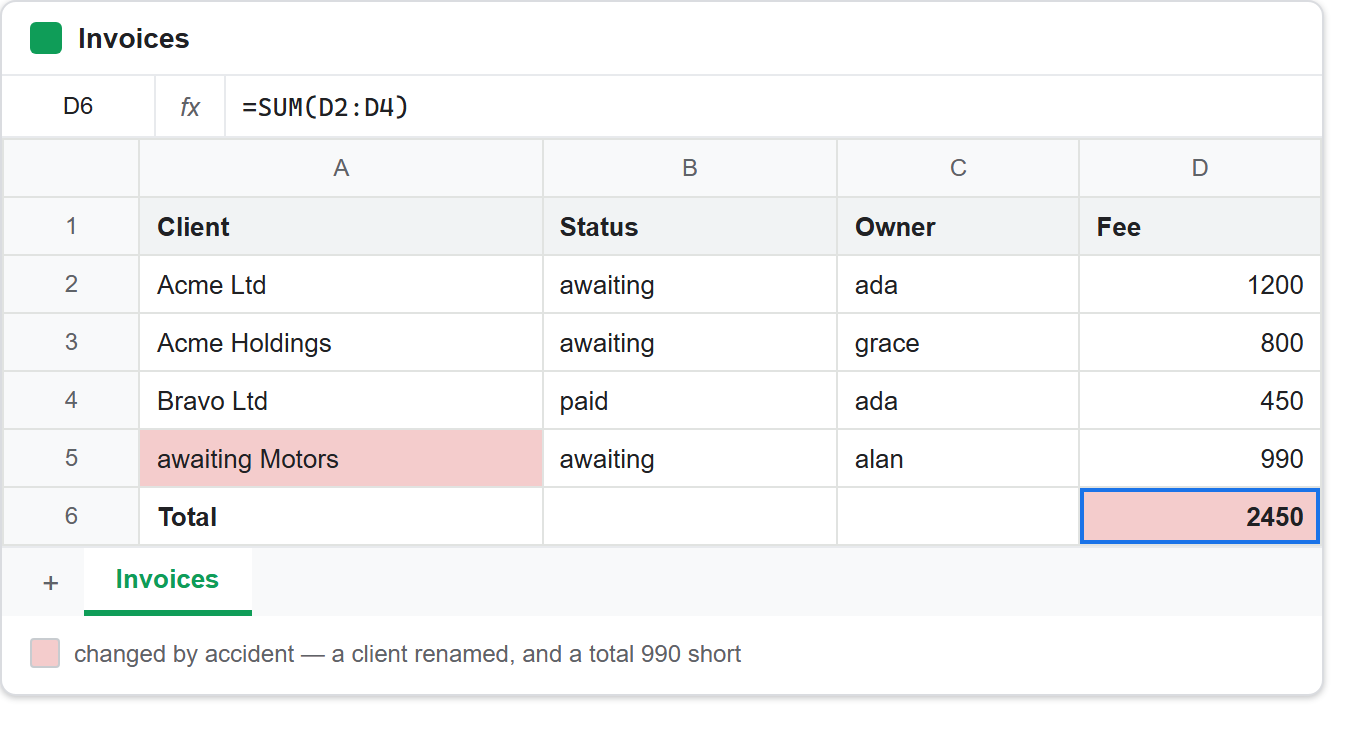
A find and replace that renamed a client.
The default run reported four changes and made them all. Three were the ones anyone would want. The fourth, however, turned a customer called Pending Motors into awaiting Motors.
Two defaults combine to produce that. First, matchCase is false, so Pending matches pending. Then matchEntireCell is also false, so a match anywhere inside a cell counts, and the API swaps out only the matched part. So a find and replace aimed at a status column, with no range to hold it there, wandered into the client column and edited a company name.
The careful version says what it means:
defaults                       -> occurrences=4  rows=3
matchCase + matchEntireCell    -> occurrences=2  rows=2
Two occurrences, both of them cells whose entire contents were the word pending. The run left PENDING in row 3 alone, which is the honest outcome. After all, if capitals mean the same status, that is a separate decision and a separate request — not something a default should sweep up silently.
So the habit worth forming is to scope by range rather than sheetId whenever you know which column you mean. matchEntireCell protects you from matching inside the wrong cell; a range stops you visiting it at all.
A find and replace that changed a number, not a value.
The last pair is the one to remember. D2:D5 is not visible anywhere in the sheet — it exists only inside =SUM(D2:D5) in D6.
With includeFormulas at its default of false, nothing happened at all. Every counter came back null:
D2:D5 -> D2:D4, formulas off
    occurrences=NULL  rows=NULL  values=NULL  formulas=NULL
D2:D5 -> D2:D4, formulas on
    occurrences=1     rows=1     values=NULL  formulas=1
Turn it on, however, and the API rewrites one formula. The sheet now reads:
Total 2450 (D6 holds =SUM(D2:D4))
The total fell by 990 — the whole of the Pending Motors invoice — because the sum now stops one row short. Meanwhile the replace touched nothing a person would call data. No cell they typed changed. Yet the number they read off the bottom of the sheet is simply wrong now.
Notice which counter caught it. valuesChanged is null, while formulasChanged is 1. So code that checks the reply by reading getValuesChanged() concludes nothing happened, and looks straight past the only change the run made.
For that reason, includeFormulas => true deserves real caution. It is the right flag when you deliberately rewrite references — renaming a tab that formulas mention, say — and a poor one to switch on because a find and replace “did not seem to work”. If you must use it, scope it to a range holding no formulas, or read the formulas back afterwards with valueRenderOption => 'FORMULA', as dump() does above.
What a find and replace reports back.
The reply is more informative than it first looks, and none of the fields totals the others:
occurrencesChanged  individual matches replaced
rowsChanged         rows containing at least one of them
valuesChanged       cells holding literal values
formulasChanged     cells holding formulas
sheetsChanged       tabs touched (relevant with allSheets)
For example, the default run shows why the first two differ: occurrences=4 but rows=3, because the Pending Motors row contributed two of the four matches on its own.
Finally, a null is not a zero — it is an absent field, because the API omits anything sitting at its default. Know that before you write if ($result->getOccurrencesChanged() === 0), which is never true no matter how little the run found. Compare loosely, or coalesce with ?? 0, and treat a find and replace that reports nothing as one that matched nothing.