This article shows how to sort a range in a Google Sheet from PHP, and how to sort on more than one column at once. It also shows why the range you choose matters far more than the sort key.
There is a pointed contrast here with the Excel half of the site. Sorting rows before writing an Excel file has to sort in PHP and write the result. PhpSpreadsheet has no sort of its own, so the ordering is done by the time the file exists. The Sheets API is the other way round. In fact, when you sort a range with sortRange it reorders cells that are already in the sheet, on the server, and nothing is downloaded at all.
One request does the whole job. sortRange takes a range and a list of sortSpecs, each naming a column and a direction. The subtlety is that those two fields count columns differently, and getting that wrong quietly shuffles your data instead of failing.
Requirements to sort a range:
- Authenticate With A Service Account
- Create A Google Cloud Project
- Enable Google Sheets API Library
- Install The Google Client Library Specifying Google Sheets
- Composer
- PHP 8.1 or newer
Step 1.
First, set up the dependencies. This is the Sheets-only install used across this series. Tested with google/apiclient 2.19 on PHP 8.5.
{
    "require": {
        "google/apiclient": "^2.12.1"
    },
    "scripts": {
        "pre-autoload-dump": "Google\\Task\\Composer::cleanup"
    },
    "extra": {
        "google/apiclient-services": [
            "Sheets"
        ]
    }
}
Step 2.
Next, install the Google Client Library.
$ composer install
Step 3.
Then build the client and get a tab to work on. Sorting rearranges whatever is already in the sheet, so a script that reuses a tab is sorting the result of its own last run. Starting from a fresh tab every time is what makes the output below reproducible.
<?php

require 'vendor/autoload.php';

use Google\Client;
use Google\Service\Sheets;
use Google\Service\Sheets\BatchUpdateSpreadsheetRequest;
use Google\Service\Sheets\Request;
use Google\Service\Sheets\ValueRange;

$spreadsheetId = 'YOUR_SPREADSHEET_ID';
$keyFile = 'service-account.json';
$tabName = 'Scores';

$client = new Client();
$client->setApplicationName('Sort A Range');
$client->setAuthConfig($keyFile);
$client->addScope(Sheets::SPREADSHEETS);

$service = new Sheets($client);

function freshSheetId(Sheets $service, string $spreadsheetId, string $title): int
{
    $requests = [];

    foreach ($service->spreadsheets->get($spreadsheetId)->getSheets() as $sheet) {
        if ($sheet->getProperties()->getTitle() === $title) {
            $requests[] = new Request([
                'deleteSheet' => ['sheetId' => $sheet->getProperties()->getSheetId()],
            ]);
        }
    }

    $requests[] = new Request(['addSheet' => ['properties' => ['title' => $title]]]);

    $response = $service->spreadsheets->batchUpdate($spreadsheetId, new BatchUpdateSpreadsheetRequest([
        'requests' => $requests,
    ]));

    $replies = $response->getReplies();

    return end($replies)->getAddSheet()->getProperties()->getSheetId();
}

$sheetId = freshSheetId($service, $spreadsheetId, $tabName);
Step 4.
Add two helpers — one to write the fixture, one to print it. Every demonstration below re-seeds first, so each one starts from the same six rows rather than from whatever the previous sort left behind.
function seed(Sheets $service, string $spreadsheetId, string $tabName): void
{
    $service->spreadsheets_values->update(
        $spreadsheetId,
        $tabName . '!A1',
        new ValueRange(['values' => [
            ['Name', 'Team', 'Score'],
            ['Ada', 'Platform', 88],
            ['Grace', 'Data', 92],
            ['Alan', 'Platform', 97],
            ['Edsger', 'Data', 71],
            ['Barbara', 'Platform', 60],
        ]]),
        ['valueInputOption' => 'USER_ENTERED']
    );
}

function dump(Sheets $service, string $spreadsheetId, string $tabName, string $label): void
{
    $rows = $service->spreadsheets_values->get($spreadsheetId, $tabName . '!A1:C6')->getValues() ?? [];

    printf("%s\n", $label);
    foreach ($rows as $index => $row) {
        printf("  row %-2d %-9s %-9s %s\n", $index + 1, $row[0] ?? '', $row[1] ?? '', $row[2] ?? '');
    }
}
Step 5.
Now the sort itself. Wrapping it in a small function keeps the four demonstrations that follow down to their range and their sort keys, which is the only part that changes.
function sortRange(Sheets $service, string $spreadsheetId, array $range, array $sortSpecs): void
{
    $service->spreadsheets->batchUpdate($spreadsheetId, new BatchUpdateSpreadsheetRequest([
        'requests' => [
            new Request(['sortRange' => ['range' => $range, 'sortSpecs' => $sortSpecs]]),
        ],
    ]));
}
Step 6.
Sort by score, highest first. The range is A2:C6 — all three columns, and the header row deliberately left out, because a range that includes row 1 sorts the word Name in among the people.
Indexes are zero-based and the row range is half-open, so startRowIndex 1 with endRowIndex 6 means the five data rows.
sortRange($service, $spreadsheetId, [
    'sheetId'          => $sheetId,
    'startRowIndex'    => 1,
    'endRowIndex'      => 6,
    'startColumnIndex' => 0,
    'endColumnIndex'   => 3,
], [
    ['dimensionIndex' => 2, 'sortOrder' => 'DESCENDING'],
]);
Step 7.
Add a second entry to sortSpecs to sort on two columns. They apply in order: team alphabetically, and within each team the highest score first. There is no limit of two — the list is as long as you need, and each entry can pick its own direction.
sortRange($service, $spreadsheetId, [
    'sheetId'          => $sheetId,
    'startRowIndex'    => 1,
    'endRowIndex'      => 6,
    'startColumnIndex' => 0,
    'endColumnIndex'   => 3,
], [
    ['dimensionIndex' => 1, 'sortOrder' => 'ASCENDING'],
    ['dimensionIndex' => 2, 'sortOrder' => 'DESCENDING'],
]);
Step 8.
Now run the same score sort against a narrower range that starts at column B, so Name is outside it. Nothing about this request is invalid, and the API will not complain. Watch what happens to the names.
sortRange($service, $spreadsheetId, [
    'sheetId'          => $sheetId,
    'startRowIndex'    => 1,
    'endRowIndex'      => 6,
    'startColumnIndex' => 1,
    'endColumnIndex'   => 3,
], [
    ['dimensionIndex' => 2, 'sortOrder' => 'DESCENDING'],
]);
Complete code to sort a range.
<?php

require 'vendor/autoload.php';

use Google\Client;
use Google\Service\Sheets;
use Google\Service\Sheets\BatchUpdateSpreadsheetRequest;
use Google\Service\Sheets\Request;
use Google\Service\Sheets\ValueRange;

$spreadsheetId = 'YOUR_SPREADSHEET_ID';
$keyFile = 'service-account.json';
$tabName = 'Scores';

$client = new Client();
$client->setApplicationName('Sort A Range');
$client->setAuthConfig($keyFile);
$client->addScope(Sheets::SPREADSHEETS);

$service = new Sheets($client);

/**
 * Return a brand-new tab with this name, deleting any previous one.
 */
function freshSheetId(Sheets $service, string $spreadsheetId, string $title): int
{
    $requests = [];

    foreach ($service->spreadsheets->get($spreadsheetId)->getSheets() as $sheet) {
        if ($sheet->getProperties()->getTitle() === $title) {
            $requests[] = new Request([
                'deleteSheet' => ['sheetId' => $sheet->getProperties()->getSheetId()],
            ]);
        }
    }

    $requests[] = new Request(['addSheet' => ['properties' => ['title' => $title]]]);

    $response = $service->spreadsheets->batchUpdate($spreadsheetId, new BatchUpdateSpreadsheetRequest([
        'requests' => $requests,
    ]));

    $replies = $response->getReplies();

    return end($replies)->getAddSheet()->getProperties()->getSheetId();
}

/** Write the fixture back, so every demo starts from the same grid. */
function seed(Sheets $service, string $spreadsheetId, string $tabName): void
{
    $service->spreadsheets_values->update(
        $spreadsheetId,
        $tabName . '!A1',
        new ValueRange(['values' => [
            ['Name', 'Team', 'Score'],
            ['Ada', 'Platform', 88],
            ['Grace', 'Data', 92],
            ['Alan', 'Platform', 97],
            ['Edsger', 'Data', 71],
            ['Barbara', 'Platform', 60],
        ]]),
        ['valueInputOption' => 'USER_ENTERED']
    );
}

/** Print the grid as it currently stands. */
function dump(Sheets $service, string $spreadsheetId, string $tabName, string $label): void
{
    $rows = $service->spreadsheets_values->get($spreadsheetId, $tabName . '!A1:C6')->getValues() ?? [];

    printf("%s\n", $label);
    foreach ($rows as $index => $row) {
        printf("  row %-2d %-9s %-9s %s\n", $index + 1, $row[0] ?? '', $row[1] ?? '', $row[2] ?? '');
    }
}

/** Send one sortRange request and wait for it. */
function sortRange(Sheets $service, string $spreadsheetId, array $range, array $sortSpecs): void
{
    $service->spreadsheets->batchUpdate($spreadsheetId, new BatchUpdateSpreadsheetRequest([
        'requests' => [
            new Request(['sortRange' => ['range' => $range, 'sortSpecs' => $sortSpecs]]),
        ],
    ]));
}

$sheetId = freshSheetId($service, $spreadsheetId, $tabName);
seed($service, $spreadsheetId, $tabName);

dump($service, $spreadsheetId, $tabName, "Before:");

// ---------------------------------------------------------- one sort key
// A2:C6 - the data rows only, header left out of the range.
sortRange($service, $spreadsheetId, [
    'sheetId'          => $sheetId,
    'startRowIndex'    => 1,
    'endRowIndex'      => 6,
    'startColumnIndex' => 0,
    'endColumnIndex'   => 3,
], [
    ['dimensionIndex' => 2, 'sortOrder' => 'DESCENDING'],
]);

echo "\n";
dump($service, $spreadsheetId, $tabName, "Sorted by Score, descending:");

// ---------------------------------------------------------- two sort keys
seed($service, $spreadsheetId, $tabName);

sortRange($service, $spreadsheetId, [
    'sheetId'          => $sheetId,
    'startRowIndex'    => 1,
    'endRowIndex'      => 6,
    'startColumnIndex' => 0,
    'endColumnIndex'   => 3,
], [
    ['dimensionIndex' => 1, 'sortOrder' => 'ASCENDING'],
    ['dimensionIndex' => 2, 'sortOrder' => 'DESCENDING'],
]);

echo "\n";
dump($service, $spreadsheetId, $tabName, "Sorted by Team ascending, then Score descending:");

// ------------------------------------------- the range decides what moves
seed($service, $spreadsheetId, $tabName);

// B2:C6 - Name is NOT in the range.
sortRange($service, $spreadsheetId, [
    'sheetId'          => $sheetId,
    'startRowIndex'    => 1,
    'endRowIndex'      => 6,
    'startColumnIndex' => 1,
    'endColumnIndex'   => 3,
], [
    ['dimensionIndex' => 2, 'sortOrder' => 'DESCENDING'],
]);

echo "\n";
dump($service, $spreadsheetId, $tabName, "Same sort, but the range was B2:C6 and left Name out:");

// -------------------------------------- dimensionIndex counts from the sheet
seed($service, $spreadsheetId, $tabName);

// Range starts at column B. dimensionIndex 1 is still column B, not column C.
sortRange($service, $spreadsheetId, [
    'sheetId'          => $sheetId,
    'startRowIndex'    => 1,
    'endRowIndex'      => 6,
    'startColumnIndex' => 1,
    'endColumnIndex'   => 3,
], [
    ['dimensionIndex' => 1, 'sortOrder' => 'ASCENDING'],
]);

echo "\n";
dump($service, $spreadsheetId, $tabName, "Range B2:C6 sorted on dimensionIndex 1:");

// ------------------------------------------------ a column index outside it
seed($service, $spreadsheetId, $tabName);

echo "\nSorting range B2:C6 on dimensionIndex 0 (column A, outside the range):\n";

try {
    sortRange($service, $spreadsheetId, [
        'sheetId'          => $sheetId,
        'startRowIndex'    => 1,
        'endRowIndex'      => 6,
        'startColumnIndex' => 1,
        'endColumnIndex'   => 3,
    ], [
        ['dimensionIndex' => 0, 'sortOrder' => 'ASCENDING'],
    ]);

    echo "  accepted\n";
} catch (Google\Service\Exception $e) {
    $error = json_decode($e->getMessage(), true)['error'] ?? [];
    printf("  HTTP %d: %s\n", $e->getCode(), $error['message'] ?? $e->getMessage());
}
Test how to sort a range.
$ php sort.php
Result of the code to sort a range.
Before:
  row 1  Name      Team      Score
  row 2  Ada       Platform  88
  row 3  Grace     Data      92
  row 4  Alan      Platform  97
  row 5  Edsger    Data      71
  row 6  Barbara   Platform  60

Sorted by Score, descending:
  row 1  Name      Team      Score
  row 2  Alan      Platform  97
  row 3  Grace     Data      92
  row 4  Ada       Platform  88
  row 5  Edsger    Data      71
  row 6  Barbara   Platform  60

Sorted by Team ascending, then Score descending:
  row 1  Name      Team      Score
  row 2  Grace     Data      92
  row 3  Edsger    Data      71
  row 4  Alan      Platform  97
  row 5  Ada       Platform  88
  row 6  Barbara   Platform  60

Same sort, but the range was B2:C6 and left Name out:
  row 1  Name      Team      Score
  row 2  Ada       Platform  97
  row 3  Grace     Data      92
  row 4  Alan      Platform  88
  row 5  Edsger    Data      71
  row 6  Barbara   Platform  60

Range B2:C6 sorted on dimensionIndex 1:
  row 1  Name      Team      Score
  row 2  Ada       Data      92
  row 3  Grace     Data      71
  row 4  Alan      Platform  88
  row 5  Edsger    Platform  97
  row 6  Barbara   Platform  60

Sorting range B2:C6 on dimensionIndex 0 (column A, outside the range):
  HTTP 500: Internal error encountered.
When you sort a range, the range is the record.
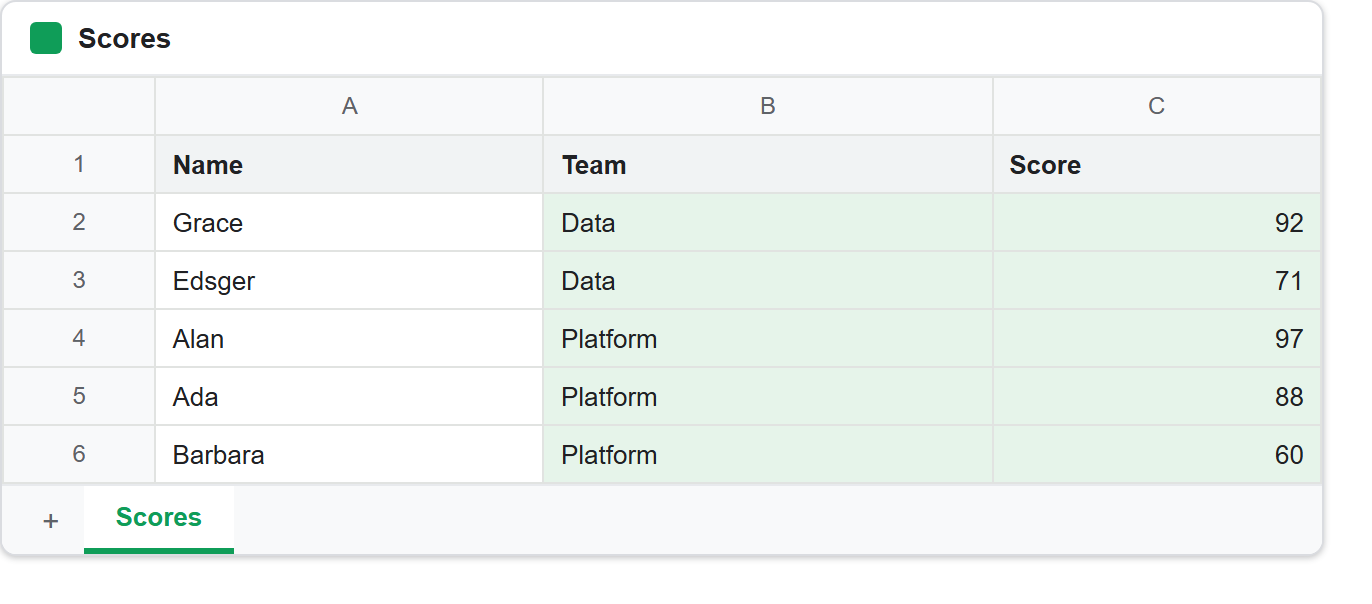
The fourth block is the one worth staring at. The request asked for exactly the same thing as the first: sort these rows by score, highest first. Sure enough, the scores came back in order — 97, 92, 88, 71, 60. But the names did not move, because column A was not in the range.
So Ada, who scored 88, is now credited with 97. Alan, who actually scored 97, is showing 88. Every row in the table is wrong, the column the API sorted is perfectly sorted, and nothing anywhere reported a problem.
In short, sortRange reorders the cells inside the range and nothing else. It has no concept of a record, a row that belongs together, or a table. So if you leave a column out of the range it simply stays where it is, while its neighbours move out from under it.
The rule that follows is short. Whenever you sort a range, that range must span every column of the table. Narrow it vertically to skip the header row, never horizontally. Of course, if you genuinely want to reorder one column on its own you already have that — but you almost never do.
dimensionIndex counts from the sheet, not from the range.
The fifth block answers the question the fourth one raises. The range starts at column B, and the sort key was dimensionIndex 1. If the index were relative to the range, 1 would be the second column of the range — Score. It is not:
row 2  Ada       Data      92
row 3  Grace     Data      71
row 4  Alan      Platform  88
row 5  Edsger    Platform  97
row 6  Barbara   Platform  60
Team is in alphabetical order and Score is not, so dimensionIndex 1 meant column B — the second column of the sheet. In other words, the index is absolute. Offsetting it by startColumnIndex to make it range-relative is a natural-looking mistake that silently sorts on the wrong column.
Pointing it at a column outside the range is worse than a mistake:
HTTP 500: Internal error encountered.
Not a 400 explaining that the key is not in the range — a 500. There is nothing to catch and correct there, and no message that would help a reader diagnose it. So validate your own indexes before you sort a range. A sort key is only meaningful when it falls inside the range’s own columns — that is, at or after startColumnIndex and before endColumnIndex.
Sort a range on the server, or sort rows in PHP.
Both halves of this site now sort, and they do it in genuinely different places. The PhpSpreadsheet article sorts an array with usort() and then writes the file, because the library has nothing that reorders a worksheet after the fact. As a result, rows are in the right order for one reason only: nobody ever wrote them in the wrong one.
When you sort a range with sortRange, it happens server-side and after the fact. The data is already in the sheet, possibly typed in by a person, and one small request rearranges it in place. Nothing is downloaded, nothing is re-uploaded, and everyone looking at the sheet sees the new order.
That last part is the trade-off. A sort is destructive and shared: it changes the stored order of the sheet for every viewer, permanently. So if you only want to look at the data in a different order, reach for a filter view instead. It sorts a private copy of the view and leaves the underlying rows alone.