Excel does not call it SUM everywhere. A French user sees SOMME, a German one SUMME, and a Dutch one SOM. PhpSpreadsheet ships those translations, so you can translate Excel formulas from English into any of sixteen languages with two method calls.
The catch is what the result is for. A translated formula is something you show to a person. It is not something you can put in a cell, and getting that wrong fails silently, which is why this article ends by writing one into a spreadsheet and watching it do nothing.
Two methods do the work. translateFormulaToLocale() turns English into the current locale, and translateFormulaToEnglish() turns it back. Both hang off Calculation::getInstance(), and setLocale() decides which language they mean.
Requirements to translate Excel formulas:
- How to install PhpSpreadsheet
- Composer
- PHP 8.2 or newer
Step 1.
First, set up the dependency. Tested with PhpSpreadsheet 5.9 on PHP 8.5.
{
    "require": {
        "phpoffice/phpspreadsheet": "^5.0"
    }
}
Step 2.
Next, install PhpSpreadsheet.
$ composer install
Step 3.
Then get hold of the calculation engine. Translation lives on the singleton, not on the spreadsheet, so you do not need a workbook open to use it.
<?php

require 'vendor/autoload.php';

use PhpOffice\PhpSpreadsheet\Calculation\Calculation;
use PhpOffice\PhpSpreadsheet\Spreadsheet;
use PhpOffice\PhpSpreadsheet\Writer\Xlsx;

$calculation = Calculation::getInstance();
Step 4.
Now pick a language and check the answer. setLocale() returns a boolean, and it is worth reading, because a failed call does not throw and does not reset anything — it simply leaves the previous locale in place. Code that ignores the return value carries on translating into whatever was set last.
$formulas = [
    '=SUM(A1:A3)',
    '=IF(A1>2,"yes","no")',
    '=VLOOKUP(A1,B:C,2,FALSE)',
    '=IF(AND(A1>2,B1<10),SUM(A1:A3),0)',
];

foreach (['fr', 'de', 'nl'] as $locale) {
    if (!$calculation->setLocale($locale)) {
        printf("locale '%s' is not available, skipping\n", $locale);
        continue;
    }

    printf("=== %s ===\n", $locale);

    foreach ($formulas as $english) {
        $translated = $calculation->translateFormulaToLocale($english);
        $back = $calculation->translateFormulaToEnglish($translated);

        printf("  %-34s -> %s\n", $english, $translated);

        if ($back !== $english) {
            printf("  %-34s !! did not survive the round trip: %s\n", '', $back);
        }
    }
}
Step 5.
Then set the language back. This is the line people get wrong: 'en' on its own is not a locale code and returns false. The library’s English is 'en_us', and that is what returns you to plain SUM.
$calculation->setLocale('en_us');Step 6.
Finally, put a translated formula into a real cell next to its English twin, and save the file. This is the part that decides how you use the feature.
$calculation->setLocale('fr');
$french = $calculation->translateFormulaToLocale('=IF(A1>2,"yes","no")');
$calculation->setLocale('en_us');

$spreadsheet = new Spreadsheet();
$sheet = $spreadsheet->getActiveSheet();
$sheet->setCellValue('A1', 5);
$sheet->setCellValue('B1', $french);
$sheet->setCellValue('C1', '=IF(A1>2,"yes","no")');

printf("  B1 data type        : %s\n", $sheet->getCell('B1')->getDataType());
printf("  B1 calculated value : %s\n", $sheet->getCell('B1')->getCalculatedValue());
printf("  C1 data type        : %s\n", $sheet->getCell('C1')->getDataType());
printf("  C1 calculated value : %s\n", $sheet->getCell('C1')->getCalculatedValue());

$writer = new Xlsx($spreadsheet);
$writer->save('locale.xlsx');
Complete code to translate Excel formulas.
<?php

require 'vendor/autoload.php';

use PhpOffice\PhpSpreadsheet\Calculation\Calculation;
use PhpOffice\PhpSpreadsheet\Spreadsheet;
use PhpOffice\PhpSpreadsheet\Writer\Xlsx;

$calculation = Calculation::getInstance();

$formulas = [
    '=SUM(A1:A3)',
    '=IF(A1>2,"yes","no")',
    '=VLOOKUP(A1,B:C,2,FALSE)',
    '=IF(AND(A1>2,B1<10),SUM(A1:A3),0)',
];

foreach (['fr', 'de', 'nl'] as $locale) {
    if (!$calculation->setLocale($locale)) {
        printf("locale '%s' is not available, skipping\n", $locale);
        continue;
    }

    printf("=== %s ===\n", $locale);

    foreach ($formulas as $english) {
        $translated = $calculation->translateFormulaToLocale($english);
        $back = $calculation->translateFormulaToEnglish($translated);

        printf("  %-34s -> %s\n", $english, $translated);

        if ($back !== $english) {
            printf("  %-34s !! did not survive the round trip: %s\n", '', $back);
        }
    }
}

// Back to the library's English. Note the code: 'en' on its own is not one.
$calculation->setLocale('en_us');

// A translated formula is for showing to a person. It is NOT something a
// cell can hold, and the failure is silent, so it is worth seeing once.
$calculation->setLocale('fr');
$french = $calculation->translateFormulaToLocale('=IF(A1>2,"yes","no")');
$calculation->setLocale('en_us');

$spreadsheet = new Spreadsheet();
$sheet = $spreadsheet->getActiveSheet();
$sheet->setCellValue('A1', 5);
$sheet->setCellValue('B1', $french);
$sheet->setCellValue('C1', '=IF(A1>2,"yes","no")');

echo "\n=== what a cell does with each form ===\n";
printf("  B1 holds the french text : %s\n", $sheet->getCell('B1')->getValue());
printf("  B1 data type             : %s\n", $sheet->getCell('B1')->getDataType());
printf("  B1 calculated value      : %s\n", $sheet->getCell('B1')->getCalculatedValue());
printf("  C1 data type             : %s\n", $sheet->getCell('C1')->getDataType());
printf("  C1 calculated value      : %s\n", $sheet->getCell('C1')->getCalculatedValue());

// And what the saved file stores, which explains all of the above.
$writer = new Xlsx($spreadsheet);
$writer->save('locale.xlsx');

$zip = new ZipArchive();
$zip->open('locale.xlsx');
$xml = $zip->getFromName('xl/worksheets/sheet1.xml');
$zip->close();

preg_match_all('/<f>([^<]*)<\/f>/', $xml, $matches);

echo "\n=== formulas stored inside locale.xlsx ===\n";
foreach ($matches[1] as $stored) {
    printf("  %s\n", html_entity_decode($stored));
}
Test how to translate Excel formulas.
$ php locale.php
Result of the code to translate Excel formulas.
=== fr ===
  =SUM(A1:A3)                        -> =SOMME(A1:A3)
  =IF(A1>2,"yes","no")               -> =SI(A1>2;"yes";"no")
  =VLOOKUP(A1,B:C,2,FALSE)           -> =RECHERCHEV(A1;B:C;2;FAUX)
  =IF(AND(A1>2,B1<10),SUM(A1:A3),0)  -> =SI(ET(A1>2;B1<10);SOMME(A1:A3);0)
=== de ===
  =SUM(A1:A3)                        -> =SUMME(A1:A3)
  =IF(A1>2,"yes","no")               -> =WENN(A1>2;"yes";"no")
  =VLOOKUP(A1,B:C,2,FALSE)           -> =SVERWEIS(A1;B:C;2;FALSCH)
  =IF(AND(A1>2,B1<10),SUM(A1:A3),0)  -> =WENN(UND(A1>2;B1<10);SUMME(A1:A3);0)
=== nl ===
  =SUM(A1:A3)                        -> =SOM(A1:A3)
  =IF(A1>2,"yes","no")               -> =ALS(A1>2;"yes";"no")
  =VLOOKUP(A1,B:C,2,FALSE)           -> =VERT.ZOEKEN(A1;B:C;2;ONWAAR)
  =IF(AND(A1>2,B1<10),SUM(A1:A3),0)  -> =ALS(EN(A1>2;B1<10);SOM(A1:A3);0)

=== what a cell does with each form ===
  B1 holds the french text : =SI(A1>2;"yes";"no")
  B1 data type             : s
  B1 calculated value      : =SI(A1>2;"yes";"no")
  C1 data type             : f
  C1 calculated value      : yes

=== formulas stored inside locale.xlsx ===
  IF(A1>2,"yes","no")
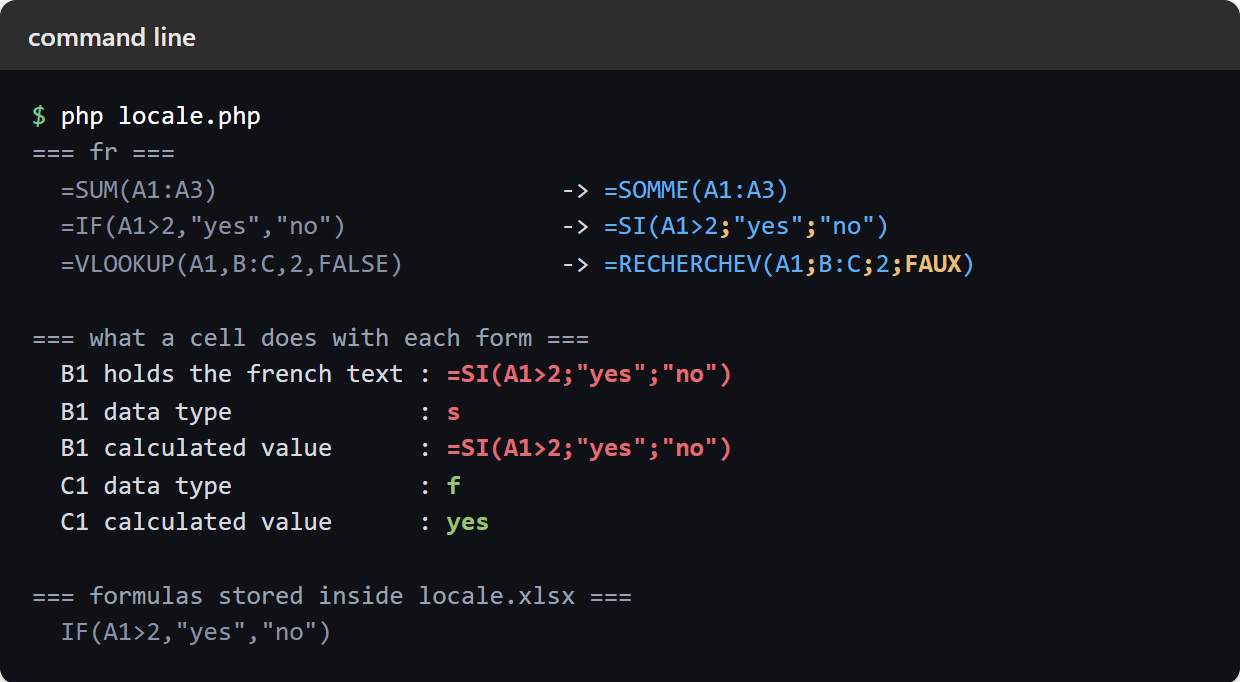
The comma becomes a semicolon.
Look at the second line of each block rather than the first. =SUM(A1:A3) only changes its function name, which makes translation look like a dictionary lookup. It is not.
=IF(A1>2,"yes","no") -> =SI(A1>2;"yes";"no")
The argument separator changed too. English Excel separates arguments with commas; the French, German and Dutch locales use semicolons. Booleans move as well, so FALSE becomes FAUX, FALSCH and ONWAAR. A one-argument example like SUM hides both changes, which is exactly why people who translate by hand get it wrong.
The round trip is clean. Every formula above translates back to the byte-identical English it started as, including the nested IF(AND(...)) case, so you can safely store English and render whatever language a user reads.
A translated formula is not a formula.
Now the result that governs how you use all of this. Look at what the two cells did.
  B1 data type             : s     <- string
  B1 calculated value      : =SI(A1>2;"yes";"no")
  C1 data type             : f     <- formula
  C1 calculated value      : yes
The French version went in as text. It was not rejected, nothing threw, and the cell now holds a string that happens to start with an equals sign. Ask for its calculated value and you get the string straight back. Meanwhile the English one in C1 is a real formula and answers yes.
The saved file explains why. locale.xlsx contains exactly one stored formula, and it is the English one. That is not a PhpSpreadsheet limitation — it is how the file format works. An .xlsx always stores formulas in English, and Excel renders them in whatever language the reader has installed. The localisation you see in Excel is a display layer over an English file.
So the calculation engine only ever speaks English, and it should. Translation is for output: a formula shown in a web page, a report column explaining what a sheet computes, a help string next to an input.
Which languages ship.
Sixteen, reachable by a two-letter code: bg, cs, da, de, es, fi, fr, hu, it, nb, nl, pl, pt, ru, sv and tr. Regional codes work too, so fr_fr and pt_br both return true.
English is the odd one out. There is a seventeenth folder in the library named en, but setLocale('en') returns false, because English is the source language and has no function table to load. Use en_us. For the same reason setLocale('en_uk') returns false as well, despite the folder existing.
This is the practical reason to check the boolean. An unavailable locale and English both return false, and neither changes anything, so a script that assumes setLocale('en') reset it will keep emitting French.
Translate Excel formulas for display, store them in English.
The rule that falls out of all of this is short. Keep every formula in your code in English, write English into your cells, and translate Excel formulas only at the moment you show one to somebody.
That also keeps your files portable. A workbook whose formulas were built the normal way opens correctly for a French reader without you doing anything, because Excel handles the display side. The one thing you should never do is build a localised string and write it into a cell — it will look right in your terminal and land as inert text in the file. If you need the reverse direction, translateFormulaToEnglish() takes a formula a user typed in their own language and gives you something the engine can actually run.