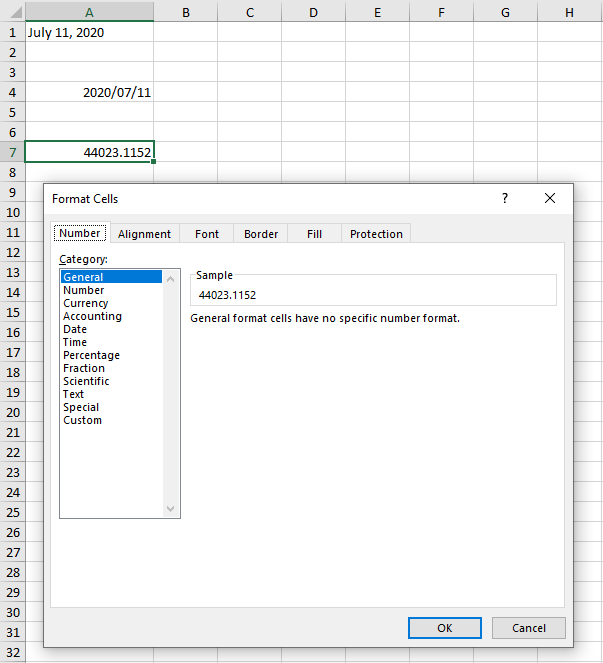
Create a new xlsx file with correct cell date format settings.
Requirements:
- Composer
- PHP 7.2 or newer
Step 1.
Setup dependencies.
{
    "require": {
        "phpoffice/phpspreadsheet": "^1.3"
    }
}
Step 2.
Install phpspreadsheet.
$ composer install
Step 3.
Create a new PHP file, and start coding.
<?php

// Autoload dependencies
require 'vendor/autoload.php';

// Import the core class of PhpSpreadsheet
use PhpOffice\PhpSpreadsheet\Spreadsheet;

// Import the Xlsx writer class
use PhpOffice\PhpSpreadsheet\Writer\Xlsx;

// Create a new Spreadsheet object
$spreadsheet = new Spreadsheet();

// Retrieve the current active worksheet
$sheet = $spreadsheet->getActiveSheet();

// Set cell A1 with the "Current Date" string value
$sheet->setCellValue('A1', date('F d, Y'));

// Format cell A1 as date
$sheet->getStyle('A1')
    ->getNumberFormat()
    ->setFormatCode(\PhpOffice\PhpSpreadsheet\Style\NumberFormat::FORMAT_DATE_YYYYMMDDSLASH)
;

// Set cell A4 with the "Current Date" timestamp value
$sheet->setCellValue('A4', \PhpOffice\PhpSpreadsheet\Shared\Date::PHPToExcel(time()));

// Format cell A4 as date
$sheet->getStyle('A4')
    ->getNumberFormat()
    ->setFormatCode(\PhpOffice\PhpSpreadsheet\Style\NumberFormat::FORMAT_DATE_YYYYMMDDSLASH)
;

// Set cell A7 with the "Current Date" timestamp value without formatting
$sheet->setCellValue('A7', \PhpOffice\PhpSpreadsheet\Shared\Date::PHPToExcel(time()));

// Write a new .xlsx file
$writer = new Xlsx($spreadsheet);

// Save the new .xlsx file
$writer->save('create-xlsx-files-with-date-and-time-data.xlsx');
Test.
Run the following codes.
$ php create-xlsx-files-with-date-and-time-data.php
Result.
Open the generated file create-xlsx-files-with-date-and-time-data.xlsx.
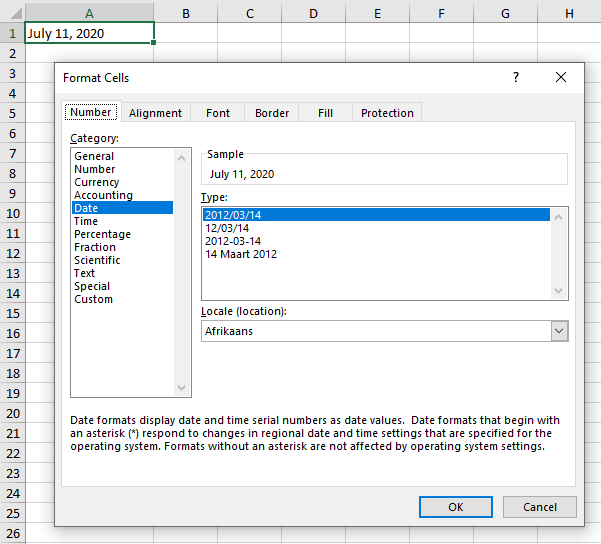
// Set cell A1 with the "Current Date" string value
$sheet->setCellValue('A1', date('F d, Y'));

// Format cell A1 as date
$sheet->getStyle('A1')
    ->getNumberFormat()
    ->setFormatCode(\PhpOffice\PhpSpreadsheet\Style\NumberFormat::FORMAT_DATE_YYYYMMDDSLASH)
;
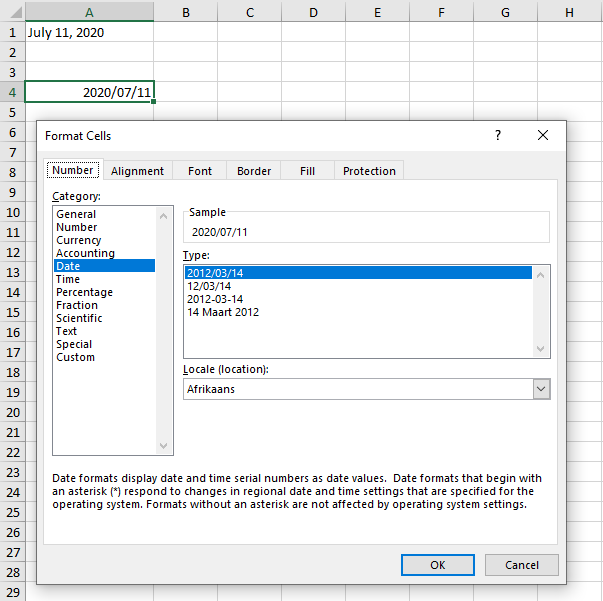
// Set cell A4 with the "Current Date" timestamp value
$sheet->setCellValue('A4', \PhpOffice\PhpSpreadsheet\Shared\Date::PHPToExcel(time()));

// Format cell A4 as date
$sheet->getStyle('A4')
    ->getNumberFormat()
    ->setFormatCode(\PhpOffice\PhpSpreadsheet\Style\NumberFormat::FORMAT_DATE_YYYYMMDDSLASH)
;
// Set cell A7 with the "Current Date" timestamp value without formatting
$sheet->setCellValue('A7', \PhpOffice\PhpSpreadsheet\Shared\Date::PHPToExcel(time()));