This article shows how to read Google Sheets cells from PHP. The rest of this series writes to a sheet. It can create one, update it, merge, border and duplicate it. However, none of those posts gets a value back out. This one closes that gap.
The call itself is one line. What makes it worth an article is the shape of what comes back, because the API does not hand you a neat rectangle. It trims. It leaves rows short. And when a range is empty it returns nothing at all, in a way that crashes the obvious loop on PHP 8.
So below we read a small signup sheet four different ways. First plainly, then defensively, then by column, then several ranges in one request. The sheet has five people in it, and the last row is deliberately unfinished, because that is where naive code breaks.
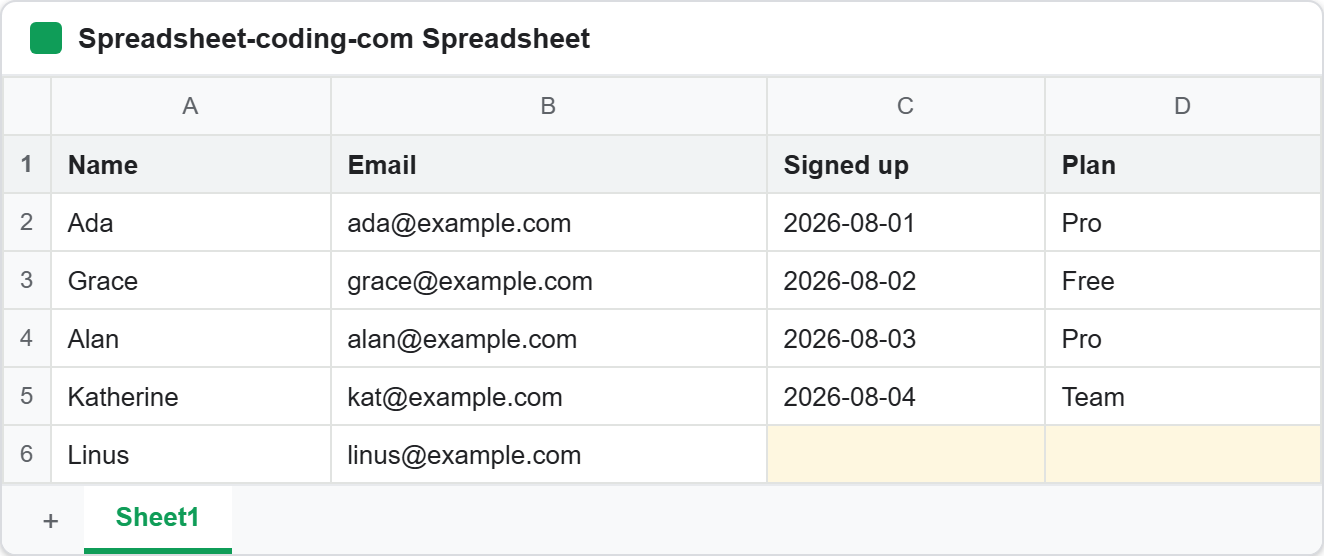
Look at row 6. On screen it is simply a row with two blank cells, which is how a colleague would describe it. The API disagrees, as the next few steps show.
Requirements to read Google Sheets cells:
- Authenticate With A Service Account
- Create A Google Cloud Project
- Enable Google Sheets API Library
- Install The Google Client Library Specifying Google Sheets
- Composer
- PHP 8.1 or newer
Step 1.
First, set up the dependencies. This is the Sheets-only install used across this series. Tested with google/apiclient 2.19 on PHP 8.5.
{
    "require": {
        "google/apiclient": "^2.12.1"
    },
    "scripts": {
        "pre-autoload-dump": "Google\\Task\\Composer::cleanup"
    },
    "extra": {
        "google/apiclient-services": [
            "Sheets"
        ]
    }
}
Step 2.
Next, install the Google Client Library.
$ composer install
Step 3.
Then create a PHP file and build the client. Here we authenticate with a service account, which needs no browser and no consent screen. The service account article covers that key file and the sharing step it depends on, so we will not repeat it.
<?php

require 'vendor/autoload.php';

use Google\Client;
use Google\Service\Sheets;

/**
 * Set up parameters.
 */
$spreadsheetId = 'Your spreadsheetId here.';
$keyFile = 'service-account.json';

$client = new Client();
$client->setApplicationName('Read Google Sheets Cells');
$client->setAuthConfig($keyFile);
$client->addScope(Sheets::SPREADSHEETS);

$service = new Sheets($client);
Step 4.
Now read a range. The call is spreadsheets_values->get(), and the rows live behind getValues() on the response. Note the ?? [], which is the single most important character sequence in this article.
/**
 * Read one range and return its rows, never null.
 */
function readRows(Sheets $service, string $spreadsheetId, string $range): array
{
    $response = $service->spreadsheets_values->get($spreadsheetId, $range);

    // An empty range has no values key at all, so this is null, not [].
    return $response->getValues() ?? [];
}

$rows = readRows($service, $spreadsheetId, 'Sheet1!A1:D10');
printf("Asked for Sheet1!A1:D10, got %d rows.\n\n", count($rows));
When a range holds nothing, the API omits the values key from its response entirely. Consequently getValues() returns null rather than an empty array. On PHP 8 that is not a harmless difference: count(null) throws a TypeError and foreach (null as $row) raises a warning. So a script that works all week dies the first morning somebody clears the sheet. Always coalesce.
Notice the row count too. We asked for ten rows and six came back, because the API drops trailing empty rows instead of padding them out.
Step 5.
Next, deal with the second surprise. Rows come back ragged. A row whose last cells were never filled in is returned short, while its neighbours are full width.
echo "Cells per row, as returned:\n";
foreach ($rows as $i => $row) {
    printf("  row %d: %d cell(s)  %s\n", $i + 1, count($row), implode(' | ', $row));
}

// The last row is short. Pad every row to the header width before use.
$width = count($rows[0]);
$padded = array_map(fn(array $r): array => array_pad($r, $width, ''), $rows);

$header = array_shift($padded);
echo "\nKeyed by the header row:\n";
foreach ($padded as $row) {
    $record = array_combine($header, $row);
    printf("  %-10s %-20s %-12s %s\n",
        $record['Name'], $record['Email'], $record['Signed up'], $record['Plan'] ?: '(none)');
}
This matters because of what people do next. The natural move is array_combine($header, $row) to key each row by its column name. But array_combine() requires both arrays to be the same length, so a short row makes it throw. Even reaching for $row[3] directly gives an undefined-key warning and a null. Therefore pad first with array_pad(), then key.
Step 6.
Then look at how ranges are written. A1 notation is more forgiving than it first appears, and the response tells you what the API actually read.
echo "\nWhat each range actually reads:\n";
foreach (['Sheet1', 'Sheet1!A:A', 'Sheet1!A2:D', 'A1:B2'] as $range) {
    $response = $service->spreadsheets_values->get($spreadsheetId, $range);
    printf("  %-12s -> %-18s %d row(s)\n",
        $range, $response->getRange(), count($response->getValues() ?? []));
}
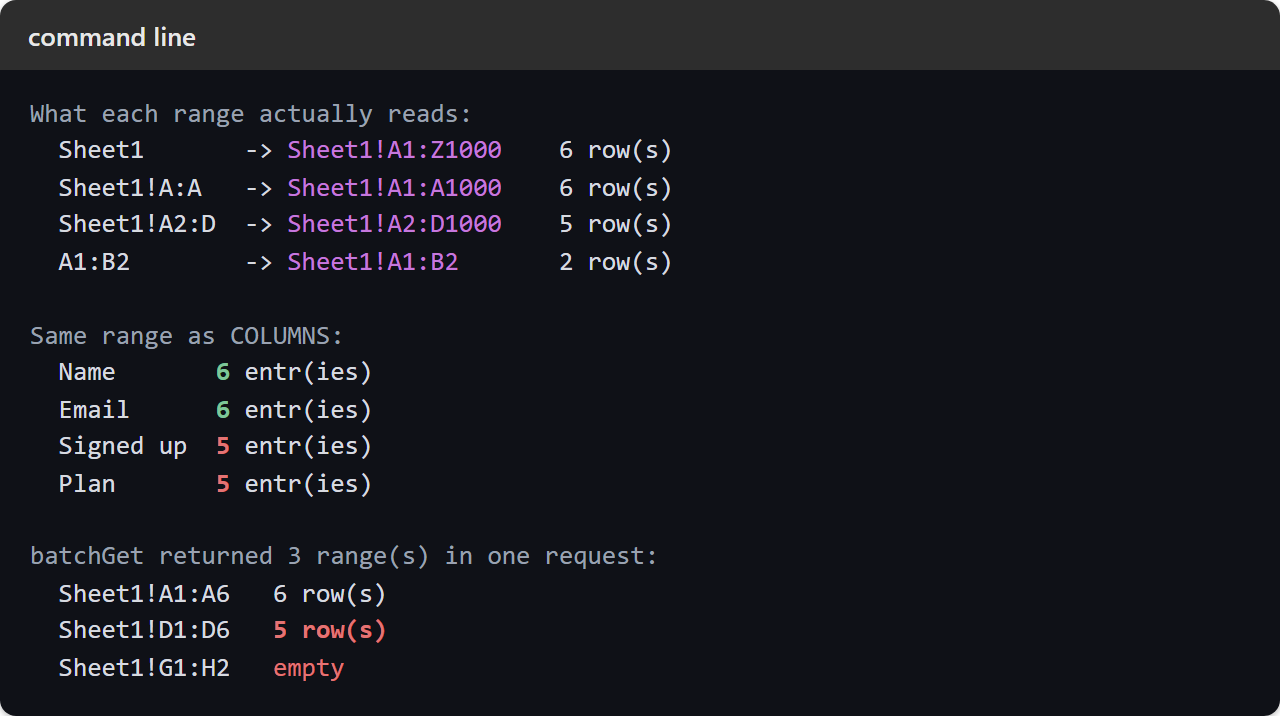
Four forms are worth knowing. A bare sheet name reads the whole grid. A column letter twice, as in A:A, reads that entire column. An open-ended range like A2:D runs from row 2 to the bottom, which is the one to use when you do not know how many rows there are. And a range with no sheet name falls back to the first sheet in the spreadsheet, which is a quiet trap in a workbook with several tabs. In every case getRange() reports the range the API resolved, and that string is usually not the one you sent.
Step 7.
Next, flip the orientation. By default each entry is a row, but majorDimension can return columns instead.
$response = $service->spreadsheets_values->get(
    $spreadsheetId,
    'Sheet1!A1:D6',
    ['majorDimension' => 'COLUMNS']
);

echo "\nSame range as COLUMNS:\n";
foreach ($response->getValues() as $column) {
    printf("  %-10s %d entr(ies)\n", $column[0], count($column));
}
This is genuinely useful when a sheet is laid out sideways, or when you want one field for every person without walking every row. Be aware that the trimming happens per column, not across the block. Two of our columns come back with six entries and two with five, because the unfinished row leaves their last cell empty.
Step 8.
Finally, read several ranges at once. Calling get() in a loop costs one HTTP request each, while batchGet() fetches them together.
$batch = $service->spreadsheets_values->batchGet($spreadsheetId, [
    'ranges' => ['Sheet1!A1:A6', 'Sheet1!D1:D6', 'Sheet1!G1:H2'],
]);

printf("\nbatchGet returned %d range(s) in one request:\n", count($batch->getValueRanges()));
foreach ($batch->getValueRanges() as $valueRange) {
    $values = $valueRange->getValues();
    printf("  %-14s %s\n", $valueRange->getRange(),
        $values === null ? 'empty' : count($values) . ' row(s)');
}
You get one ValueRange back per range, in the order you asked for them. Also note that every rule above still applies inside a batch. The empty range is null again rather than an empty array, and the second range comes back one row shorter than the first because its last cell is blank.
Complete code to read Google Sheets cells.
<?php

require 'vendor/autoload.php';

use Google\Client;
use Google\Service\Sheets;

/**
 * Set up parameters.
 */
$spreadsheetId = 'Your spreadsheetId here.';
$keyFile = 'service-account.json';

$client = new Client();
$client->setApplicationName('Read Google Sheets Cells');
$client->setAuthConfig($keyFile);
$client->addScope(Sheets::SPREADSHEETS);

$service = new Sheets($client);

/**
 * Read one range and return its rows, never null.
 */
function readRows(Sheets $service, string $spreadsheetId, string $range): array
{
    $response = $service->spreadsheets_values->get($spreadsheetId, $range);

    // An empty range has no values key at all, so this is null, not [].
    return $response->getValues() ?? [];
}

$rows = readRows($service, $spreadsheetId, 'Sheet1!A1:D10');
printf("Asked for Sheet1!A1:D10, got %d rows.\n\n", count($rows));

echo "Cells per row, as returned:\n";
foreach ($rows as $i => $row) {
    printf("  row %d: %d cell(s)  %s\n", $i + 1, count($row), implode(' | ', $row));
}

// The last row is short. Pad every row to the header width before use.
$width = count($rows[0]);
$padded = array_map(fn(array $r): array => array_pad($r, $width, ''), $rows);

$header = array_shift($padded);
echo "\nKeyed by the header row:\n";
foreach ($padded as $row) {
    $record = array_combine($header, $row);
    printf("  %-10s %-20s %-12s %s\n",
        $record['Name'], $record['Email'], $record['Signed up'], $record['Plan'] ?: '(none)');
}

echo "\nWhat each range actually reads:\n";
foreach (['Sheet1', 'Sheet1!A:A', 'Sheet1!A2:D', 'A1:B2'] as $range) {
    $response = $service->spreadsheets_values->get($spreadsheetId, $range);
    printf("  %-12s -> %-18s %d row(s)\n",
        $range, $response->getRange(), count($response->getValues() ?? []));
}

$response = $service->spreadsheets_values->get(
    $spreadsheetId,
    'Sheet1!A1:D6',
    ['majorDimension' => 'COLUMNS']
);

echo "\nSame range as COLUMNS:\n";
foreach ($response->getValues() as $column) {
    printf("  %-10s %d entr(ies)\n", $column[0], count($column));
}

$batch = $service->spreadsheets_values->batchGet($spreadsheetId, [
    'ranges' => ['Sheet1!A1:A6', 'Sheet1!D1:D6', 'Sheet1!G1:H2'],
]);

printf("\nbatchGet returned %d range(s) in one request:\n", count($batch->getValueRanges()));
foreach ($batch->getValueRanges() as $valueRange) {
    $values = $valueRange->getValues();
    printf("  %-14s %s\n", $valueRange->getRange(),
        $values === null ? 'empty' : count($values) . ' row(s)');
}
Test reading Google Sheets cells.
Command line testing.
$ php read-google-sheets-cells.php
Result of reading Google Sheets cells.
Every quirk in this article is visible in one run. The ten-row request returns six rows. Row six carries two cells while the rest carry four. After padding, Linus keeps his name and email and shows an empty signup date and no plan. Each range resolves to something wider than it was written. Two columns are a row shorter than the other two. And the empty range in the batch reports as empty rather than crashing:
Asked for Sheet1!A1:D10, got 6 rows.

Cells per row, as returned:
  row 1: 4 cell(s)  Name | Email | Signed up | Plan
  row 2: 4 cell(s)  Ada | ada@example.com | 2026-08-01 | Pro
  row 3: 4 cell(s)  Grace | grace@example.com | 2026-08-02 | Free
  row 4: 4 cell(s)  Alan | alan@example.com | 2026-08-03 | Pro
  row 5: 4 cell(s)  Katherine | kat@example.com | 2026-08-04 | Team
  row 6: 2 cell(s)  Linus | linus@example.com

Keyed by the header row:
  Ada        ada@example.com      2026-08-01   Pro
  Grace      grace@example.com    2026-08-02   Free
  Alan       alan@example.com     2026-08-03   Pro
  Katherine  kat@example.com      2026-08-04   Team
  Linus      linus@example.com                 (none)

What each range actually reads:
  Sheet1       -> Sheet1!A1:Z1000    6 row(s)
  Sheet1!A:A   -> Sheet1!A1:A1000    6 row(s)
  Sheet1!A2:D  -> Sheet1!A2:D1000    5 row(s)
  A1:B2        -> Sheet1!A1:B2       2 row(s)

Same range as COLUMNS:
  Name       6 entr(ies)
  Email      6 entr(ies)
  Signed up  5 entr(ies)
  Plan       5 entr(ies)

batchGet returned 3 range(s) in one request:
  Sheet1!A1:A6   6 row(s)
  Sheet1!D1:D6   5 row(s)
  Sheet1!G1:H2   empty
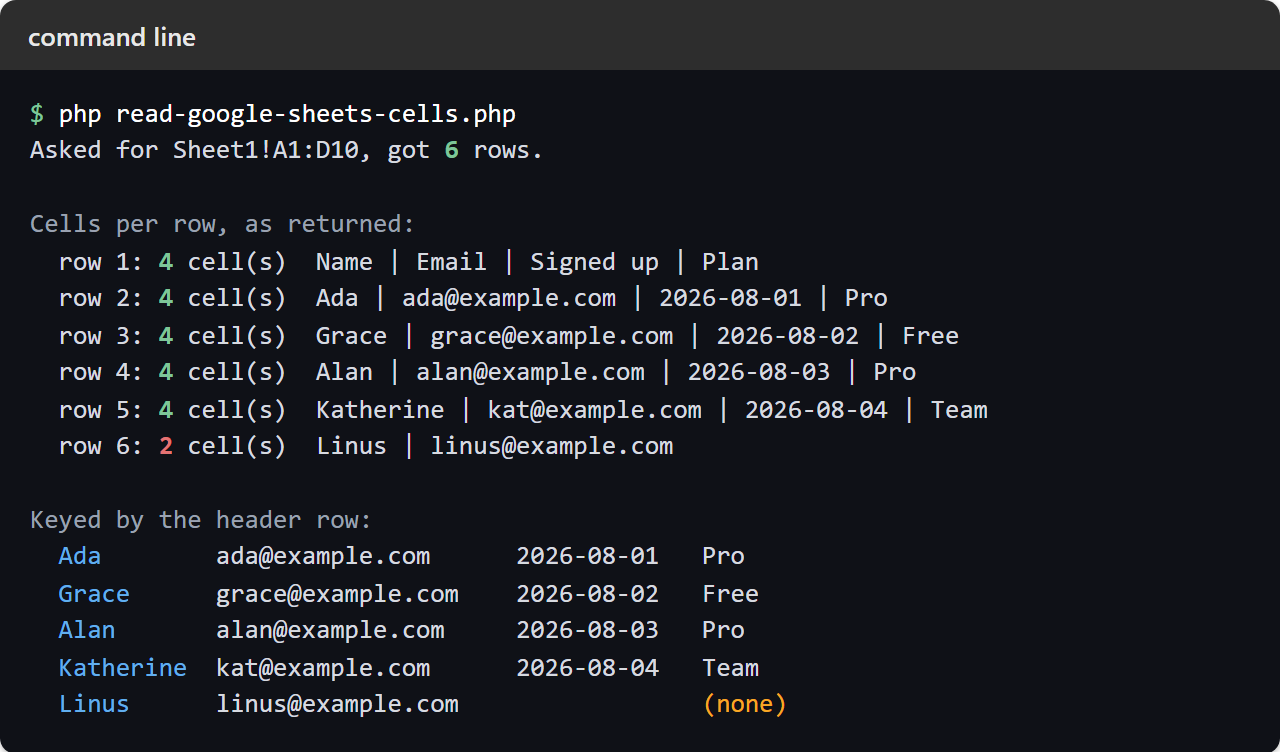
The second half of the run covers the range forms, the column orientation and the batch. Look at the middle column of the first block, which is the range the API resolved rather than the one we sent:
Reading Google Sheets cells safely.
So the rule of thumb is short. Coalesce the null, pad the rows, and trust getRange() over the string you sent. Those three habits cover every surprise on this page.
In practice the failures show up later rather than immediately, which is what makes them worth knowing in advance. A script that reads Google Sheets cells happily for a month breaks the morning somebody empties the tab, or adds a row and leaves the last column blank. Neither change looks like a code problem from the sheet’s side. Once the reading is solid, writing values back is the easy half.
One thing worth knowing before you write a read script at all: not every question needs one. When what you want is a subset, a grouping or a total of the sheet’s own data, the sheet can answer it in a single cell — Write SQL In A Cell With The Google Sheets QUERY Function runs select, where, group by and order by inside the spreadsheet. The API half earns its place when the answer has to leave the sheet; the formula half is faster when it does not.