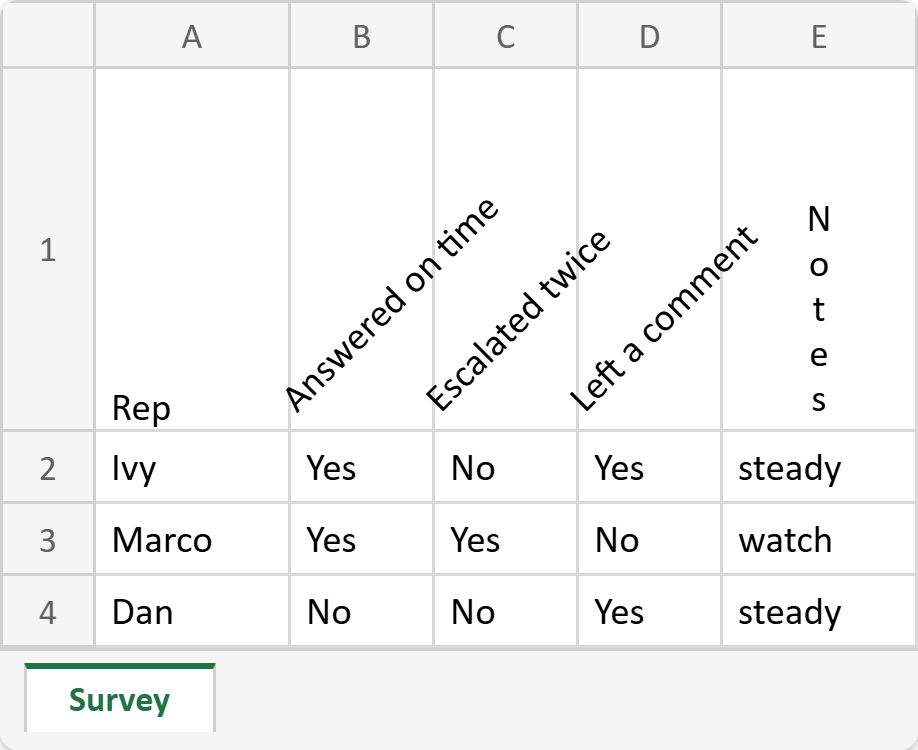
This article shows how to rotate text in PHP with the latest version of PhpSpreadsheet. The usual reason is a header row: you have eight narrow yes/no columns and headings like “Answered on time”, and laying them flat either stretches every column to the width of its title or truncates all of them. Tilting the headings 45 degrees fixes both at once, and it is a single call.
The call is getAlignment()->setTextRotation(), and it takes an angle in degrees. Positive angles tilt upward, negative angles tilt downward, and the legal range is -90 to 90. However, there is one value outside that range which is also legal, and it does something different from rotating: 255 stacks the letters vertically, one under the next, each still upright. That is the mode Excel calls Vertical Text.
Two details bite people, and we prove both below rather than just mentioning them. First, 255 does not stay 255 — read the property back and you get -165. Second, an out-of-range angle is rejected, not clamped, so a value your code computed rather than typed will throw.
Requirements to rotate text in PHP:
- Composer
- PHP 8.2 or newer
Step 1.
First, set up the dependencies. Here we pin the latest major release of PhpSpreadsheet (the 5.x line, tested with 5.9).
{
    "require": {
        "phpoffice/phpspreadsheet": "^5.0"
    }
}
Step 2.
Next, install phpspreadsheet.
$ composer install
Step 3.
Then create a new PHP file. Alongside the usual imports we bring in Alignment, because rotation lives on the alignment object rather than on the font, and also the exception class so the last step can catch it.
<?php

require 'vendor/autoload.php';

use PhpOffice\PhpSpreadsheet\Exception as SpreadsheetException;
use PhpOffice\PhpSpreadsheet\IOFactory;
use PhpOffice\PhpSpreadsheet\Spreadsheet;
use PhpOffice\PhpSpreadsheet\Style\Alignment;
use PhpOffice\PhpSpreadsheet\Writer\Xlsx;
Step 4.
Next, build the sheet this is for. Notice the shape of the problem: three long headings sitting over columns that only ever hold Yes or No.
$spreadsheet = new Spreadsheet();
$worksheet = $spreadsheet->getActiveSheet();
$worksheet->setTitle('Survey');

$worksheet->fromArray([
    ['Rep', 'Answered on time', 'Escalated twice', 'Left a comment', 'Notes'],
    ['Ivy', 'Yes', 'No', 'Yes', 'steady'],
    ['Marco', 'Yes', 'Yes', 'No', 'watch'],
    ['Dan', 'No', 'No', 'Yes', 'steady'],
], null, 'A1');
Step 5.
Then rotate the headings. One call covers the whole range, so B1:D1 tilts together. Also set the vertical alignment to bottom; otherwise the tilted headings float in the middle of a tall row and stop lining up with the columns they label.
// Long headings over narrow columns: rotate them 45 degrees.
$worksheet->getStyle('B1:D1')->getAlignment()
    ->setTextRotation(45)
    ->setVertical(Alignment::VERTICAL_BOTTOM);

// The 255 special case: letters stacked one under the next, not rotated.
$worksheet->getStyle('E1')->getAlignment()->setTextRotation(255);
Step 6.
Next, make room. This is the step people skip, and then the headings arrive clipped to a single line of text. Rotating does not change how much space a cell asks for, so you set the row height yourself. Meanwhile the columns can be narrow, which was the point of rotating in the first place.
// Rotated text needs the room; Excel will not grow the row for you here.
$worksheet->getRowDimension(1)->setRowHeight(90);
foreach (range('B', 'D') as $column) {
    $worksheet->getColumnDimension($column)->setWidth(6);
}

(new Xlsx($spreadsheet))->save('survey.xlsx');
echo "Wrote survey.xlsx\n\n";
Step 7.
Finally, read the angles back, and try an illegal one. The 255 you set comes back as -165, because PhpSpreadsheet stores the stacked mode internally as 90 - 255 and only converts it back to 255 when writing the file. So compare against Alignment::TEXTROTATION_STACK_PHPSPREADSHEET rather than against 255 when you test for it. Then 120 throws, which is worth knowing if your angle comes from user input or a calculation.
printf("%-6s %-14s %s\n", 'Cell', 'Set to', 'Stored as');
foreach (['B1' => 45, 'C1' => 45, 'D1' => 45, 'E1' => 255] as $cell => $set) {
    printf("%-6s %-14s %d\n", $cell, $set, $worksheet->getStyle($cell)->getAlignment()->getTextRotation());
}

echo "\nRow 1 height: " . $worksheet->getRowDimension(1)->getRowHeight() . "\n";

// Anything outside -90..90 (except 255) is rejected, not clamped.
try {
    $worksheet->getStyle('A1')->getAlignment()->setTextRotation(120);
} catch (SpreadsheetException $e) {
    echo "\nsetTextRotation(120): " . $e->getMessage() . "\n";
}

$reloaded = IOFactory::load('survey.xlsx')->getActiveSheet();
echo "\nAfter a save and reload:\n";
printf("  B1 %d\n  E1 %d\n",
    $reloaded->getStyle('B1')->getAlignment()->getTextRotation(),
    $reloaded->getStyle('E1')->getAlignment()->getTextRotation()
);
Complete code to rotate text in PHP.
<?php

require 'vendor/autoload.php';

use PhpOffice\PhpSpreadsheet\Exception as SpreadsheetException;
use PhpOffice\PhpSpreadsheet\IOFactory;
use PhpOffice\PhpSpreadsheet\Spreadsheet;
use PhpOffice\PhpSpreadsheet\Style\Alignment;
use PhpOffice\PhpSpreadsheet\Writer\Xlsx;

$spreadsheet = new Spreadsheet();
$worksheet = $spreadsheet->getActiveSheet();
$worksheet->setTitle('Survey');

$worksheet->fromArray([
    ['Rep', 'Answered on time', 'Escalated twice', 'Left a comment', 'Notes'],
    ['Ivy', 'Yes', 'No', 'Yes', 'steady'],
    ['Marco', 'Yes', 'Yes', 'No', 'watch'],
    ['Dan', 'No', 'No', 'Yes', 'steady'],
], null, 'A1');

// Long headings over narrow columns: rotate them 45 degrees.
$worksheet->getStyle('B1:D1')->getAlignment()
    ->setTextRotation(45)
    ->setVertical(Alignment::VERTICAL_BOTTOM);

// The 255 special case: letters stacked one under the next, not rotated.
$worksheet->getStyle('E1')->getAlignment()->setTextRotation(255);

// Rotated text needs the room; Excel will not grow the row for you here.
$worksheet->getRowDimension(1)->setRowHeight(90);
foreach (range('B', 'D') as $column) {
    $worksheet->getColumnDimension($column)->setWidth(6);
}

(new Xlsx($spreadsheet))->save('survey.xlsx');
echo "Wrote survey.xlsx\n\n";

printf("%-6s %-14s %s\n", 'Cell', 'Set to', 'Stored as');
foreach (['B1' => 45, 'C1' => 45, 'D1' => 45, 'E1' => 255] as $cell => $set) {
    printf("%-6s %-14s %d\n", $cell, $set, $worksheet->getStyle($cell)->getAlignment()->getTextRotation());
}

echo "\nRow 1 height: " . $worksheet->getRowDimension(1)->getRowHeight() . "\n";

// Anything outside -90..90 (except 255) is rejected, not clamped.
try {
    $worksheet->getStyle('A1')->getAlignment()->setTextRotation(120);
} catch (SpreadsheetException $e) {
    echo "\nsetTextRotation(120): " . $e->getMessage() . "\n";
}

$reloaded = IOFactory::load('survey.xlsx')->getActiveSheet();
echo "\nAfter a save and reload:\n";
printf("  B1 %d\n  E1 %d\n",
    $reloaded->getStyle('B1')->getAlignment()->getTextRotation(),
    $reloaded->getStyle('E1')->getAlignment()->getTextRotation()
);
Test rotating text in PHP.
Command line testing.
$ php rotate-text.php
Result of rotating text in PHP.
First, the three 45 degree headings read back exactly as set. Then E1 makes the special case visible: you asked for 255 and the object holds -165. Next, 120 throws rather than snapping to 90. Finally the reload shows the values are stable across a save, so -165 is the value you compare against in your own code:
Wrote survey.xlsx

Cell   Set to         Stored as
B1     45             45
C1     45             45
D1     45             45
E1     255            -165

Row 1 height: 90

setTextRotation(120): Text rotation 120 should be a value between -90 and 90.

After a save and reload:
  B1 45
  E1 -165
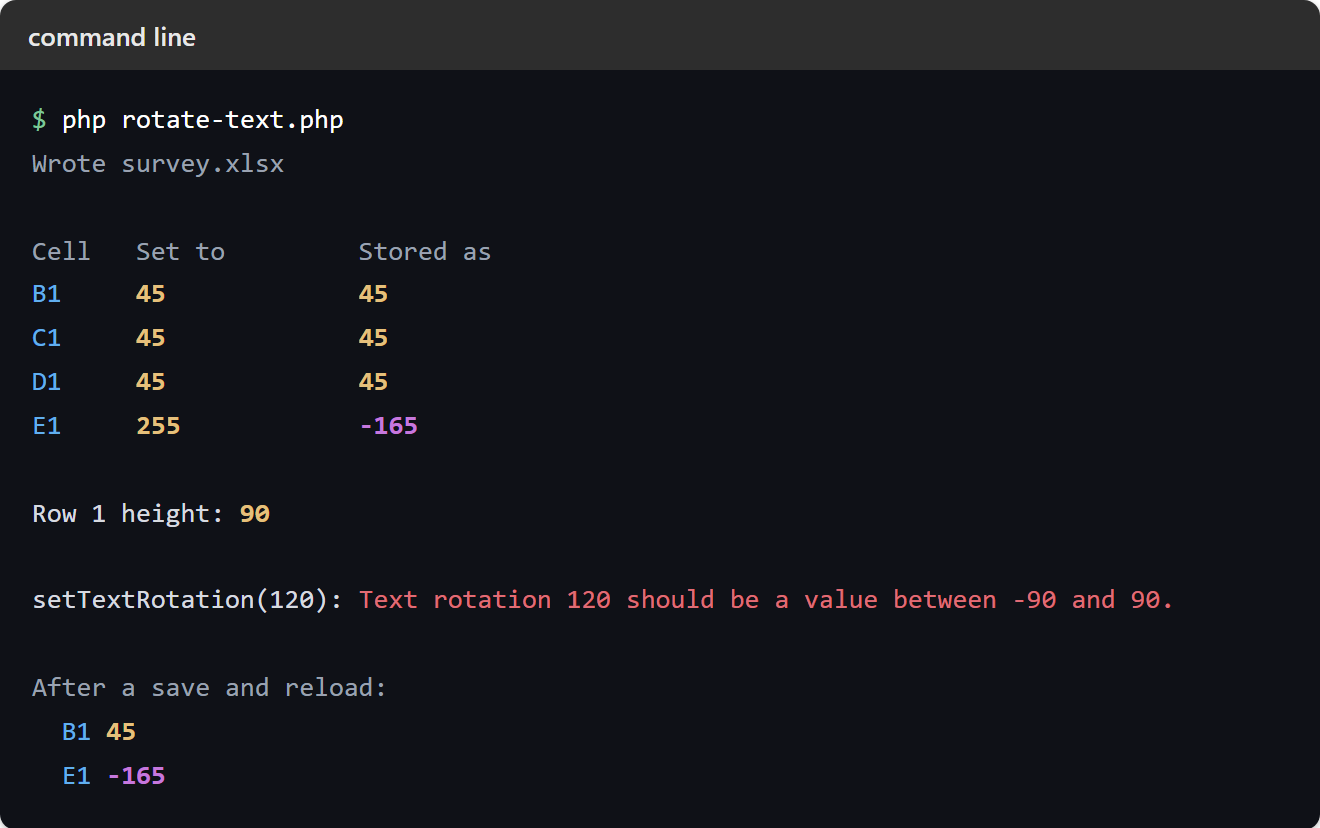
So open survey.xlsx and the three headings sit at a tidy diagonal above six-character columns, while Notes runs top to bottom with its letters upright. The error message is worth one last note: it says “between -90 and 90” and does not mention 255, so if you hit it while passing a legal stacked value, check that you sent 255 and not -165.